


- Category: project management
- Auth: OAUTH2
- Composio-managed OAuth available? Yes
- Tools: 126
- Triggers: 17
- Slug:
MONDAY - Version: 20261101_00
Frequently Asked Questions
Why do I see "App is not installed" when connecting Monday?
Why do I see "App is not installed" when connecting Monday?
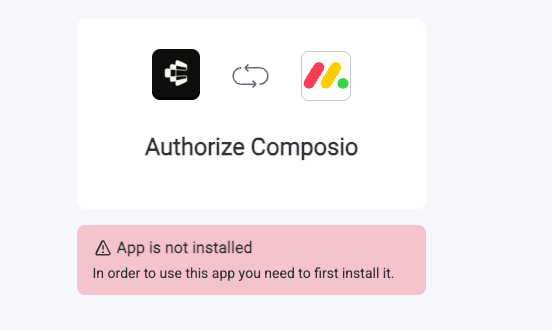
https://auth.monday.com/oauth2/authorize?client_id=96b038435fc029e045f9ba800e66fefa&response_type=install.We are working on making this flow smoother so developers do not need to manually share the install link.How do I set up custom OAuth credentials for Monday.com?
How do I set up custom OAuth credentials for Monday.com?
How do Monday scopes work?
How do Monday scopes work?
Tools
Get account trigger statistics
Get account trigger statistics
Activate users
Activate users
Add subscribers to board
Add subscribers to board
MONDAY_ADD_SUBSCRIBERS_TO_BOARDTool to add users as subscribers to a Monday.com board. Use when granting subscriber or owner access to specific users on a board. Note: This mutation is deprecated - consider using add_users_to_board instead.Input Parameters
Output
Add subscribers to object
Add subscribers to object
MONDAY_ADD_SUBSCRIBERS_TO_OBJECTTool to add subscribers or owners to a monday.com object. Use when you need to grant users notification access or ownership permissions to a specific object.Input Parameters
Output
Add teams to board
Add teams to board
MONDAY_ADD_TEAMS_TO_BOARDTool to add teams to a Monday.com board with specified permission levels. Use when you need to associate teams with a board as owners or subscribers.Input Parameters
Output
Add users to board
Add users to board
Add users to team
Add users to team
Add users to workspace
Add users to workspace
MONDAY_ADD_USERS_TO_WORKSPACEAdds existing users to a workspace. The returned success flag can be true even when no added users are returned; inspect the added users list.Input Parameters
Output
Aggregate board data
Aggregate board data
Get app subscription
Get app subscription
Archive board
Archive board
Archive item
Archive item
Archive object
Archive object
MONDAY_ARCHIVE_OBJECTArchives a Monday.com object by changing its state to archived rather than permanently deleting it. Use when you need to remove objects from active use while preserving the ability to restore them later.Input Parameters
Output
Archive workspace
Archive workspace
Get audit logs
Get audit logs
MONDAY_AUDIT_LOGSTool to retrieve detailed security-related activity records for a Monday.com account. Use when you need to audit user actions, security events, or account activity. Requires Enterprise plan and account admin permissions with manage_account_security scope.Input Parameters
Output
Get document blocks
Get document blocks
Get boards
Get boards
MONDAY_BOARDSRetrieves metadata for one or multiple monday.com boards, including owners and workspace details, with filters for state, board kind, hierarchy type, and workspace.Input Parameters
Output
Change simple column value
Change simple column value
MONDAY_CHANGE_SIMPLE_COLUMN_VALUEChanges a monday.com item’s column value using a simple string, suitable for Text, Status, or Dropdown columns. For Status or Dropdown columns, it can create missing labels; label creation is enabled by default.Input Parameters
Output
Get board columns
Get board columns
MONDAY_COLUMNSRetrieves column metadata from monday.com boards, including type, title, settings, and archived status, with optional filters by column ID and type.Input Parameters
Output
Get connection board IDs
Get connection board IDs
MONDAY_CONNECTION_BOARD_IDSTool to retrieve board IDs associated with connection columns. Use when you need to discover which boards can be linked through connection columns. Queries boards and filters for connection columns (board_relation type) to extract the configured board IDs from their settings.Input Parameters
Output
Get connections
Get connections
MONDAY_CONNECTIONSTool to retrieve connection data for integrations with external services. Use when you need to inspect or manage integrations like Gmail, Slack, or other external service connections. Returns a list of connections with details about authentication, state, and associated accounts.Input Parameters
Output
Connect project to portfolio
Connect project to portfolio
Convert board to project
Convert board to project
MONDAY_CONVERT_BOARD_TO_PROJECTConverts a regular Monday.com board into a project board with advanced project management features. Use when upgrading a board to enable project-specific capabilities like timeline views, project status tracking, and owner assignments.Input Parameters
Output
Create a Monday board
Create a Monday board
MONDAY_CREATE_BOARDCreates a Monday.com board; template_id if used must be accessible, and folder_id must be in workspace_id if both are provided.Input Parameters
workspace_id is absent, the board uses this folder’s containing workspace. If workspace_id is present, this folder must be within the specified workspace.folder_id is given, this workspace must contain that folder.Output
Create column
Create column
MONDAY_CREATE_COLUMNCreates a new column with a specified type and title on a monday.com board.Input Parameters
Output
Create custom activity
Create custom activity
MONDAY_CREATE_CUSTOM_ACTIVITYTool to create a custom activity in the Monday.com Emails & Activities app. Use when you need to define a new activity type with specific color and icon for tracking interactions.Input Parameters
Output
Create a Monday dashboard
Create a Monday dashboard
MONDAY_CREATE_DASHBOARDTool to create a Monday.com dashboard with associated boards. Use when you need to establish a new dashboard in a workspace with specific board visibility settings.Input Parameters
Output
Create doc
Create doc
MONDAY_CREATE_DOCTool to create a new doc in Monday.com. Use when you need to add a doc to a workspace or into a doc column on an item.Input Parameters
Output
Create a folder
Create a folder
MONDAY_CREATE_FOLDERTool to create a new folder in a Monday.com workspace to organize boards. Use when you need to structure boards within a workspace by grouping them into folders.Input Parameters
Output
Create group
Create group
Create item
Create item
MONDAY_CREATE_ITEMCreates a new item on a Monday.com board, optionally assigning it to a group and setting column values.Input Parameters
Output
Create Item From Natural Language
Create Item From Natural Language
MONDAY_CREATE_ITEM_FROM_NLCreates a new item on a Monday.com board from a natural language description. Fetches the board’s column schema at runtime, uses an LLM to generate the column values and extract the item name, and creates the item.Input Parameters
Output
Create notification
Create notification
MONDAY_CREATE_NOTIFICATIONTool to send a notification to a user. Use when you need to alert a user about a board, item, or update. Call after obtaining the user and target IDs.Input Parameters
Output
Create object
Create object
MONDAY_CREATE_OBJECTExecute a custom Monday.com GraphQL mutation, with optional variables. It can create objects such as workspaces, boards, items, columns, docs, updates, and webhooks, and can also modify or delete data.Input Parameters
Output
Create tag
Create tag
Create timeline item
Create timeline item
MONDAY_CREATE_TIMELINE_ITEMTool to create a new timeline item in the Emails & Activities app on a Monday.com item. Use when you need to establish a timeline event or activity on an item. Note: Timeline items created via this action won’t trigger automations that run when a new E&A timeline item is created.Input Parameters
Output
Create update
Create update
Invite and create a Monday user
Invite and create a Monday user
MONDAY_CREATE_USERTool to invite and create a new user. Use when you need to programmatically add new users to your Monday account.Input Parameters
Output
Create a Monday workspace
Create a Monday workspace
Get custom activity
Get custom activity
Deactivate users
Deactivate users
MONDAY_DEACTIVATE_USERSDeactivates up to 200 users per request from a monday.com account; only admins can do so, and users cannot deactivate themselves. Deactivating a user also deactivates their integrations and automations.Input Parameters
Output
Delete asset
Delete asset
Delete board
Delete board
Delete column
Delete column
Delete Custom Activity
Delete Custom Activity
Delete doc
Delete doc
Delete folder
Delete folder
MONDAY_DELETE_FOLDERTool to permanently delete a folder and all its contents from a Monday.com workspace. Use when you need to remove a folder along with all nested subfolders and boards. This action is irreversible.Input Parameters
Output
Delete group
Delete group
Delete item
Delete item
Delete object
Delete object
MONDAY_DELETE_OBJECTTool to permanently delete a Monday.com object with a 30-day recovery grace period. Use when you need to remove any object type from Monday.com by its unique identifier.Input Parameters
Output
Delete subscribers from board
Delete subscribers from board
Delete tag
Delete tag
MONDAY_DELETE_TAGTool to remove a tag from an item in Monday.com. Important: Monday.com’s GraphQL API does not provide a mutation to delete a tag from the account. Tags are account-level entities shared across boards. This action can remove a tag from a specific item by updating its tags column to exclude the given tag_id. To do so, provide item_id and board_id.Input Parameters
Output
Delete team
Delete team
Delete teams from board
Delete teams from board
MONDAY_DELETE_TEAMS_FROM_BOARDRemove teams from a Monday.com board to revoke their board access. Inspect the raw response for GraphQL errors before treating the removal as successful.Input Parameters
Output
Delete teams from workspace
Delete teams from workspace
Delete timeline item
Delete timeline item
Delete update
Delete update
Delete workspace
Delete workspace
Retrieve Monday docs
Retrieve Monday docs
MONDAY_DOCSTool to retrieve Monday.com document data via the API. Use when you need to fetch documents with filtering by IDs, object IDs, workspace IDs, or with pagination support.Input Parameters
Output
Duplicate board
Duplicate board
MONDAY_DUPLICATE_BOARDTool to duplicate a Monday.com board with its structure and optionally items and updates. Use when you need to create a copy of an existing board. Duplication is asynchronous and may take time to complete for large boards.Input Parameters
Output
Duplicate item
Duplicate item
MONDAY_DUPLICATE_ITEMDuplicates an item on a Monday.com board, optionally including its updates.Input Parameters
board_id.Output
Edit update
Edit update
Get account info
Get account info
MONDAY_GET_ACCOUNT_INFORetrieve account metadata and settings for the authenticated Monday.com account. Use this action to inspect account configuration such as: - Account name, slug, and tier - Active member count - Calendar preferences (first day of week, timeline weekends) - Active products and billing plan details Requires the ‘account:read’ OAuth scope.Output
Get board activity logs
Get board activity logs
Get API version
Get API version
Get assets
Get assets
MONDAY_GET_ASSETSTool to retrieve file/asset metadata from monday.com by asset IDs. Returns file information including URL, name, size, extension, and thumbnails for images. Asset IDs originate from updates, update replies, or file-type columns.Input Parameters
Output
Get board views
Get board views
MONDAY_GET_BOARD_VIEWSTool to retrieve board view data via GraphQL API. Returns array of board view metadata including type, settings, filters, and access levels. Must be nested within a boards query.Input Parameters
Output
Get favorites
Get favorites
Get folders
Get folders
Get form details
Get form details
MONDAY_GET_FORMTool to retrieve form metadata via the API using the form’s unique token from the URL. Returns form configuration, questions, and settings.Input Parameters
Output
Get items by IDs
Get items by IDs
Get current user
Get current user
Execute GraphQL and get mutation complexity
Execute GraphQL and get mutation complexity
MONDAY_GET_MUTATION_COMPLEXITYExecute a caller-provided Monday.com GraphQL document and return its complexity data. The supplied document runs in full and may perform destructive mutations.Input Parameters
Output
Get query complexity
Get query complexity
Get teams
Get teams
Get update replies
Get update replies
Get item updates
Get item updates
Get API versions
Get API versions
Get view schema by type
Get view schema by type
MONDAY_GET_VIEW_SCHEMA_BY_TYPETool to retrieve type-specific board view configuration schemas via GraphQL API. Use when you need to understand the structure and available settings for creating or updating board views of a specific type.Input Parameters
Output
Get webhooks
Get webhooks
Get workspaces
Get workspaces
Import doc from HTML
Import doc from HTML
MONDAY_IMPORT_DOC_FROM_HTMLTool to import HTML content into a new Monday.com doc, converting it to doc blocks. Use when you need to create a doc from HTML content.Input Parameters
Output
Get items page
Get items page
MONDAY_ITEMS_PAGERetrieve a page of items from a Monday.com board or group, with optional server-side filtering and sorting. Column values can be included as ID, text, and raw value; use the returned cursor to fetch subsequent pages.Input Parameters
Output
Like update
Like update
List board items
List board items
List Monday boards (Deprecated)
List Monday boards (Deprecated)
MONDAY_LIST_BOARDSDEPRECATED: Use MONDAY_BOARDS instead. Retrieves a list of boards from a Monday.com account, supporting pagination and filtering by state.Input Parameters
Output
List columns (Deprecated)
List columns (Deprecated)
MONDAY_LIST_COLUMNSDEPRECATED: Use MONDAY_COLUMNS instead. Lists all columns and their properties for a specified Monday.com board_id; the board must exist.Input Parameters
Output
List groups
List groups
MONDAY_LIST_GROUPSRetrieves groups from a specified Monday.com board, optionally filtering by group IDs. Returns group details such as title, color, position, and archived or deleted status.Input Parameters
Output
List items
List items
List items by column values
List items by column values
MONDAY_LIST_ITEMS_BY_COLUMN_VALUESTool to search for items on a Monday.com board based on column values using the items_page_by_column_values query. Use when you need to find items matching specific column criteria (e.g., status=“Done”, name contains “Task 1”). For initial requests, provide columns; for pagination, use the cursor from the previous response.Input Parameters
Output
List subitems by parent
List subitems by parent
List team members
List team members
List users
List users
Move item to board
Move item to board
Move item to group
Move item to group
Query board mute settings
Query board mute settings
Pin update to top
Pin update to top
Publish object
Publish object
MONDAY_PUBLISH_OBJECTTool to publish a Monday.com object. Use when you need to make an object publicly visible or change its state to published.Input Parameters
Output
Query dashboards
Query dashboards
Query sprints
Query sprints
MONDAY_QUERY_SPRINTSTool to query sprint data for agile project management from Monday.com boards. Use when you need to retrieve sprint information including sprint title, ID, color, position, archived/deleted status, and associated items.Input Parameters
Output
Remove users from team
Remove users from team
Remove users from workspace
Remove users from workspace
Set board permission
Set board permission
MONDAY_SET_BOARD_PERMISSIONSets or updates a board’s default role and permissions. Use when you need to configure default permissions for a board. Requires boards:write scope and can only be used by board owners on enterprise plans.Input Parameters
Output
Get item timeline
Get item timeline
MONDAY_TIMELINETool to retrieve an item’s Email & Activities (E&A) timeline data from Monday.com. Use when you need to access CRM activity tracking and client communication history for a specific item. This returns a paginated list of timeline entries.Input Parameters
Output
Get timeline item
Get timeline item
MONDAY_TIMELINE_ITEMTool to retrieve a specific timeline item from the Emails & Activities app by ID. Use when you need to fetch metadata including content, user, title, type, and associated custom activity for a timeline item.Input Parameters
Output
Unlike update
Unlike update
Unpin update from top
Unpin update from top
Unpublish object
Unpublish object
MONDAY_UNPUBLISH_OBJECTUnpublish a Monday.com object (board, item, or workspace) to revert it from a published state. The operation will return success=true only if the object was previously published and can be unpublished. If the object is not in a publishable state or was never published, success=false is returned.Input Parameters
Output
Update board
Update board
MONDAY_UPDATE_BOARDUpdates a specified attribute of an existing board on Monday.com.Input Parameters
Output
Update board hierarchy
Update board hierarchy
MONDAY_UPDATE_BOARD_HIERARCHYUpdates a board’s position, workspace, or product in Monday.com. Use when you need to move a board to a different workspace or folder, assign it to a product, or reposition it relative to other boards.Input Parameters
Output
Update column
Update column
Update a doc
Update a doc
MONDAY_UPDATE_DOCUpdates a doc’s title and/or adds Markdown content, optionally after a specified block. When both are requested, the title is updated first and may remain changed if adding content fails.Input Parameters
Output
Update email domain
Update email domain
Update a Monday folder
Update a Monday folder
MONDAY_UPDATE_FOLDERTool to update a Monday.com folder’s properties including name, color, or parent folder. Use when you need to modify existing folder details or move folders between workspaces.Input Parameters
Output
Update group
Update group
MONDAY_UPDATE_GROUPTool to update an existing group on a board. Use when you need to modify a group’s attribute (title, color, or position) after confirming the group ID.Input Parameters
Output
Update item
Update item
MONDAY_UPDATE_ITEMTool to update an existing item’s column value on Monday.com. Use when setting complex column types like Timeline or People.Input Parameters
Output
Update multiple users
Update multiple users
MONDAY_UPDATE_MULTIPLE_USERSTool to update one or multiple users’ attributes on Monday.com. Use when you need to batch update user profiles such as name, email, title, or department.Input Parameters
Output
Update mute board settings
Update mute board settings
MONDAY_UPDATE_MUTE_BOARD_SETTINGSTool to update a board’s notification mute settings. Use when you need to configure notification preferences for a specific board.Input Parameters
Output
Update tag
Update tag
MONDAY_UPDATE_TAGTool to return a tag’s details or best-effort “rename” by creating or getting a tag with the requested name. The monday API does not support updating existing tag name/color.Input Parameters
Output
Update team
Update team
Update users role
Update users role
MONDAY_UPDATE_USERS_ROLEUpdates users’ roles to custom or default roles; this admin-only operation cannot update your own role. Inspect the returned updated users and per-user errors to determine which changes succeeded.Input Parameters
Output
Update a Monday workspace
Update a Monday workspace
Upload Asset
Upload Asset
MONDAY_UPLOAD_ASSETTool to upload a file to an update or file column. Use when you need to attach a file to an existing update or file column. File attachments are permanent and irreversible; confirm with the user before uploading.Input Parameters
Output
Get user connections
Get user connections
MONDAY_USER_CONNECTIONSTool to query user-specific connection data from Monday.com. Use when you need to retrieve integration connections established by the authenticated user with external services.Input Parameters
Output
Triggers
Column Created
Column Created
MONDAY_COLUMN_CREATEDType: webhookTriggers when a column is added to the board.Configuration
MONDAY_BOARDS to find board ids. The subitem triggers take the PARENT board here, not the subitem board.Payload
parent_item_board_id or parent_board_id.Item Archived
Item Archived
MONDAY_ITEM_ARCHIVEDType: webhookTriggers when an item is archived. Archiving is reversible from monday’s archive view; a restore does not fire any trigger.Configuration
MONDAY_BOARDS to find board ids. The subitem triggers take the PARENT board here, not the subitem board.Payload
parent_item_board_id or parent_board_id.item_id / item_name, not the pulse_id / pulse_name the create and update events use, and carries no pulse_id at all.Item Column Value Updated
Item Column Value Updated
MONDAY_ITEM_COLUMN_VALUE_UPDATEDType: webhookTriggers when a column value changes on an item — a status flips, a date is set, an owner is assigned. Narrow it to one column, or to one status label, with the config.Configuration
MONDAY_BOARDS to find board ids. The subitem triggers take the PARENT board here, not the subitem board.MONDAY_COLUMNS to find column ids.column_id, and that column must be a status column. MONDAY_COLUMNS returns the label-to-index map in each column’s settings_str.Payload
parent_item_board_id or parent_board_id.Item Created
Item Created
MONDAY_ITEM_CREATEDType: webhookTriggers when an item is created on the board. Subitems do not fire this; use MONDAY_SUBITEM_CREATED for those.Configuration
MONDAY_BOARDS to find board ids. The subitem triggers take the PARENT board here, not the subitem board.Payload
parent_item_board_id or parent_board_id.{} when the item was created bare. Forwarded as monday’s raw object: a column value’s shape varies entirely by column type.Item Deleted
Item Deleted
MONDAY_ITEM_DELETEDType: webhookTriggers when an item is deleted. Archiving an item does not fire this; use MONDAY_ITEM_ARCHIVED for that.Configuration
MONDAY_BOARDS to find board ids. The subitem triggers take the PARENT board here, not the subitem board.Payload
parent_item_board_id or parent_board_id.item_id / item_name, not the pulse_id / pulse_name the create and update events use, and carries no pulse_id at all.Item Moved To Group
Item Moved To Group
MONDAY_ITEM_MOVED_TO_GROUPType: webhookTriggers when an item is moved into a different group on the board. Narrow it to one destination group with the config.Configuration
MONDAY_BOARDS to find board ids. The subitem triggers take the PARENT board here, not the subitem board.MONDAY_LIST_GROUPS to find group ids.Payload
parent_item_board_id or parent_board_id.Item Name Updated
Item Name Updated
MONDAY_ITEM_NAME_UPDATEDType: webhookTriggers when an item is renamed. Fires only on the item’s name, not on any column value.Configuration
MONDAY_BOARDS to find board ids. The subitem triggers take the PARENT board here, not the subitem board.Payload
parent_item_board_id or parent_board_id.Item Update Deleted
Item Update Deleted
MONDAY_ITEM_UPDATE_DELETEDType: webhookTriggers when an update on an item is deleted.Configuration
MONDAY_BOARDS to find board ids. The subitem triggers take the PARENT board here, not the subitem board.Payload
parent_item_board_id or parent_board_id.Item Update Edited
Item Update Edited
MONDAY_ITEM_UPDATE_EDITEDType: webhookTriggers when an update on an item changes. This is the thread changing, not only the author editing their text: monday also fires it when someone REPLIES, because the thread’s reply count changed. Compare body against what you last saw to tell a real edit apart.Configuration
MONDAY_BOARDS to find board ids. The subitem triggers take the PARENT board here, not the subitem board.Payload
parent_item_board_id or parent_board_id.Item Update Posted
Item Update Posted
MONDAY_ITEM_UPDATE_POSTEDType: webhookTriggers when someone posts a new update on an item. Replies to an existing update do not fire this; use MONDAY_ITEM_UPDATE_REPLY_POSTED for those.Configuration
MONDAY_BOARDS to find board ids. The subitem triggers take the PARENT board here, not the subitem board.Payload
parent_item_board_id or parent_board_id.MONDAY_ITEM_UPDATE_REPLY_POSTED instead.Item Update Reply Posted
Item Update Reply Posted
MONDAY_ITEM_UPDATE_REPLY_POSTEDType: webhookTriggers when someone replies to an update on an item. A new top-level update does not fire this; use MONDAY_ITEM_UPDATE_POSTED for those.Configuration
MONDAY_BOARDS to find board ids. The subitem triggers take the PARENT board here, not the subitem board.Payload
parent_item_board_id or parent_board_id.update_id is the parent update it replies to, not this reply.Subitem Archived
Subitem Archived
MONDAY_SUBITEM_ARCHIVEDType: webhookTriggers when a subitem is archived. Configure the PARENT board, not the subitem board.Configuration
MONDAY_BOARDS to find board ids. The subitem triggers take the PARENT board here, not the subitem board.Payload
parent_item_board_id or parent_board_id.parent_item_board_id and send a string.item_id. Sent on the subitem archive event but not on the item-level one, so do not rely on it across triggers.Subitem Column Value Updated
Subitem Column Value Updated
MONDAY_SUBITEM_COLUMN_VALUE_UPDATEDType: webhookTriggers when a column value changes on a subitem. monday accepts no column filter on this event, so it fires for every column; branch on column_id in the payload. Configure the PARENT board, not the subitem board.Configuration
MONDAY_BOARDS to find board ids. The subitem triggers take the PARENT board here, not the subitem board.Payload
parent_item_board_id or parent_board_id.Subitem Created
Subitem Created
MONDAY_SUBITEM_CREATEDType: webhookTriggers when a subitem is created under any item on the board. Configure the PARENT board, not the subitem board.Configuration
MONDAY_BOARDS to find board ids. The subitem triggers take the PARENT board here, not the subitem board.Payload
parent_item_board_id or parent_board_id.{} when the subitem was created bare. Forwarded as monday’s raw object: a column value’s shape varies entirely by column type.parent_board_id and send an integer.Subitem Deleted
Subitem Deleted
MONDAY_SUBITEM_DELETEDType: webhookTriggers when a subitem is deleted. Archiving a subitem does not fire this; use MONDAY_SUBITEM_ARCHIVED for that. Configure the PARENT board, not the subitem board.Configuration
MONDAY_BOARDS to find board ids. The subitem triggers take the PARENT board here, not the subitem board.Payload
parent_item_board_id or parent_board_id.parent_item_board_id and send a string.item_id. Sent on the subitem delete event but not on the item-level one, so do not rely on it across triggers.Subitem Name Updated
Subitem Name Updated
MONDAY_SUBITEM_NAME_UPDATEDType: webhookTriggers when a subitem is renamed. Configure the PARENT board, not the subitem board.Configuration
MONDAY_BOARDS to find board ids. The subitem triggers take the PARENT board here, not the subitem board.Payload
parent_item_board_id or parent_board_id.Subitem Update Posted
Subitem Update Posted
MONDAY_SUBITEM_UPDATE_POSTEDType: webhookTriggers when someone posts an update on a subitem, whether a new update or a reply. Configure the PARENT board, not the subitem board.Configuration
MONDAY_BOARDS to find board ids. The subitem triggers take the PARENT board here, not the subitem board.Payload
parent_item_board_id or parent_board_id.