Salesforce logo
  • Category: crm
  • Auth: OAUTH2, S2S_OAUTH2
  • Composio-managed OAuth available? Yes
  • Tools: 325
  • Triggers: 7
  • Slug: SALESFORCE
  • Version: 20261103_00

Frequently Asked Questions

For a step-by-step guide on creating and configuring your own Salesforce OAuth credentials with Composio, see How to create OAuth credentials for Salesforce.
URL_NOT_RESET can happen when the Salesforce org requires a specific My Domain value but the connection is using the generic login default or an incomplete subdomain. The default login value is fine for most Salesforce flows, but for org-specific failures recheck the Salesforce domain/subdomain values on the connection, pass the correct My Domain subdomain, and retry on the latest toolkit version if the issue was seen on an older pinned version.
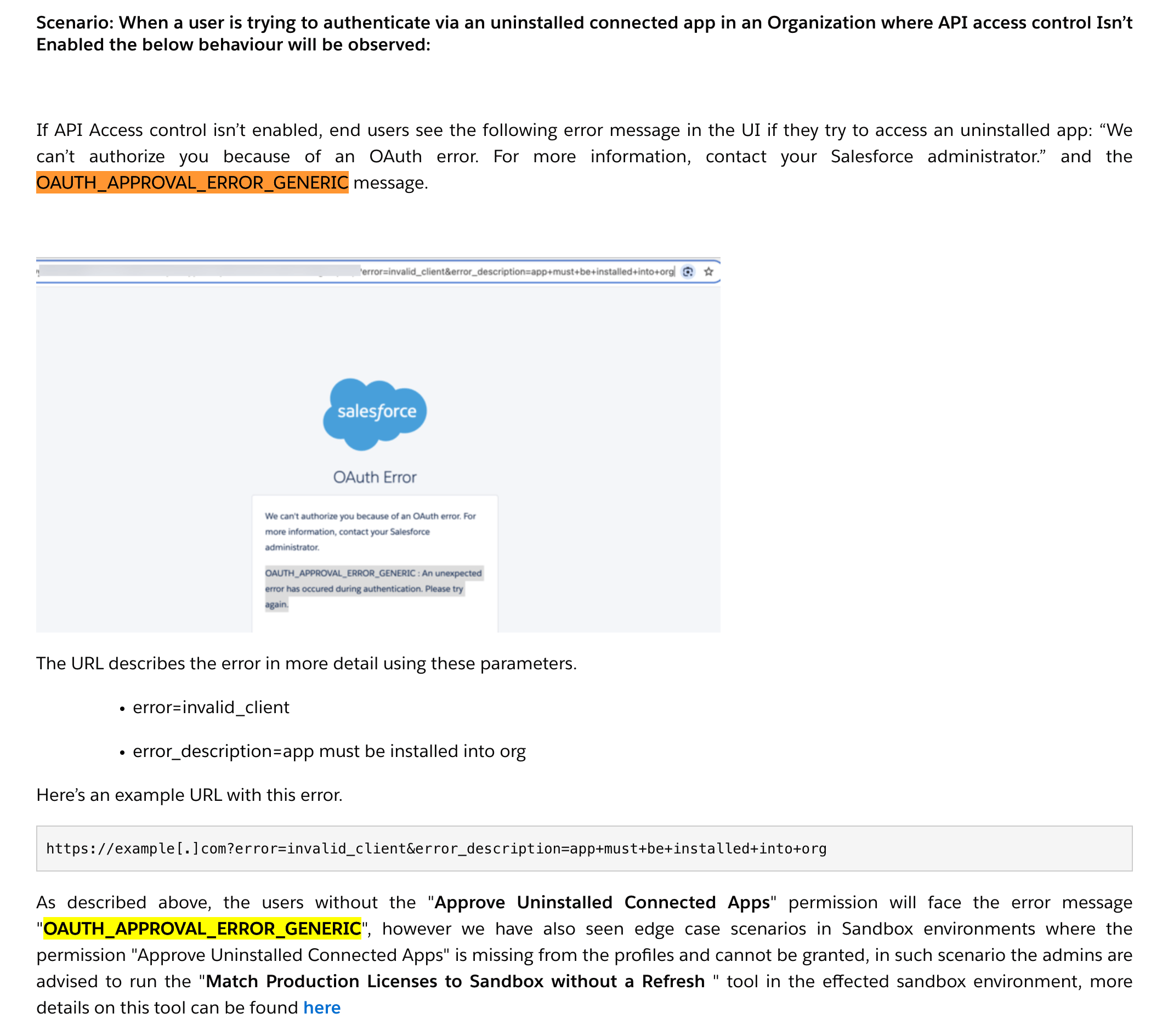
These errors usually mean Salesforce is blocking OAuth because the connected app has not been installed or approved for the org. The user may see OAUTH_APPROVAL_ERROR_GENERIC, or the callback URL may include error=invalid_client&error_description=app+must+be+installed+into+org.Ask a Salesforce org admin to approve or install the connected app. In Salesforce Setup, search for External Client App Settings or OAuth Connected App Usage, find the app, and use the install/approval action shown by Salesforce. After the admin approves the app, the user should retry the OAuth connection.Salesforce OAuth approval error showing OAUTH_APPROVAL_ERROR_GENERIC and app must be installed into org.Salesforce Setup search showing External Client App Settings for connected app approval.
Salesforce allows only five active refresh tokens per user per connected app. When the same Salesforce user connects a sixth time, Salesforce can revoke the oldest refresh token, which makes older Composio connected accounts fail with token errors. Also check whether the user changed their password, revoked the app, changed connected app refresh-token policy away from valid until revoked, or has org-level session policies that invalidate tokens.
Use SOQL subqueries to traverse relationships. For example, Products → Pricebooks → Opportunities:
You need your subdomain (e.g., your-company.my) and instance endpoint /services/data/v61.0. If you see URL_NOT_RESET, replace the login subdomain with your organization’s subdomain.
Deprecated tools continue to work until removed. Check tool descriptions for “DEPRECATED:” markers.
Created records may not appear in a given Salesforce view. Use search to confirm they exist.

Tools

Slug: SALESFORCE_ABORT_QUERY_JOBAbort a Bulk API 2.0 query job in UploadComplete or InProgress state. Requires the job creator or Manage Data Integrations permission. Completed, failed, or already aborted jobs cannot be aborted. Does not delete the job.

Input Parameters

string
required
ID of a Bulk API 2.0 query job in UploadComplete or InProgress state.

Output

string
required
Data from the action execution
string
Error if any occurred during the execution of the action
boolean
required
Whether or not the action execution was successful or not
Slug: SALESFORCE_ACCOUNT_CREATION_WITH_CONTENT_TYPE_OPTIONDEPRECATED: Creates a new Salesforce Account using a JSON POST request, requiring ‘Name’; specific fields (e.g., custom, DunsNumber) may have org-level prerequisites.

Input Parameters

string
Unique identifier for the account (system-generated and read-only upon creation).
string
Fax number for the account.
string
Standard Industrial Classification (SIC) code (max 20 chars). For business accounts only.
string
required
Name of the account (required, max 255 chars). For Person Accounts, this is a concatenated field from the associated contact and not directly modifiable.
string
Name of the account’s specific location or site (max 80 chars).
string
Type of account, influencing categorization and behavior.
string
Primary phone number for the account (max 40 chars).
string
Data.com company ID reference (max 20 chars, API v22.0+). For business accounts. Read-only, do not modify.
string
Prospect rating (picklist).
string
Custom field for Service Level Agreement (SLA) type/details.
string
ID of the Salesforce user owning this account. ‘Transfer Record’ permission may be needed to update if not the API user (API v16.0+).
string
Description of line of business based on SIC code (max 80 chars). For business accounts only.
string
Website URL of the account (max 255 chars).
string
Primary industry of the account (picklist, max 40 chars).
string
ID of the parent account for subsidiary or hierarchical relationships.
string
URL path for the social network profile image (read-only). Blank if Social Accounts and Contacts is not enabled for the user.
string
Custom field indicating if the account is active.
boolean
Indicates if the account is in the Recycle Bin (read-only).
string
NAICS code (6-digit industry classifier, max 8 chars). For business accounts. Requires Data.com Prospector/Clean.
string
Description of line of business based on NAICS code (max 120 chars). For business accounts. Requires Data.com Prospector/Clean.
string
Ownership structure (picklist).
string
D-U-N-S number (9-digit identifier, max 9 chars). For business accounts. Requires Data.com Prospector/Clean.
string
Organization’s ‘Doing Business As’ (DBA) name (max 255 chars). For business accounts. Requires Data.com Prospector/Clean.
string
City for the billing address (max 40 chars).
string
Data quality status compared with Data.com.
string
ID of the user who created the account (read-only).
string
Date and time of account creation (read-only).
string
Text description of the account (max 32,000 chars).
string
Year the organization was established (max 4 chars). For business accounts. Requires Data.com Prospector/Clean.
string
State or province for the billing address (max 80 chars).
string
City for the shipping address (max 40 chars).
string
Stock market ticker symbol (max 20 chars). For business accounts only.
string
Account number assigned to this account (max 40 chars).
string
Origin source of the account record (admin-defined picklist, values max 40 chars).
integer
Estimated annual revenue.
string
Street address for the billing location.
string
State or province for the shipping address (max 80 chars).
object
Dictionary of custom field API names and their values. Custom field names typically end with ‘__c’.
string
Country for the billing address (max 80 chars).
string
Associated Dun & Bradstreet company ID for D&B integration (read-only).
string
Timestamp of when current user last viewed this account record (read-only).
string
ID of the master record if this account was merged (read-only).
string
Street address for the shipping location (max 255 chars).
string
Timestamp of last modification by user or automated process (read-only).
integer
Latitude for the billing address (-90 to 90, up to 15 decimal places).
string
Associated Data.com company ID (read-only).
string
Country for the shipping address (max 80 chars).
string
Internal Salesforce field: Relative API URL for this SObject record. System-set or read-only.
integer
Longitude for the billing address (-180 to 180, up to 15 decimal places).
string
Most recent due date of an event or closed task associated with the record (read-only).
string
ID of the user who last modified the account (read-only).
string
Date and time of last modification (read-only).
string
ID of associated operating hours. Requires Salesforce Field Service.
integer
Latitude for the shipping address (-90 to 90, up to 15 decimal places).
string
Internal Salesforce field: Type of the SObject (e.g., ‘Account’). System-set or read-only.
string
Postal code for the billing address (max 20 chars).
integer
Number of employees (max 8 digits).
integer
Longitude for the shipping address (-180 to 180, up to 15 decimal places).
string
Timestamp of when current user last accessed this record or related items (read-only).
string
Custom field for SLA serial number.
string
Postal code for the shipping address (max 20 chars).
string
Custom field for customer priority (e.g., High, Medium, Low).
integer
Custom field for the number of physical locations.
string
Custom field for SLA expiration date.
string
Custom field indicating upsell opportunity potential.
string
Accuracy level of the geocode for the billing address.
string
Accuracy level of the geocode for the shipping address.

Output

string
required
Data from the action execution
string
Error if any occurred during the execution of the action
boolean
required
Whether or not the action execution was successful or not
Slug: SALESFORCE_ADD_CONTACT_TO_CAMPAIGNAdds a contact to a campaign by creating a CampaignMember record to track campaign engagement. Fails if the contact is already a member of the campaign; pre-check membership via SOQL before calling.

Input Parameters

string
The status of the campaign member. Common values include ‘Sent’, ‘Responded’. The available statuses depend on campaign configuration. Value must exactly match a configured CampaignMember Status for the campaign; arbitrary strings will fail. Query the campaign’s CampaignMemberStatus records first if unsure of valid values.
string
required
The Salesforce ID of the contact to add to the campaign.
string
required
The Salesforce ID of the campaign to add the contact to.
object
Dictionary of custom field API names and their values for CampaignMember. Custom field names typically end with ‘__c’.

Output

string
required
Data from the action execution
string
Error if any occurred during the execution of the action
boolean
required
Whether or not the action execution was successful or not
Slug: SALESFORCE_ADD_LEAD_TO_CAMPAIGNAdds a lead to a campaign by creating a CampaignMember record, allowing you to track campaign engagement. Both campaign_id and lead_id must be valid Salesforce IDs of active, existing records — names or emails cannot be substituted, and deleted or inactive records will cause the call to fail. This is a persistent CRM write; confirm the correct lead and campaign before calling.

Input Parameters

string
The status of the campaign member. Common values include ‘Sent’, ‘Responded’. The available statuses depend on campaign configuration. Value must exactly match one of the campaign’s configured CampaignMember statuses; a mismatch will cause the call to be rejected.
string
required
The Salesforce ID of the lead to add to the campaign.
string
required
The Salesforce ID of the campaign to add the lead to.
object
Dictionary of custom field API names and their values for CampaignMember. Custom field names typically end with ‘__c’.

Output

string
required
Data from the action execution
string
Error if any occurred during the execution of the action
boolean
required
Whether or not the action execution was successful or not
Slug: SALESFORCE_ADD_OPPORTUNITY_LINE_ITEMAdds a product (line item) to an opportunity. The product must exist in a pricebook entry that’s associated with the opportunity’s pricebook.

Input Parameters

number
Discount percentage (0-100). Cannot be used with TotalPrice.
number
required
The quantity of the product to add.
number
The sales price per unit. Provide either unit_price or total_price — Salesforce does NOT auto-fill the price from the pricebook entry on insert, and omitting both fails with FIELD_INTEGRITY_EXCEPTION.
string
Optional description for this line item.
number
The total price for this line item. Cannot be used with UnitPrice or Discount.
string
Service date for the product in YYYY-MM-DD format.
object
Dictionary of custom field API names and their values. Custom field names typically end with ‘__c’.
string
required
The Salesforce ID of the opportunity to add a product to.
string
required
The ID of the PricebookEntry that contains the product and price information. This links to a specific product in a specific pricebook. Entry must be active and match the opportunity’s pricebook and currency; mismatches cause REQUIRED_FIELD_MISSING or INVALID_CROSS_REFERENCE_KEY errors. Use SALESFORCE_LIST_PRICEBOOK_ENTRIES to find valid entries.

Output

string
required
Data from the action execution
string
Error if any occurred during the execution of the action
boolean
required
Whether or not the action execution was successful or not
Slug: SALESFORCE_APPLY_LEAD_ASSIGNMENT_RULESApplies configured lead assignment rules to a specific lead, automatically routing it to the appropriate owner based on your organization’s rules. Allow a brief propagation delay before querying updated ownership or field values after rule application.

Input Parameters

string
required
The Salesforce ID of the lead to apply assignment rules to.

Output

string
required
Data from the action execution
string
Error if any occurred during the execution of the action
boolean
required
Whether or not the action execution was successful or not
Slug: SALESFORCE_ASSOCIATE_CONTACT_TO_ACCOUNTAssociates a Salesforce contact with an account by updating its AccountId, replacing any existing association. It can also update additional contact fields supplied in custom_fields.

Input Parameters

string
required
The Salesforce ID of the account to associate the contact with.
string
required
The Salesforce ID of the contact to associate with an account.
object
Dictionary of custom field API names and their values to update on the contact. Custom field names typically end with ‘__c’.

Output

string
required
Data from the action execution
string
Error if any occurred during the execution of the action
boolean
required
Whether or not the action execution was successful or not
Slug: SALESFORCE_CLONE_OPPORTUNITY_WITH_PRODUCTSClones a Salesforce opportunity, with optional name, close date, and stage changes, and optionally copies its product line items. The opportunity is created before products are copied, so a later failure can leave a partial clone.

Input Parameters

string
Name for the cloned opportunity. If not specified, will append ‘Clone of’ to original name.
string
Close date for the cloned opportunity in YYYY-MM-DD format. If not specified, uses original close date.
string
Stage for the cloned opportunity. If not specified, uses original stage.
boolean
Whether to clone the opportunity’s products (line items). Set to false to clone only the opportunity.
string
required
The ID of the opportunity to clone.

Output

string
required
Data from the action execution
string
Error if any occurred during the execution of the action
boolean
required
Whether or not the action execution was successful or not
Slug: SALESFORCE_CLONE_RECORDCreates a copy of an existing Salesforce record by reading its data, removing system fields, and creating a new record. Optionally apply field updates to the clone.

Input Parameters

string
required
The ID of the record to clone.
string
required
The Salesforce object type to clone (e.g., Account, Contact, Lead, Opportunity).
string
Optional field updates to apply to the cloned record as a JSON string. Use this to modify specific fields in the clone. Example: ’{“Name”: “Clone of Original”, “Status”: “New”}‘

Output

string
required
Data from the action execution
string
Error if any occurred during the execution of the action
boolean
required
Whether or not the action execution was successful or not
Slug: SALESFORCE_CLONE_REPORTCreates a persisted copy of an existing Salesforce report under a new name.

Input Parameters

string
required
Name for the cloned report.
string
required
ID of the source report to clone.

Output

string
required
Data from the action execution
string
Error if any occurred during the execution of the action
boolean
required
Whether or not the action execution was successful or not
Slug: SALESFORCE_CLOSE_OR_ABORT_JOBTool to close or abort a Salesforce Bulk API v2 ingest job. Use when you need to finalize job processing by closing (state: UploadComplete) or cancel a job by aborting (state: Aborted). This is required for every ingest job - closing queues data for processing, while aborting cancels the job and deletes uploaded data.

Input Parameters

string ("UploadComplete" | "Aborted")
required
The state to update the job to. ‘UploadComplete’ closes the job and queues uploaded data for processing. ‘Aborted’ cancels the job and deletes any uploaded data. This field is required.
string
required
The unique identifier of the Bulk API v2 ingest job to close or abort.

Output

string
required
Data from the action execution
string
Error if any occurred during the execution of the action
boolean
required
Whether or not the action execution was successful or not
Slug: SALESFORCE_COMPLETE_TASKUpdates a Salesforce task with status Completed, optional completion notes, and additional field values. Additional field values can override the status or description set by the action.

Input Parameters

string
required
The Salesforce ID of the task to mark as completed.
object
Dictionary of custom field API names and their values. Custom field names typically end with ‘__c’ (e.g., ‘Completion_Source__c’).
string
Optional notes to add about the task completion. Will be appended to existing description.

Output

string
required
Data from the action execution
string
Error if any occurred during the execution of the action
boolean
required
Whether or not the action execution was successful or not
Slug: SALESFORCE_COMPOSITE_GRAPH_ACTIONDEPRECATED: Use SALESFORCE_POST_COMPOSITE_GRAPH instead. Tool to execute multiple Salesforce REST API requests in a single call using composite graphs. Use when you need to perform a series of related operations that should either all succeed or all fail together. Composite graphs support up to 500 subrequests per graph (compared to 25 for regular composite requests) and allow referencing outputs from previous subrequests using @{referenceId.fieldName} syntax.

Input Parameters

array
required
Array of graph objects to execute. Each graph is transactional. Multiple graphs can be submitted in one request.

Output

string
required
Data from the action execution
string
Error if any occurred during the execution of the action
boolean
required
Whether or not the action execution was successful or not
Slug: SALESFORCE_CREATE_ACCOUNTCreates a new account in Salesforce with the specified information. Returns the created Account’s ID at data.response_data.id.

Input Parameters

string
Fax number.
string
required
Account name (required field in Salesforce).
string
Type of account.
string
Main phone number.
string
Company website URL.
string
Industry the account belongs to.
string
Standard Industrial Classification (SIC) description.
string
ID of the parent account if this is a subsidiary. Must be a valid Salesforce Account Id (15- or 18-character).
string
Text description of the account.
string
Billing address city.
string
Billing address state/province. For US/Canada addresses, use full state/province names (e.g., ‘California’, ‘New York’, ‘Ontario’) or abbreviations (‘CA’, ‘NY’) which are auto-converted. For other countries, leave empty unless you know the exact valid picklist value for your Salesforce org. WARNING: If State/Country Picklists are enabled in your org, only pre-configured values are accepted; arbitrary region names will be rejected with FIELD_INTEGRITY_EXCEPTION.
object
Custom fields to set on the account. Use Salesforce API field names (e.g., ‘Level__c’, ‘Languages__c’). Values can be strings, numbers, booleans, or null.
string
Shipping address city.
string
Source of the account.
number
Estimated annual revenue.
string
Billing address street.
string
Shipping address state/province. For US/Canada addresses, use full state/province names (e.g., ‘California’, ‘New York’, ‘Ontario’) or abbreviations (‘CA’, ‘NY’) which are auto-converted. For other countries, leave empty unless you know the exact valid picklist value for your Salesforce org. WARNING: If State/Country Picklists are enabled in your org, only pre-configured values are accepted; arbitrary region names will be rejected with FIELD_INTEGRITY_EXCEPTION.
string
Billing address country.
string
Shipping address street.
string
Shipping address country.
string
Billing address postal/zip code.
integer
Number of employees.
string
Shipping address postal/zip code.

Output

string
required
Data from the action execution
string
Error if any occurred during the execution of the action
boolean
required
Whether or not the action execution was successful or not
Slug: SALESFORCE_CREATE_ANALYTICS_NOTIFICATIONCreate a scheduled report, dashboard or Analytics notification with delivery actions.

Input Parameters

string
Notification display name.
object
Report-running user object with id and optional name. Requires Subscribe to Reports: Add Recipients permission.
boolean
Whether delivery is enabled. Set false to create without sending.
string ("lightningSubscribe" | "lightningDashboardSubscribe" | "lightningReportSubscribe" | "waveNotification")
Notification source type.
string
Report or Analytics lens ID to subscribe to.
object
Notification schedule.
array
Delivery actions and conditions. An empty recipient list may implicitly target the subscriber.
array
Analytics configuration, applicable only to waveNotification.
boolean
Deactivate after sending; Salesforce defaults to false.

Output

string
required
Data from the action execution
string
Error if any occurred during the execution of the action
boolean
required
Whether or not the action execution was successful or not
Slug: SALESFORCE_CREATE_A_RECORDCreates a Salesforce record using the UI API and returns its ID and field values, including formatted display values where available.

Input Parameters

object
required
Dictionary mapping field API names to their values. Keys are field API names (e.g., ‘Name’, ‘FirstName’, ‘AccountId’) and values are the data to set for those fields. Custom fields (ending in ‘__c’) should be passed as direct key-value pairs, not nested under a ‘CustomFields’ key.
string
required
The API name of the Salesforce object to create (e.g., ‘Account’, ‘Contact’, ‘Opportunity’, ‘ContentNote’).
boolean
Controls whether to allow saving when duplicates are detected. Note: Not currently supported in Lightning Web Components createRecord function.
string
Internal message about input processing performed during execution.

Output

string
required
Data from the action execution
string
Error if any occurred during the execution of the action
boolean
required
Whether or not the action execution was successful or not
Slug: SALESFORCE_CREATE_BULK_INGEST_JOBCreate a Bulk API 2.0 ingest job (POST /jobs/ingest). Returns a job in the ‘Open’ state with an id and contentUrl. This is the first step of a bulk load: create the job here, upload CSV data to it (upload_job_data), then close it (close_or_abort_a_job with state=UploadComplete) to queue processing. Without this action the rest of the ingest-job family has no obtainable job_id.

Input Parameters

string ("insert" | "delete" | "hardDelete" | "update" | "upsert")
required
The processing operation for the job. ‘upsert’ requires external_id_field_name. ‘hardDelete’ permanently deletes records (bypassing the Recycle Bin) and requires the ‘Bulk API Hard Delete’ user permission.
string ("LF" | "CRLF")
Line ending used in the CSV data you will upload. Defaults to LF if omitted.
string
required
The API name of the Salesforce object the job operates on (e.g., ‘Account’, ‘Contact’, ‘MyObject__c’). Sent to the API as the ‘object’ field.
string
Format of the data to be uploaded. Bulk API 2.0 ingest only supports ‘CSV’.
string ("BACKQUOTE" | "CARET" | "COMMA" | "PIPE" | "SEMICOLON" | "TAB")
Column delimiter used in the CSV data you will upload. Defaults to COMMA if omitted.
string
The ID of a specific assignment rule to run for Case or Lead records. Optional.
string
The external ID field API name used to match records. REQUIRED when operation is ‘upsert’; ignored otherwise.

Output

string
required
Data from the action execution
string
Error if any occurred during the execution of the action
boolean
required
Whether or not the action execution was successful or not
Slug: SALESFORCE_CREATE_BULK_QUERY_JOBCreate a Bulk API 2.0 query job (POST /jobs/query) for a SOQL query over a large result set. Returns a job with an id; poll get_job_info_query until state is ‘JobComplete’, then retrieve CSV results with get_job_query_result. Without this action the Bulk query family has no obtainable job_id.

Input Parameters

string
required
The SOQL query the job will run. For very large result sets, Bulk API 2.0 query jobs stream results as CSV pages.
string ("query" | "queryAll")
‘query’ returns current rows; ‘queryAll’ also returns deleted and archived rows.
string ("LF" | "CRLF")
Line ending for the CSV results. Defaults to LF if omitted.
string
Format of the query results. Bulk API 2.0 query only supports ‘CSV’.
string ("BACKQUOTE" | "CARET" | "COMMA" | "PIPE" | "SEMICOLON" | "TAB")
Column delimiter for the CSV results. Defaults to COMMA if omitted.

Output

string
required
Data from the action execution
string
Error if any occurred during the execution of the action
boolean
required
Whether or not the action execution was successful or not
Slug: SALESFORCE_CREATE_CAMPAIGNCreates a new campaign in Salesforce. Only name is universally required, but org-level validation rules commonly enforce type, status, start_date, and end_date as well — omitting them may cause creation to fail.

Input Parameters

string
required
Campaign name (required field in Salesforce).
string
Type of campaign.
string
Current status of the campaign.
string
Campaign end date in YYYY-MM-DD format.
boolean
Whether the campaign is currently active. Depending on org configuration, setting to true may require valid start_date/end_date ranges; violations raise a non-retriable CANNOT_INSERT_UPDATE_ACTIVATE_ENTITY error.
string
ID of the parent campaign if this is a child campaign.
string
Campaign start date in YYYY-MM-DD format.
number
Actual cost spent on the campaign.
string
Detailed description of the campaign.
number
Number of individuals targeted by the campaign.
number
Budgeted cost for the campaign.
object
Dictionary of custom field names and their values. Custom field names should end with ‘__c’ (e.g., ‘Priority__c’, ‘Region__c’). Values can be strings, numbers, booleans, or dates depending on the field type.
number
Expected revenue from the campaign.
number
Expected response rate as a percentage.

Output

string
required
Data from the action execution
string
Error if any occurred during the execution of the action
boolean
required
Whether or not the action execution was successful or not
Slug: SALESFORCE_CREATE_CAMPAIGN_RECORD_VIA_POSTDEPRECATED: Creates a new campaign record in Salesforce; if ‘ParentId’ is provided, it must be a valid ID of an existing Campaign record, and if ‘OwnerId’ is provided, it must be a valid ID of an active User.

Input Parameters

string
Unique identifier for the campaign record, usually system-generated upon creation.
string
required
Required. Name of the campaign (limit 80 characters).
string
Type of campaign (limit 40 characters).
string
Current status of the campaign (limit 40 characters).
string
Ending date for the campaign (YYYY-MM-DD); responses received after this date are still counted.
string
ID of the campaign owner. Defaults to the ID of the user making the API call.
boolean
Indicates if the campaign is active. Label: Active.
string
ID of the parent Campaign record for hierarchical grouping.
boolean
Indicates if the campaign record has been deleted.
string
Starting date for the campaign (YYYY-MM-DD).
integer
Actual cost of the campaign, in the organization’s currency.
integer
Total number of individuals targeted (e.g., emails sent). Label: Num Sent.
string
Read-only. ID of the user who created this campaign record.
string
Read-only. Creation date and time (ISO 8601).
string
Detailed description of the campaign (limit 32KB; first 255 characters displayed in reports).
integer
Budgeted cost for this campaign, in the organization’s currency.
integer
Read-only. Total leads associated with this campaign. Label: Leads in Campaign.
object
Dictionary of custom field API names and their values. Custom field names typically end with ‘__c’.
string
Read-only. Timestamp of current user’s last view of this record/list view (ISO 8601). Null if only accessed (see LastReferencedDate) but not viewed.
string
Read-only. Last modification date and time by a user or automated process (ISO 8601).
integer
Expected revenue from this campaign, in the organization’s currency.
string
Read-only. Relative URL to the campaign record.
integer
Percentage of responses expected from targeted individuals.
string
Read-only. Most recent activity date (event due date or closed task due date, YYYY-MM-DD).
string
Read-only. ID of the user who last modified this campaign record.
string
Read-only. Last modification date and time (ISO 8601).
integer
Read-only. Total contacts associated with this campaign. Label: Total Contacts.
string
sObject type, typically ‘Campaign’.
integer
Read-only. Contacts and unconverted leads with Member Status “Responded”. Label: Responses in Campaign.
string
Read-only. Timestamp of current user’s last access to this record, a related record, or a list view (ISO 8601).
integer
Read-only. Total opportunities associated with this campaign. Label: Opportunities in Campaign.
integer
Read-only. Total monetary amount of all opportunities (including closed/won) in this campaign, in organization’s currency. Label: Value Opportunities in Campaign.
integer
Read-only. Total monetary amount of closed/won opportunities in this campaign, in organization’s currency. Label: Value Won Opportunities in Campaign.
integer
Read-only. Leads converted to an account and contact from this campaign. Label: Converted Leads.
integer
Read-only. Closed or won opportunities from this campaign. Label: Won Opportunities in Campaign.
string
Record type ID for associated CampaignMember records, determining their fields and layout.

Output

string
required
Data from the action execution
string
Error if any occurred during the execution of the action
boolean
required
Whether or not the action execution was successful or not
Slug: SALESFORCE_CREATE_CONTACTCreates a new contact in Salesforce with the specified information. Writes to live CRM data — obtain explicit user confirmation before executing. Failures may reflect org-specific validation rules, permission restrictions, or duplicate rules rather than invalid inputs.

Input Parameters

string
Contact’s email address.
string
Contact’s primary phone number.
string
Contact’s job title.
string
Contact’s birthdate in YYYY-MM-DD format.
string
required
Contact’s last name (required field in Salesforce).
string
ID of the Account this contact is associated with.
string
Contact’s department.
string
Contact’s first name.
string
Source from which this contact originated.
string
Contact’s mailing city.
string
Contact’s mobile phone number.
object
Dictionary of custom field API names and their values. Custom field names typically end with ‘__c’ (e.g., ‘Level__c’, ‘Languages__c’).
string
Contact’s mailing state/province.
string
Contact’s mailing street address.
string
Contact’s mailing country.
string
Contact’s mailing postal/zip code.

Output

string
required
Data from the action execution
string
Error if any occurred during the execution of the action
boolean
required
Whether or not the action execution was successful or not
Slug: SALESFORCE_CREATE_CUSTOM_FIELDTool to create a custom field on a Salesforce object using the Tooling API. Use when you need to add a new field (Text, Number, Checkbox, Date, Picklist, Lookup, etc.) to any standard or custom object without deploying metadata packages. The Tooling API provides direct field creation for rapid development and automation tasks.

Input Parameters

string
required
The display label for the field shown in the Salesforce UI.
integer
Number of decimal places for Number, Currency, or Percent fields. Must be less than precision.
integer
Maximum character length. Required for Text (max 255) and LongTextArea (max 131072) fields.
boolean
If true, enforce that all values in this field are unique across all records (case-insensitive by default).
boolean
If true, this field must be populated when creating or editing records.
integer
Total number of digits for Number, Currency, or Percent fields (including decimal places). Maximum is 18.
string ("Text" | "LongTextArea" | "Number" | "Checkbox" | "Date" | "DateTime" | "Picklist" | "MultiselectPicklist" | "Lookup" | "Email" | "Phone" | "Url" | "Currency" | "Percent")
required
The type of custom field to create. Common types: Text (string up to 255 chars), LongTextArea (larger text), Number (integer or decimal), Checkbox (boolean), Date, DateTime, Picklist (single-select dropdown), MultiselectPicklist (multi-select), Lookup (relationship to another object), Email, Phone, Url, Currency, Percent.
boolean
For Picklist/MultiselectPicklist fields, if true restricts values to only those defined in the picklist (no custom values allowed).
string
Optional description of the field’s purpose and usage.
boolean
If true, marks this field as an external ID for integration purposes (allows upsert operations and improves query performance).
string
For Lookup fields, the API name of the object this field references (e.g., ‘Account’, ‘Contact’, ‘CustomObject__c’).
string
Default value for the field. Format depends on field type (e.g., ‘true’/‘false’ for Checkbox, date string for Date fields).
integer
Number of visible lines for LongTextArea fields in the UI. Typically 3-10.
boolean
If true, checks if the field already exists before attempting creation. Prevents errors when field is already present.
string
required
The API name for the new custom field. Must end with ‘__c’ for custom fields (e.g., ‘Customer_Tier__c’, ‘Priority_Level__c’).
string
required
The API name of the Salesforce object to add the field to (e.g., ‘Account’, ‘Contact’, ‘Opportunity’, or a custom object like ‘Invoice__c’).
array
List of picklist values for Picklist or MultiselectPicklist fields. Each value must have at minimum a fullName.
string
Optional help text shown as a tooltip when users hover over the field in the UI.
string
For Lookup fields, the API name for the relationship (used in queries). If not specified, Salesforce auto-generates one.
integer
For MultiselectPicklist fields, number of visible lines to display in the UI.

Output

string
required
Data from the action execution
string
Error if any occurred during the execution of the action
boolean
required
Whether or not the action execution was successful or not
Slug: SALESFORCE_CREATE_CUSTOM_OBJECTCreates a Salesforce custom object using the Metadata API, with a configured name field and object settings.

Input Parameters

string
required
The display label for the custom object shown in the Salesforce UI (singular form).
string
required
The API name of the custom object. Must end with ‘__c’ suffix (e.g., ‘Invoice__c’, ‘Student__c’). This is the unique identifier for the object in Salesforce.
object
required
Configuration for the name field of the custom object. Every custom object requires a name field.
string
Optional description of the custom object’s purpose and usage.
string
required
The plural form of the label shown in the Salesforce UI when referring to multiple records.
string ("ReadWrite" | "Read" | "Private" | "ControlledByParent")
Defines default record-level sharing. ‘ReadWrite’ allows all users to read and edit, ‘Read’ allows read-only access, ‘Private’ restricts to owner only, ‘ControlledByParent’ inherits from parent object.
boolean
If true, enables reporting on this object. Allows users to create reports and dashboards with this object’s data.
string ("Deployed" | "InDevelopment")
Deployment status of the custom object. ‘Deployed’ makes it available to all users, ‘InDevelopment’ restricts access to admins and developers only.
boolean
If true, enables tasks and events for this object. Allows users to track activities related to records.

Output

string
required
Data from the action execution
string
Error if any occurred during the execution of the action
boolean
required
Whether or not the action execution was successful or not
Slug: SALESFORCE_CREATE_FOLDERCreate a Salesforce folder, optionally beneath an existing parent folder.

Input Parameters

string
Unique folder API name. Required for admins; auto-generated for non-admins when omitted.
string ("report" | "dashboard" | "document" | "email" | "insights")
required
Type of content the folder contains.
string
required
Folder display name.
string
Parent folder ID, only for creating a subfolder. Omit for a root folder.

Output

string
required
Data from the action execution
string
Error if any occurred during the execution of the action
boolean
required
Whether or not the action execution was successful or not
Slug: SALESFORCE_CREATE_FOLDER_SHARESAppend shares to a Salesforce folder without replacing its share list.

Input Parameters

array
required
Shares to append to the folder’s existing share list.
string
required
ID of the folder to share. Requires manage access.

Output

string
required
Data from the action execution
string
Error if any occurred during the execution of the action
boolean
required
Whether or not the action execution was successful or not
Slug: SALESFORCE_CREATE_KNOWLEDGE_ARTICLE_DRAFTCreate a draft copy of an online primary Knowledge article without unpublishing it.

Input Parameters

string
required
The 15- or 18-character KnowledgeArticle ID of the online primary article. Use the kA0-prefixed article ID, not a ka0-prefixed version ID.

Output

string
required
Data from the action execution
string
Error if any occurred during the execution of the action
boolean
required
Whether or not the action execution was successful or not
Slug: SALESFORCE_CREATE_LEADCreates a new lead in Salesforce. LastName and Company are required. Org-level validation rules (e.g., email format, custom required fields) may reject requests beyond these; inspect the error response body for the failing field. The created lead id is returned in a response wrapper, not at the top level.

Input Parameters

string
Lead’s city.
string
Lead’s email address.
string
Lead’s phone number.
string
Lead’s state/province.
string
Lead’s job title. Maximum length is 128 characters.
string
Lead rating.
string
Lead status.
string
Lead’s street address.
string
required
Lead’s company name. Required - must be provided to create a lead.
string
Lead’s country.
string
Lead’s company website.
string
Lead’s industry.
string
required
Lead’s last name. Required - must be provided to create a lead.
string
Lead’s first name.
string
Source of the lead.
string
Lead’s postal/zip code.
object
Dictionary of custom field API names and their values. Custom field names typically end with ‘__c’ (e.g., ‘Level__c’, ‘Languages__c’). Use this to set any custom fields defined in your Salesforce org.
number
Lead’s company annual revenue.
boolean
When True, allows creating duplicate leads even if Salesforce duplicate detection rules are triggered. When False (default), creation fails if duplicates are detected and returns duplicate information in the response.
integer
Number of employees at lead’s company.

Output

string
required
Data from the action execution
string
Error if any occurred during the execution of the action
boolean
required
Whether or not the action execution was successful or not
Slug: SALESFORCE_CREATE_LEAD_WITH_SPECIFIED_CONTENT_TYPEDEPRECATED: Creates a new Lead in Salesforce, requiring LastName and Company.

Input Parameters

string
City for the address.
string
Email address.
string
Primary phone number.
string
State or province for the address.
string
Title (e.g., CFO, CEO; up to 128 characters).
string
Data.com contact ID (max 20 chars). Indicates Data.com import. Do not modify; for import troubleshooting.
string
Rating (e.g., Hot, Warm, Cold).
string
Current status (e.g., Open, Contacted). Defined in LeadStatus object in Salesforce setup.
string
Street address.
string
required
Company name (up to 255 characters). If person accounts are enabled and this is null, lead converts to a person account.
string
Country for the address.
string
ID of the owner (must be a valid 15 or 18-character Salesforce User ID starting with ‘005’, e.g., ‘005XXXXXXXXXXXXXXX’). Omit or set to null to assign to the current user. The string ‘me’ is automatically converted to null to use the default.
string
Website URL.
string
Primary industry of the lead’s company.
string
required
Last name of the lead (up to 80 characters).
string
Path for social network profile image URL; used with Salesforce instance URL. Empty if Social Accounts/Contacts disabled.
string
First name (up to 40 characters).
boolean
Indicates if the lead is in the Recycle Bin (true) or not (false). Salesforce defaults to false if this field is omitted.
string ("Web" | "Other" | "Phone Inquiry" | "Partner Referral" | "Purchased List")
Source of the lead.
string
Postal or ZIP code for the address.
string
Custom field, possibly indicates if primary contact/lead.
string
Custom field for Standard Industrial Classification (SIC) code.
string ("Mr." | "Ms." | "Mrs." | "Dr." | "Prof.")
Salutation for the lead.
string
Record’s clean status compared with Data.com (e.g., Matched, Different, Pending).
string
ID of user who created this. System-generated, read-only.
string
Creation timestamp. System-generated, read-only.
string
Description (up to 32,000 characters).
boolean
True if converted to Account/Contact/Opportunity; false otherwise. Read-only; set upon conversion.
string
Associated data privacy record ID. Available if Data Protection/Privacy enabled.
integer
Annual revenue of the lead’s company.
string
Conversion date. Read-only; set upon conversion.
object
Dictionary of custom field API names and their values. Custom field names typically end with ‘__c’.
string
Associated D&B Company record ID. Available if Data.com used.
string
Timestamp when current user last viewed. Null if only accessed (LastReferencedDate) but not viewed. Read-only.
string
ID of the master record if this lead was deleted due to a merge; null otherwise.
string
Timestamp of last modification by user or system. System-generated, read-only.
boolean
True if assigned to an owner but not yet viewed by them. Salesforce defaults to true when a lead is created or its owner changes.
string
Jigsaw contact ID. Read-only.
string
Relative URL of SObject record. Usually metadata, not set by user on creation.
string
Date/time of last email bounce (if bounce management active).
boolean
True if this lead is marked as a priority record.
string
Later of most recent event’s Due Date or most recently closed task’s Due Date. Read-only.
string
ID of user who last modified this. System-generated, read-only.
string
Last modification timestamp. System-generated, read-only.
string
SObject type (typically ‘Lead’). Usually metadata, not set by user on creation.
integer
Number of employees at the lead’s company.
string
ID of the Account object from conversion. Read-only.
string
ID of the Contact object from conversion. Read-only.
string
Reason for last email bounce (if bounce management active).
string
Timestamp when current user last accessed this or related record. Read-only.
string
Custom field indicating the product(s) the lead is interested in.
string
Custom field for information about current generators or similar equipment/services.
integer
Custom field for the number of locations the lead’s company has.
string
ID of the Opportunity from conversion. Read-only.

Output

string
required
Data from the action execution
string
Error if any occurred during the execution of the action
boolean
required
Whether or not the action execution was successful or not
Slug: SALESFORCE_CREATE_LIST_VIEWCreate a Salesforce UI API list view for a standard or custom object.

Input Parameters

string
Display label for the list view.
object
Scope identifiers for the list.
string ("Private" | "Public" | "Shared")
Visibility of the new list view.
array
Role or group API names when visibility is Shared.
array
Field API names displayed as columns in the list.
string
required
API name of the standard or custom object.
array
Filters applied to the list.
string
Stable API name for the list; Salesforce generates one when omitted.
string
Boolean expression over one-based filter indexes, such as ‘(1 OR 2) AND 3’.

Output

string
required
Data from the action execution
string
Error if any occurred during the execution of the action
boolean
required
Whether or not the action execution was successful or not
Slug: SALESFORCE_CREATE_NEW_CONTACT_WITH_JSON_HEADERDEPRECATED: Creates a new Contact in Salesforce; ‘LastName’ is required, an existing ‘AccountId’ must be used if provided, and any custom fields (ending with ‘__c’) must be predefined.

Input Parameters

string
Unique contact identifier, system-generated; omit for new contact creation.
string
Primary business fax. Label: Business Fax.
string
Read-only: Full name, a concatenation of FirstName, MiddleName, LastName, and Suffix (up to 203 characters).
string
Email address.
string
Primary business phone. Label: Business Phone.
string
Contact’s title (e.g., CEO, Vice President).
string
Read-only: Data.com Company ID (max 20 chars), indicates import from Data.com. Label: Data.com Key. Do not modify.
string
ID of the Salesforce user owning this contact. Defaults to the logged-in user if unspecified.
string
required
Required: Contact’s last name (up to 80 characters).
string
Custom field: Contact’s level (e.g., Primary, Secondary). ‘__c’ denotes a custom field.
string
Read-only: Path for social profile image URL (redirects). Empty if Social Accounts & Contacts disabled.
string
Parent Account ID; must exist if specified. Caution advised when changing for portal-enabled contacts.
string
Birthdate (YYYY-MM-DD). SOQL queries ignore year for date comparisons (e.g., Birthdate > TODAY).
string
Contact’s first name (up to 40 characters).
string
Home phone.
boolean
Read-only: True if contact is in Recycle Bin. Label: Deleted.
string
Alternate address: City.
string
Contact’s department.
string
Lead source for this contact (e.g., Web, Phone Inquiry).
string
Alternate address phone.
string
Alternate address: State or province.
string
Honorific for the contact’s name (e.g., Dr., Mr., Mrs.).
string
Record’s clean status compared to Data.com (e.g., ‘Matched’ may appear as ‘In Sync’ in UI).
string
Read-only: ID of user who created contact.
string
Read-only: Timestamp of contact creation.
string
Description (up to 32KB). Label: Contact Description.
string
Mailing address: City.
string
Mobile phone.
string
Alternate address: Street.
string
ID of manager contact reports to. Not for person accounts (IsPersonAccount true).
string
ID of associated data privacy record. Available if Data Protection & Privacy enabled.
string
Custom field: Languages spoken by the contact (e.g., English;Spanish). ‘__c’ denotes a custom field.
string
Mailing address: State or province.
string
Alternate address: Country.
string
Assistant’s name.
string
Source of contact information, for more granular tracking than LeadSource.
string
Mailing address: Street.
integer
Alternate address: Latitude (-90 to 90, 15 decimal places). Use with OtherLongitude.
object
Dictionary of custom field API names and their values. Custom field names typically end with ‘__c’.
string
Assistant’s phone.
boolean
True if email bounced; bounce management must be active.
string
Read-only: Timestamp current user last viewed contact. Null if only referenced.
string
Mailing address: Country.
string
Read-only: ID of the master record post-merge deletion; null otherwise.
integer
Alternate address: Longitude (-180 to 180, 15 decimal places). Use with OtherLatitude.
string
Read-only: Timestamp of last system modification (user or automated).
string
Read-only: Jigsaw (Data.com) ID, links to Data.com contact data.
integer
Mailing address: Latitude (-90 to 90, 15 decimal places). Use with MailingLongitude.
string
Alternate address: Postal code.
string
Relative URL for this SObject record, usually system-generated. Part of ‘attributes’ metadata.
string
Date and time of email bounce, if bounce management is active and an email bounced.
boolean
True if contact is a priority record.
string
Read-only: Most recent due date of associated event or closed task.
string
Read-only: Timestamp of last update from a contact update request.
string
Read-only: ID of user who last modified contact.
string
Read-only: Timestamp of last modification.
integer
Mailing address: Longitude (-180 to 180, 15 decimal places). Use with MailingLatitude.
string
Salesforce SObject type, typically ‘Contact’. Part of ‘attributes’ metadata.
string
Read-only: Timestamp of last contact update request (e.g., Data.com Clean).
string
Mailing address: Postal code.
string
Reason for email bounce, if bounce management is active and an email bounced.
string
Read-only: Timestamp current user last accessed contact, related record, or its list view.
string
Alternate address: Geocode accuracy. See Salesforce docs for geolocation compound fields.
string
Mailing address: Geocode accuracy. See Salesforce docs for geolocation compound fields.

Output

string
required
Data from the action execution
string
Error if any occurred during the execution of the action
boolean
required
Whether or not the action execution was successful or not
Slug: SALESFORCE_CREATE_NOTECreates a new note attached to a Salesforce record with the specified title and content. Does not deduplicate — identical calls create duplicate notes. High-volume creation can trigger REQUEST_LIMIT_EXCEEDED; apply exponential backoff on retries.

Input Parameters

string
Body/content of the note. Can contain detailed text information.
string
required
Title of the note (required field in Salesforce).
string
ID of the user who will own the note. Defaults to the current user if not specified.
string
required
ID of the record to attach the note to (required field in Salesforce). Can be any record that supports notes like Account, Contact, Lead, Opportunity, etc.
boolean
Whether the note should be private (only visible to owner and users with Modify All Data permission).
object
Dictionary of custom field API names and their values. Custom field names typically end with ‘__c’ (e.g., ‘Priority__c’, ‘Category__c’). Use this to set any custom fields defined on the Note object in your Salesforce org.

Output

string
required
Data from the action execution
string
Error if any occurred during the execution of the action
boolean
required
Whether or not the action execution was successful or not
Slug: SALESFORCE_CREATE_NOTE_RECORD_WITH_CONTENT_TYPE_HEADERDEPRECATED: Creates a new Note record in Salesforce, associated with an existing Salesforce object via ParentId, automatically including a Content-Type: application/json header.

Input Parameters

string
Unique identifier for the Note object, typically auto-generated and not provided in the request.
string
required
Content or body of the note.
string
required
Title of the note.
string
ID of the Salesforce User who will own the note; defaults to the API user.
string
required
ID of the parent Salesforce record (e.g., Account, Contact) to which this note is related; must reference an existing record.
boolean
Indicates if the object is in the Recycle Bin. Label is Deleted.
boolean
If true, restricts note visibility to the owner or users with “Modify All Data” permission. Label is Private.
string
ID of the user who created the note (system-generated, read-only on create).
string
Timestamp of note creation (system-generated, read-only on create).
object
Dictionary of custom field API names and their values. Custom field names typically end with ‘__c’.
string
Timestamp of last system change (system-generated).
string
API URL for the SObject. Corresponds to attributes.url in the JSON body (typically read-only).
string
ID of the user who last modified the note (system-generated).
string
Timestamp of last modification (system-generated).
string
SObject type, should be ‘Note’ if provided. Corresponds to attributes.type in the JSON body.

Output

string
required
Data from the action execution
string
Error if any occurred during the execution of the action
boolean
required
Whether or not the action execution was successful or not
Slug: SALESFORCE_CREATE_OPPORTUNITYCreates a Salesforce opportunity with the specified information. The contact ID parameter is ignored, and standard amount and probability values are sent only when positive.

Input Parameters

string
required
Opportunity name (required field in Salesforce).
string
Type of opportunity.
number
Estimated total sale amount.
string
Description of next step in sales process.
string
ID of the Account this opportunity is associated with. Omitting leaves the opportunity orphaned and excluded from account-based reports.
string
required
Expected close date in YYYY-MM-DD format (required field in Salesforce).
string
Deprecated: Salesforce Opportunity does not have a writable ContactId field. Contact-to-Opportunity associations must be managed through OpportunityContactRole. This parameter is accepted but ignored.
string
required
Current stage of the opportunity (required field in Salesforce).
string
Text description of the opportunity.
string
Source of the opportunity.
number
Percentage probability of closing (0-100).
object
Dictionary of custom field API names and their values. Custom field names typically end with ‘__c’ (e.g., ‘Custom_Field__c’). Values are subject to org-level validation rules; invalid values raise FIELD_CUSTOM_VALIDATION_EXCEPTION.
string
ID of the price book for this opportunity.

Output

string
required
Data from the action execution
string
Error if any occurred during the execution of the action
boolean
required
Whether or not the action execution was successful or not
Slug: SALESFORCE_CREATE_OPPORTUNITY_RECORDDEPRECATED: Creates a new Opportunity record in Salesforce; Name, StageName, and CloseDate are mandatory, and ensure any referenced IDs (e.g., AccountId, CampaignId) are valid and corresponding Salesforce features are enabled if used.

Input Parameters

string
System-generated unique identifier. Typically not provided during creation; providing it may be ignored or cause an error.
string
required
Descriptive name for the opportunity. Required. Limit: 120 characters.
string
Opportunity type (e.g., ‘New Business’, ‘Existing Customer’). Values depend on Salesforce configuration.
boolean
Read-only. Indicates if won, lost, or open. Auto-set by Salesforce based on StageName; cannot be set on creation.
integer
Estimated total sale amount. If products are involved, this may be auto-calculated, and direct updates might be ignored.
string
Fiscal period (‘YYYY Q’ format, e.g., ‘2024 1’) based on CloseDate. Used if standard fiscal year settings not enabled. Often auto-derived.
string
ID of the User owning this opportunity. Defaults to creating user if unspecified (depending on settings). Ensure User ID is valid and active.
boolean
Read-only. Indicates if closed or open. Auto-set by Salesforce based on StageName; cannot be set on creation.
string
Next actionable step towards closing. Limit: 255 characters.
string
ID of the linked Account. Often crucial for creating a valid opportunity.
string
required
Expected close date (YYYY-MM-DD). Required.
string
ID of the primary Contact. Set only during creation. Use OpportunityContactRole object to modify or add other contacts later.
boolean
Indicates if the record is in the Recycle Bin. Generally used for querying, not set during creation.
boolean
If true, this opportunity is private and only visible to the owner and users with appropriate sharing access.
integer
Read-only. Used internally by Salesforce for mobile sync updates. Not user-settable.
string
required
Current stage (e.g., ‘Prospecting’, ‘Closed Won’). Required. May update ForecastCategoryName, IsClosed, IsWon, and Probability. Query OpportunityStage object or refer to Salesforce setup for valid names.
string
ID of the influencing Campaign. Ensure Campaign feature is enabled and ID is valid.
integer
Fiscal year (e.g., 2024) of CloseDate. Often auto-derived from CloseDate based on org’s fiscal year settings.
string
Lead or opportunity source (e.g., ‘Web’, ‘Partner Referral’). Values depend on Salesforce configuration.
string
Read-only. ID of the user who created this record. Auto-set by Salesforce.
string
Read-only. Creation timestamp. Auto-set by Salesforce.
string
Detailed text description. Limit: 32,000 characters.
integer
Likelihood (percentage, e.g., 75 for 75%) of closing. Often implied by StageName but can be overridden.
string
ID of the associated Price Book (Pricebook2). Generally required if adding products. Ensure products/price books are enabled and ID is valid.
integer
Fiscal quarter (1-4) of CloseDate. Often auto-derived from CloseDate based on org’s fiscal year settings.
object
Dictionary of custom field API names and their values. Custom field names typically end with ‘__c’.
boolean
Read-only. Indicates if overdue Tasks exist. API v35.0+.
string
Read-only. Timestamp of when current user last viewed this record. Not settable on creation.
string
Custom field: Associated order number.
string
Read-only. Last system modification timestamp. Auto-set by Salesforce.
integer
Read-only. Calculated as Amount * Probability. Cannot be set during creation.
boolean
Read-only. Indicates if open activities (Events or Tasks) exist. API v35.0+.
string
Relative URL for this Opportunity record.
string
Forecast category (e.g., ‘Pipeline’, ‘Best Case’). Often implied by StageName. For API v12.0+, typically set via ForecastCategoryName. Values depend on Salesforce configuration.
string
Read-only. Date of the most recent activity (Event or Task). Not settable on creation.
string
Read-only. ID of the user who last modified this record. Auto-set by Salesforce.
string
Read-only. Last modification timestamp. Auto-set by Salesforce.
string
SObject type for this record, typically ‘Opportunity’.
string
Custom field: Associated tracking number.
string
Read-only. Timestamp of when current user last accessed this record or a related one. Not settable on creation.
string
Custom field: Identified main competitors.
string
Read-only. Timestamp of last StageName change. Auto-set by Salesforce.
string
Custom field: Information on current generators.
string
Name of the forecast category (e.g., ‘Pipeline’). API v12.0+. Often implied by StageName but can be overridden. Typically determines ForecastCategory.
boolean
Read-only. Indicates if associated line items (products) exist. System-managed; ignored during creation.
integer
Total quantity of items (e.g., units, licenses). Used in quantity-based forecasting.
string
Read-only. ID of OpportunityHistory record tracking last Amount change (API v50.0+). Not settable on creation.
string
Custom field: Delivery or installation status.
string
Read-only. ID of OpportunityHistory record tracking last CloseDate change (API v50.0+). Not settable on creation.

Output

string
required
Data from the action execution
string
Error if any occurred during the execution of the action
boolean
required
Whether or not the action execution was successful or not
Slug: SALESFORCE_CREATE_S_OBJECT_RECORDTool to create a new Salesforce SObject record. Use when you need to create any type of standard or custom Salesforce object record by specifying the object type and field values.

Input Parameters

object
required
Dictionary of field API names and their values to set on the new record. Keys must be valid field API names for the specified object type. Required fields for the object must be included. Custom field names typically end with ‘__c’.
string
required
The API name of the Salesforce object type to create (e.g., ‘Account’, ‘Contact’, ‘Opportunity’, ‘Lead’, ‘Case’, ‘Task’). This is case-sensitive and must match the exact API name in Salesforce.

Output

string
required
Data from the action execution
string
Error if any occurred during the execution of the action
boolean
required
Whether or not the action execution was successful or not
Slug: SALESFORCE_CREATE_SOBJECT_TREETool to create one or more sObject trees with root records of the specified type. Use when creating nested parent-child record hierarchies in a single atomic operation (e.g., Account with Contacts and Opportunities). Supports up to 200 total records across all trees, up to 5 levels deep, with maximum 5 different object types. All records succeed or all fail together.

Input Parameters

array
required
Array of sObject record trees to create. Each record must include ‘attributes’ object with ‘type’ (matching sobject_api_name) and ‘referenceId’ fields, plus any standard or custom field values. Can include nested child records using relationship names (e.g., ‘Contacts’, ‘Opportunities’). Constraints: Maximum 200 total records across all trees, maximum 5 levels deep, maximum 5 different object types.
string
required
The API name of the sObject type for root records (e.g., Account, Contact, Opportunity). All root records in the request must be of this type.

Output

string
required
Data from the action execution
string
Error if any occurred during the execution of the action
boolean
required
Whether or not the action execution was successful or not
Slug: SALESFORCE_CREATE_TASKCreates a new task in Salesforce to track activities, to-dos, and follow-ups related to contacts, leads, or other records. Ensure who_id, what_id, and owner_id reference existing records before calling; invalid IDs cause silent linkage failures or validation errors.

Input Parameters

string
Status of the task. Must be a valid picklist value; arbitrary strings trigger validation errors.
string
ID of the Contact or Lead this task is associated with. Only accepts Contact IDs (prefix ‘003’) or Lead IDs (prefix ‘00Q’). Do NOT use Account/Opportunity/Case IDs here; use what_id for those. Swapping who_id and what_id creates orphaned tasks that won’t appear on contact/lead timelines. Accepts only a single ID; create separate task records for multiple contacts.
string
required
Subject/title of the task.
string
ID of the related record (Account, Opportunity, Case, etc.) this task is associated with. Accepts Account IDs (prefix ‘001’), Opportunity IDs (prefix ‘006’), Case IDs (prefix ‘500’), and other business object IDs.
string
ID of the user who owns the task. Defaults to current user if not specified.
string
Priority level of the task.
string
Detailed description or notes for the task.
string
Due date for the task in YYYY-MM-DD format. Do not use full datetimes or natural-language strings like ‘yesterday’; only YYYY-MM-DD is accepted.
object
Dictionary of custom field API names and their values. Custom field names typically end with ‘__c’ (e.g., ‘Priority_Level__c’: ‘Critical’).
boolean
Whether to set a reminder for this task.
string
Date and time for the reminder in ISO format (YYYY-MM-DDTHH:MM:SS). Required if is_reminder_set is true. Interpreted according to org/user timezone, not UTC.
string
Internal field used to communicate processing details.

Output

string
required
Data from the action execution
string
Error if any occurred during the execution of the action
boolean
required
Whether or not the action execution was successful or not
Slug: SALESFORCE_CREATE_TOOLING_FLOWCreate a Salesforce Flow version through the Tooling API.

Input Parameters

string
required
Flow metadata definition. The common fields are modeled explicitly; additional documented Flow metadata members are preserved.
string
required
Full API name for the new Salesforce Flow version. Non-null names must start with a letter, use only letters, numbers, and underscores, and cannot end with or repeat underscores.
boolean
Whether the new Flow is a reusable template. Salesforce defaults this to false.

Output

string
required
Data from the action execution
string
Error if any occurred during the execution of the action
boolean
required
Whether or not the action execution was successful or not
Slug: SALESFORCE_CREATE_TOOLING_RECORDCreate a supported Salesforce Tooling API sObject record.

Input Parameters

object
required
Tooling API fields to send unchanged as the request body. Include every field required by the selected object type.
string
required
The API name of the Tooling API sObject to create. Must be a single Salesforce API identifier, such as Flow or ApexClassMember.

Output

string
required
Data from the action execution
string
Error if any occurred during the execution of the action
boolean
required
Whether or not the action execution was successful or not
Slug: SALESFORCE_CREATE_VALIDATION_RULECreate an active or inactive Salesforce validation rule through Tooling API.

Input Parameters

boolean
required
Whether Salesforce should enforce the validation rule.
string
required
Full validation rule name in ObjectApiName.RuleName format.
string
Optional description of the validation rule. Omitted from metadata when null.
string
required
Message shown when validation fails. Maximum 255 characters.
string
Optional field API name beside which Salesforce displays the error. Omitted when null.
string
required
Salesforce formula that evaluates to true when the record is invalid.

Output

string
required
Data from the action execution
string
Error if any occurred during the execution of the action
boolean
required
Whether or not the action execution was successful or not
Slug: SALESFORCE_DELETE_ACCOUNTDeletes a Salesforce account by its ID.

Input Parameters

string
required
The Salesforce ID of the account to delete.

Output

string
required
Data from the action execution
string
Error if any occurred during the execution of the action
boolean
required
Whether or not the action execution was successful or not
Slug: SALESFORCE_DELETE_A_LEAD_OBJECT_BY_ITS_IDDEPRECATED: Deletes a Salesforce Lead record by its unique ID.

Input Parameters

string
required
The unique 15-character or 18-character ID of the Lead object to be deleted. Lead object IDs typically start with the prefix ‘00Q’. This is a required path parameter.

Output

string
required
Data from the action execution
string
Error if any occurred during the execution of the action
boolean
required
Whether or not the action execution was successful or not
Slug: SALESFORCE_DELETE_ANALYTICS_NOTIFICATIONPermanently delete one Salesforce analytics notification by ID.

Input Parameters

string
required
Salesforce ID of the analytics notification to permanently delete.

Output

string
required
Data from the action execution
string
Error if any occurred during the execution of the action
boolean
required
Whether or not the action execution was successful or not
Slug: SALESFORCE_DELETE_CAMPAIGNPermanently deletes a campaign from Salesforce. This action cannot be undone.

Input Parameters

string
required
The Salesforce ID of the campaign to delete.

Output

string
required
Data from the action execution
string
Error if any occurred during the execution of the action
boolean
required
Whether or not the action execution was successful or not
Slug: SALESFORCE_DELETE_CONTACTPermanently deletes a contact from Salesforce. This action cannot be undone. Associated records (activities, opportunities) lose the contact reference upon deletion — ensure related data is migrated or acceptable to lose before proceeding. Returns HTTP 204 with empty body on success.

Input Parameters

string
required
The Salesforce ID of the contact to delete.

Output

string
required
Data from the action execution
string
Error if any occurred during the execution of the action
boolean
required
Whether or not the action execution was successful or not
Slug: SALESFORCE_DELETE_DASHBOARDDelete a Salesforce dashboard by moving it to the Recycle Bin.

Input Parameters

string
required
Salesforce ID of the dashboard to move to the Recycle Bin.

Output

string
required
Data from the action execution
string
Error if any occurred during the execution of the action
boolean
required
Whether or not the action execution was successful or not
Slug: SALESFORCE_DELETE_FILETool to permanently delete a file from Salesforce. Use when you need to remove a file and its content. This operation cannot be undone.

Input Parameters

string
required
The unique identifier (ID) of the file to delete in Salesforce.

Output

string
required
Data from the action execution
string
Error if any occurred during the execution of the action
boolean
required
Whether or not the action execution was successful or not
Slug: SALESFORCE_DELETE_FOLDERDelete a Salesforce report or dashboard folder by ID.

Input Parameters

string
required
Salesforce ID of the report or dashboard folder to delete. Requires Manage access to the folder.

Output

string
required
Data from the action execution
string
Error if any occurred during the execution of the action
boolean
required
Whether or not the action execution was successful or not
Slug: SALESFORCE_DELETE_FOLDER_SHAREDelete one report or dashboard folder share. Requires manage access to the folder.

Input Parameters

string
required
Unique folder share ID to delete, not the recipient’s user ID.
string
required
ID of the report or dashboard folder containing the share.

Output

string
required
Data from the action execution
string
Error if any occurred during the execution of the action
boolean
required
Whether or not the action execution was successful or not
Slug: SALESFORCE_DELETE_INGEST_JOBDelete a Bulk API 2.0 ingest job and its stored job data and metadata.

Input Parameters

string
required
ID of the Bulk API 2.0 ingest job to delete. The job must be in UploadComplete, JobComplete, Aborted, or Failed state.

Output

string
required
Data from the action execution
string
Error if any occurred during the execution of the action
boolean
required
Whether or not the action execution was successful or not
Slug: SALESFORCE_DELETE_JOB_QUERYTool to delete a Salesforce Bulk API v2 query job. Use when you need to permanently remove a job and its associated data. Only the user who created the job can delete it, and the job must be in a completed state.

Input Parameters

string
required
The unique identifier of the Bulk API v2 query job to delete. Job must be in one of these states: JobComplete, Aborted, Failed, or UploadComplete.

Output

string
required
Data from the action execution
string
Error if any occurred during the execution of the action
boolean
required
Whether or not the action execution was successful or not
Slug: SALESFORCE_DELETE_LEADPermanently deletes a lead from Salesforce. This action cannot be undone.

Input Parameters

string
required
The Salesforce ID of the lead to delete.

Output

string
required
Data from the action execution
string
Error if any occurred during the execution of the action
boolean
required
Whether or not the action execution was successful or not
Slug: SALESFORCE_DELETE_NOTEPermanently deletes a note from Salesforce. This action cannot be undone.

Input Parameters

string
required
The Salesforce ID of the note to delete.

Output

string
required
Data from the action execution
string
Error if any occurred during the execution of the action
boolean
required
Whether or not the action execution was successful or not
Slug: SALESFORCE_DELETE_OPPORTUNITYPermanently deletes an opportunity from Salesforce. This action cannot be undone.

Input Parameters

string
required
The Salesforce ID of the opportunity to delete.

Output

string
required
Data from the action execution
string
Error if any occurred during the execution of the action
boolean
required
Whether or not the action execution was successful or not
Slug: SALESFORCE_DELETE_REPORTDelete a saved Salesforce report by moving it to the Recycle Bin.

Input Parameters

string
required
Salesforce ID of the saved report to move to the Recycle Bin.

Output

string
required
Data from the action execution
string
Error if any occurred during the execution of the action
boolean
required
Whether or not the action execution was successful or not
Slug: SALESFORCE_DELETE_SOBJECTDelete a single Salesforce record by object type and record ID. Works with standard and custom objects.

Input Parameters

string
required
The unique identifier of the record to delete. Must be a valid 15 or 18-character Salesforce ID format.
string
required
The API name of the Salesforce object (sObject) to delete. Examples: Account, Contact, Opportunity, CustomObject__c. Must be a valid sObject type with proper permissions.

Output

string
required
Data from the action execution
string
Error if any occurred during the execution of the action
boolean
required
Whether or not the action execution was successful or not
Slug: SALESFORCE_DELETE_SOBJECT_COLLECTIONSTool to delete up to 200 records in one request with optional rollback. Use when you need to delete multiple records efficiently, reducing API calls.

Input Parameters

array
required
List of record IDs to delete. Can specify up to 200 record IDs. Each ID should be a valid 15 or 18-character Salesforce ID.
boolean
Specifies whether the operation should roll back if any record fails. When true, all records must be successfully deleted or the entire operation rolls back (atomic transaction). When false (default), partial success is allowed - successfully deleted records are committed even if some deletions fail.

Output

string
required
Data from the action execution
string
Error if any occurred during the execution of the action
boolean
required
Whether or not the action execution was successful or not
Slug: SALESFORCE_DELETE_SURVEY_TRANSLATIONSDelete one or a batch of translated Survey flow fields (REST API 48.0+).

Input Parameters

string ("single" | "batch")
required
single uses DELETE for one translation; batch uses POST with an array.
string
Required only in single mode: translation language, such as da, nl_NL, fi, fr, or de.
array
Required only in batch mode: nonempty list of field/language pairs to delete.
string
Required only in single mode: developer name of the Survey flow field.

Output

string
required
Data from the action execution
string
Error if any occurred during the execution of the action
boolean
required
Whether or not the action execution was successful or not
Slug: SALESFORCE_DELETE_TOOLING_RECORDDelete one Tooling API metadata record by object name and Salesforce ID.

Input Parameters

string
required
Salesforce ID of the Tooling API metadata record to delete.
string
required
Tooling API object name that supports deletion, such as WorkflowRule.

Output

string
required
Data from the action execution
string
Error if any occurred during the execution of the action
boolean
required
Whether or not the action execution was successful or not
Slug: SALESFORCE_DESCRIBE_DASHBOARDGet dashboard metadata, components, filters, layout, and running user.

Input Parameters

string
required
Salesforce ID of the dashboard to describe.
boolean
Whether to return component properties. Omit to use Salesforce’s default (true). False returns null properties. Has no effect on filtered dashboards.

Output

string
required
Data from the action execution
string
Error if any occurred during the execution of the action
boolean
required
Whether or not the action execution was successful or not
Slug: SALESFORCE_DESCRIBE_LIST_VIEWRetrieve columns, filters, ordering, and generated SOQL for a list view.

Input Parameters

string
required
The 15-character or 18-character Salesforce ID of the list view.
string
required
The API name of the Salesforce object that owns the list view.

Output

string
required
Data from the action execution
string
Error if any occurred during the execution of the action
boolean
required
Whether or not the action execution was successful or not
Slug: SALESFORCE_DESCRIBE_REPORT_TYPEDescribe a Salesforce report type’s fields, filters and default metadata.

Input Parameters

string
required
Report type identifier from List report types, not a saved report ID. Custom/relationship types may contain $, @, or dot-separated components.

Output

string
required
Data from the action execution
string
Error if any occurred during the execution of the action
boolean
required
Whether or not the action execution was successful or not
Slug: SALESFORCE_DESCRIBE_TOOLING_OBJECTDescribe a Tooling API object’s fields, URLs, and child relationships.

Input Parameters

string
required
API name of the Tooling API object to describe.

Output

string
required
Data from the action execution
string
Error if any occurred during the execution of the action
boolean
required
Whether or not the action execution was successful or not
Slug: SALESFORCE_DISCOVER_UNIT_TESTSDiscover one page of Apex and automated flow tests without running them.

Input Parameters

string ("apex" | "flow")
Retrieve only Apex or automated flow tests. Omit for both categories.
integer
Test classes per page, from 1 to 10000. Provider default: 1000.
string
Cursor identifying the first test class on the next page. Copy the nextRecord query value from the previous response’s nextRecordsUrl and retain the same filters. Do not supply the entire URL.
boolean
Retrieve all methods (true) or only visible methods (false, provider default). Available through API v67.0; deprecated and replaced by testLevel in v68.0. This action targets the connection’s v67.0 API.
string
Namespace to retrieve. Omit for all namespaces. With category=flow, supply the package or org namespace, not the FlowTesting prefix.

Output

string
required
Data from the action execution
string
Error if any occurred during the execution of the action
boolean
required
Whether or not the action execution was successful or not
Slug: SALESFORCE_DOWNLOAD_ATTACHMENT_BODYDownload the binary Body field of a legacy Salesforce Attachment record.

Input Parameters

string
required
The Salesforce ID of the legacy Attachment record to download.

Output

string
required
Data from the action execution
string
Error if any occurred during the execution of the action
boolean
required
Whether or not the action execution was successful or not
Slug: SALESFORCE_EXECUTE_COMPOSITEExecute up to 25 dependent Salesforce subrequests for sObjects, query, queryAll, and sObject Collections, including record creation, updates, or deletion. Supports optional rollback and collation; inspect each subrequest status because the outer call can succeed when a subrequest fails.

Input Parameters

boolean
Roll back the whole composite on a subrequest error. Collection allOrNone also affects results.
array
required
One to 25 subrequests; at most five combined query/QueryAll or sObject Collections operations.
boolean
Bulkify unrelated subrequests. Omit for the API default (true since v49.0); false preserves order.

Output

string
required
Data from the action execution
string
Error if any occurred during the execution of the action
boolean
required
Whether or not the action execution was successful or not
Slug: SALESFORCE_EXECUTE_COMPOSITE_BATCHExecute up to 25 independent JSON Salesforce REST subrequests serially. Successful mutations commit immediately and are not rolled back when a later subrequest fails. Subrequests can create, update, or delete data. Multipart binary batch uploads are not supported by this action.

Input Parameters

boolean
Stop after the first failed subrequest. Salesforce marks each later subrequest as HTTP 412 when enabled.
array
required
One to 25 independent Salesforce REST subrequests. Salesforce executes them serially in this order, and they cannot reference one another.

Output

string
required
Data from the action execution
string
Error if any occurred during the execution of the action
boolean
required
Whether or not the action execution was successful or not
Slug: SALESFORCE_EXECUTE_GLOBAL_QUICK_ACTIONExecute a global (non-object-specific) quick action (POST /quickActions/{actionName}). The ‘Get quick actions’ action lists the available global quick actions, but only object-scoped quick actions could be executed before — this runs the global ones. Distinct from the sObject-scoped execute (POST /sobjects/{type}/quickActions/{name}).

Input Parameters

object
required
Object containing the field values for the record the quick action creates/updates. Field names depend on the quick action’s target and layout.
string
The ID of the context record for the action, when applicable.
string
required
The API name of the global (non-object-specific) quick action to execute, as listed by the ‘Get quick actions’ action (e.g., ‘LogACall’, ‘NewContact’).

Output

string
required
Data from the action execution
string
Error if any occurred during the execution of the action
boolean
required
Whether or not the action execution was successful or not
Slug: SALESFORCE_EXECUTE_INVOCABLE_ACTIONInvoke any standard or custom invocable action by name (POST /actions/standard/{name} or /actions/custom/{name}). The ‘Get standard/custom invocable actions’ actions enumerate the available actions (including Flows and Apex invocable methods), but previously only emailSimple and invocableApplyLeadAssignmentRules could actually be run — this executes any of them generically. Returns one result per input.

Input Parameters

array
required
Array of input maps, one per invocation. Each map’s keys are the action’s input parameter names. The action runs once per element and returns one result per element.
string
required
The API name of the invocable action to run (e.g., ‘chatterPost’ for a standard action, or the API name of a custom Flow/Apex action).
string ("standard" | "custom")
required
Whether the invocable action is a Salesforce standard action or a custom action (custom includes Flows and Apex invocable methods). ‘Get standard invocable actions’ / ‘Get custom invocable actions’ list the available names.

Output

string
required
Data from the action execution
string
Error if any occurred during the execution of the action
boolean
required
Whether or not the action execution was successful or not
Slug: SALESFORCE_EXECUTE_SOBJECT_QUICK_ACTIONTool to execute a specific quick action on an sObject to create records with pre-configured defaults. Use when you need to leverage Salesforce Quick Actions to streamline record creation with field mappings and default values.

Input Parameters

object
required
Object containing field data for the record to be created. Field names and types depend on the target sObject and quick action configuration. Common fields include: Subject, Description, Status, Priority, etc.
string
required
The API name of the sObject type (e.g., ‘Account’, ‘Contact’, ‘Task’, ‘Lead’, ‘Case’).
string
The ID of the context record. For object-specific actions, this provides the parent/related record context for the action execution.
string
required
The API name of the quick action to execute (e.g., ‘LogACall’, ‘NewTask’, ‘NewChildCase’).

Output

string
required
Data from the action execution
string
Error if any occurred during the execution of the action
boolean
required
Whether or not the action execution was successful or not
Slug: SALESFORCE_EXECUTE_SOQL_QUERYDEPRECATED: Use SALESFORCE_RUN_SOQL_QUERY instead. Executes the provided SOQL query against Salesforce; the query must begin with ‘SELECT’.

Input Parameters

string
required
The SOQL (Salesforce Object Query Language) query to execute. Example: ‘SELECT Id, Name, Email FROM Contact WHERE Name LIKE ‘%John%’ LIMIT 10’. Make sure to follow SOQL syntax and escape single quotes properly. IMPORTANT - DateTime field filtering: Datetime values MUST be in ISO-8601 format (YYYY-MM-DDTHH:MM:SSZ) and MUST NOT be enclosed in quotes. Examples: CreatedDate >= 2024-01-01T00:00:00Z, LastModifiedDate < 2024-12-31T23:59:59Z. You can also use date literals like TODAY, YESTERDAY, LAST_WEEK, THIS_MONTH, LAST_N_DAYS:30, etc. String values should be in single quotes, but datetime values should NOT be quoted.

Output

string
required
Data from the action execution
string
Error if any occurred during the execution of the action
boolean
required
Whether or not the action execution was successful or not
Slug: SALESFORCE_EXECUTE_SOSL_SEARCHExecute a SOSL search to search across multiple Salesforce objects. Use when you need to search for text across multiple object types simultaneously.

Input Parameters

string
required
SOSL search query string to execute. Must follow SOSL syntax with FIND clause. Special characters and spaces must be URL-encoded. Example: ‘FIND {Acme} IN ALL FIELDS RETURNING Account(Name, Phone), Contact(FirstName, LastName)‘

Output

string
required
Data from the action execution
string
Error if any occurred during the execution of the action
boolean
required
Whether or not the action execution was successful or not
Slug: SALESFORCE_EXECUTE_TOOLING_COMPOSITEExecute up to 25 mixed GET, POST, PUT, PATCH, or DELETE Tooling API requests, including at most five queries. The optional all-or-none setting rolls back supported changes when a subrequest fails.

Input Parameters

boolean
Whether Salesforce should roll back all subrequests when any subrequest fails.
array
required
Tooling API subrequests to execute in order. A request can contain at most 25 subrequests, including at most five query operations.

Output

string
required
Data from the action execution
string
Error if any occurred during the execution of the action
boolean
required
Whether or not the action execution was successful or not
Slug: SALESFORCE_FETCH_ACCOUNT_BY_ID_WITH_QUERYDEPRECATED: Use this action to retrieve a Salesforce Account by its unique ID, which must be a valid and existing Salesforce Account ID; you can optionally specify a comma-delimited list of fields to return.

Input Parameters

string
required
Unique identifier (ID) of the Salesforce Account to retrieve.
string
Optional comma-delimited list of Account field names to retrieve (e.g., ‘Name,BillingCity,Industry’). If unspecified, null, or empty, all accessible Account fields are returned.

Output

string
required
Data from the action execution
string
Error if any occurred during the execution of the action
boolean
required
Whether or not the action execution was successful or not
Slug: SALESFORCE_GET_A_BATCH_OF_RECORDSTool to retrieve multiple Salesforce records in a single request with customizable field selection. Use when you need to fetch data for multiple records at once (up to 200 records).

Input Parameters

string
Comma-separated list of qualified field names to retrieve. Format: ObjectApiName.FieldName (e.g., ‘Account.Name,Account.Phone’). If the user doesn’t have access to a field, an error occurs. Either fields or optionalFields must be provided.
string
required
Comma-separated list of record IDs to retrieve. All record IDs must be from supported objects. Maximum 200 records per request.
string
Comma-separated list of qualified optional field names. Format: ObjectApiName.FieldName (e.g., ‘Account.AnnualRevenue’). If the user doesn’t have access to an optional field, it’s excluded from the response without error. Can be used with fields parameter. Either fields or optionalFields must be provided.

Output

string
required
Data from the action execution
string
Error if any occurred during the execution of the action
boolean
required
Whether or not the action execution was successful or not
Slug: SALESFORCE_GET_ACCOUNTRetrieves a Salesforce account by ID and returns the fields represented in the account response schema.

Input Parameters

string
required
The Salesforce ID of the account to retrieve.

Output

string
required
Data from the action execution
string
Error if any occurred during the execution of the action
boolean
required
Whether or not the action execution was successful or not
Slug: SALESFORCE_GET_ALL_CUSTOM_OBJECTSRetrieves Salesforce objects (standard and custom) with detailed metadata. Each object includes a ‘custom’ field to identify custom objects. Note: the underlying Global Describe (/sobjects) is not paginated — it returns every object in one call — so the page/page_size parameters here are CLIENT-SIDE convenience slicing of that full list, not a server cursor. The full list is fetched on every call, and a page past the end returns an empty slice. Use when you need to discover available objects or their capabilities.

Input Parameters

integer
Page number to retrieve (1-indexed). Defaults to 1. Must be at least 1.
integer
Number of objects to return per page. Defaults to 50. Must be between 1 and 200 (inclusive).
boolean
If true, only returns custom objects (objects where custom=true). Defaults to false.

Output

string
required
Data from the action execution
string
Error if any occurred during the execution of the action
boolean
required
Whether or not the action execution was successful or not
Slug: SALESFORCE_GET_ALL_FIELDS_FOR_OBJECTRetrieves all fields (standard and custom) for a Salesforce object with complete metadata including field types, constraints, picklist values, and relationships.

Input Parameters

string
required
API name of the Salesforce object to describe. Use standard object names (Account, Contact, Lead, Opportunity) or custom object API names ending in __c.

Output

string
required
Data from the action execution
string
Error if any occurred during the execution of the action
boolean
required
Whether or not the action execution was successful or not
Slug: SALESFORCE_GET_ALL_NAVIGATION_ITEMSRetrieve a page of navigation items accessible to the user, optionally filtered by item names and device form factor.

Input Parameters

integer
Page offset for paginated results. Default is 0. For example, page=2 with pageSize=10 returns items starting at position 21.
integer
Maximum number of navigation items to return per page. Default is 25.
string ("Large" | "Medium" | "Small")
Specifies the display size. Valid values: ‘Large’ (desktop, default), ‘Medium’ (tablet), or ‘Small’ (phone). Determines which navigation items are returned based on the form factor.
string
Comma-delimited list of TabDefinition name values to include in the response. If omitted, all navigation items for the specified form factor are returned.

Output

string
required
Data from the action execution
string
Error if any occurred during the execution of the action
boolean
required
Whether or not the action execution was successful or not
Slug: SALESFORCE_GET_ANALYTICS_NOTIFICATIONRetrieve a Salesforce analytics notification or subscription by ID and source.

Input Parameters

string ("lightningDashboardSubscribe" | "lightningReportSubscribe" | "waveNotification")
required
Notification type: dashboard subscription, report subscription, or Analytics notification.
string
Retrieve another user’s notification by owner ID; requires Manage Analytics Notifications permission.
string
Optional report or Analytics lens ID by which to filter the notification.
string
required
ID of the analytics notification to retrieve.

Output

string
required
Data from the action execution
string
Error if any occurred during the execution of the action
boolean
required
Whether or not the action execution was successful or not
Slug: SALESFORCE_GET_ANALYTICS_NOTIFICATION_LIMITSGet maximum and remaining notification limits for a selected source.

Input Parameters

string ("lightningDashboardSubscribe" | "lightningReportSubscribe" | "waveNotification")
required
Notification type: dashboard subscriptions, report subscriptions, or CRM Analytics notifications.
string
Optional Salesforce report ID or Analytics lens ID to check limits for a single record.

Output

string
required
Data from the action execution
string
Error if any occurred during the execution of the action
boolean
required
Whether or not the action execution was successful or not
Slug: SALESFORCE_GET_APEX_LOG_BODYReturn the raw text body of one Salesforce Apex debug log.

Input Parameters

string
required
The Salesforce ID of the ApexLog record whose raw body to read.
boolean
Use the Tooling API route to retrieve the log body when true. Defaults to false, preserving the standard REST API route.

Output

string
required
Data from the action execution
string
Error if any occurred during the execution of the action
boolean
required
Whether or not the action execution was successful or not
Slug: SALESFORCE_GET_APIDiscovers available REST API resource URIs for a Salesforce API version, returning a subset of resource types represented by the response schema.

Input Parameters

string
The Salesforce API version to query in format vXX.X (e.g., v62.0, v66.0). If not provided, uses the version from the authenticated connection.

Output

string
required
Data from the action execution
string
Error if any occurred during the execution of the action
boolean
required
Whether or not the action execution was successful or not
Slug: SALESFORCE_GET_APPTool to get metadata about a specific Salesforce app by ID. Use when you need to retrieve app configuration details and navigation items for a particular application.

Input Parameters

string
required
The 18-character ID of the app or the API name (developerName) of the app to retrieve.
string ("Large" | "Medium" | "Small")
Specifies the device form factor for which to retrieve app metadata. Required by the UI API; defaults to ‘Large’. ‘Large’ for desktop/web client, ‘Medium’ for tablet client, ‘Small’ for phone/mobile client.

Output

string
required
Data from the action execution
string
Error if any occurred during the execution of the action
boolean
required
Whether or not the action execution was successful or not
Slug: SALESFORCE_GET_APP_MENUDiscover App Menu types or retrieve Lightning/mobile menu items or headers.

Input Parameters

string ("types" | "AppSwitcher" | "Salesforce1")
Select types to discover menu URLs, AppSwitcher for the Lightning dropdown, or Salesforce1 for mobile navigation items.
boolean
Use HEAD instead of GET to retrieve only response headers. Supported for AppSwitcher and Salesforce1, not types.

Output

string
required
Data from the action execution
string
Error if any occurred during the execution of the action
boolean
required
Whether or not the action execution was successful or not
Slug: SALESFORCE_GET_APPOINTMENT_CANDIDATESFind available Salesforce Scheduler resources and time slots without booking an appointment.

Input Parameters

string
Inclusive latest slot end. Salesforce returns slots only up to 31 days from startTime.
object
Work type ID or inline work definition; omit when using workTypeGroupId.
string
Associated account ID.
string
Inclusive earliest slot start; defaults to the current time. Past times are supported.
array
required
Service territory IDs where the requested work is performed.
string
Custom identifier passed to the ServiceResourceScheduleHandler Apex interface.
string
Work type group ID; provide this or workType, not both.
array
Ordered resource IDs to filter within the territories. Takes precedence over distribution limits and disables appointment distribution.
string
AppointmentSchedulingPolicy ID; omit for default configurations.
array
At most one engagement channel type ID. Requires engagement channels enabled and shift rules, not operating-hours rules.
boolean
Allow concurrent appointments; Salesforce defaults to false.
integer
Maximum resources to return when appointment distribution is enabled.

Output

string
required
Data from the action execution
string
Error if any occurred during the execution of the action
boolean
required
Whether or not the action execution was successful or not
Slug: SALESFORCE_GET_APPOINTMENT_SLOTSFind available Salesforce Scheduler time slots without booking appointments.

Input Parameters

string
Inclusive latest slot end, as an ISO-8601 timestamp.
object
Work type ID or inline duration and availability settings; use instead of workTypeGroupId.
string
Associated account ID, used for account visiting hours.
string
Inclusive earliest slot start, as an ISO-8601 timestamp. Defaults to now. Only slots within 31 days of the start are returned.
array
required
Service territory IDs where the work is performed.
string
Custom identifier passed to the ServiceResourceScheduleHandler Apex interface.
string
Work type group ID; use instead of workType.
string
Primary service resource ID; required when multi-resource scheduling is enabled.
string
AppointmentSchedulingPolicy ID. If omitted, provider defaults apply; only account visiting hours enforcement is used for slots.
array
required
Service resource IDs that must be available during each slot.
array
At most one engagement channel type ID. Requires engagement channel scheduling enabled and shifts in the scheduling policy; operating hours rules are unsupported.
boolean
Allow concurrent appointments in a slot. Provider default is false.

Output

string
required
Data from the action execution
string
Error if any occurred during the execution of the action
boolean
required
Whether or not the action execution was successful or not
Slug: SALESFORCE_GET_APPSTool to get metadata for all apps a user has access to. Use when you need to list available Salesforce applications or check app navigation items. Metadata for the selected app includes tabs on the app’s navigation bar, while other apps don’t include tab details.

Input Parameters

string ("Large" | "Medium" | "Small")
Specifies the form factor of the hardware/device the browser is running on. Determines which navigation items and metadata are returned. ‘Large’ for desktop/laptop, ‘Medium’ for tablets, ‘Small’ for mobile phones.

Output

string
required
Data from the action execution
string
Error if any occurred during the execution of the action
boolean
required
Whether or not the action execution was successful or not
Slug: SALESFORCE_GET_CAMPAIGNRetrieves a Salesforce campaign by ID and returns the fields represented in the response model.

Input Parameters

string
required
The Salesforce ID of the campaign to retrieve.

Output

string
required
Data from the action execution
string
Error if any occurred during the execution of the action
boolean
required
Whether or not the action execution was successful or not
Slug: SALESFORCE_GET_CHATTER_RESOURCESTool to access Chatter resources directory. Use when you need to discover available Chatter feeds, groups, users, email digest controls, emojis, extensions, or streams.

Output

string
required
Data from the action execution
string
Error if any occurred during the execution of the action
boolean
required
Whether or not the action execution was successful or not
Slug: SALESFORCE_GET_CHILD_RECORDSTool to get child records for a specified parent record and child relationship name. Use when you need to retrieve related records from a parent-child relationship in Salesforce, such as getting all Contacts for an Account or all Opportunities for an Account. Results are paginated with configurable page size.

Input Parameters

string
Comma-separated list of API names of the related list’s column fields to query. Supports spanning relationships in the format ObjectApiName.ChildRelationshipName.FieldApiName (e.g., Opportunity.Account.BillingAddress). If not specified, default fields are returned.
integer
The number of list records to return per page. The default value is 5 and the value can be 1-2000.
string
required
The unique 18-character Salesforce ID of the parent record. This is the record whose child records you want to retrieve.
string
Token for pagination, used to navigate to a specific page of results. Obtained from the response’s nextPageToken or previousPageToken fields.
string
Comma-separated list of additional field API names in the related list to query. These are additional fields queried for the records returned that don’t create visible columns. If the field is not available to the user, no error occurs.
string
required
The API name of the child relationship (typically the plural form of the child object name). Common examples include ‘Contacts’, ‘Opportunities’, ‘Cases’, ‘Tasks’.

Output

string
required
Data from the action execution
string
Error if any occurred during the execution of the action
boolean
required
Whether or not the action execution was successful or not
Slug: SALESFORCE_GET_COMPACT_LAYOUTSTool to retrieve compact layout information for multiple Salesforce objects. Use when you need to display object data in compact form for Lightning Experience, mobile apps, or custom interfaces.

Input Parameters

string
required
Comma-separated list of Salesforce object names to retrieve compact layouts for (e.g., ‘Account’, ‘Account,Contact’, ‘Account,Contact,Lead’).

Output

string
required
Data from the action execution
string
Error if any occurred during the execution of the action
boolean
required
Whether or not the action execution was successful or not
Slug: SALESFORCE_GET_COMPOSITE_RESOURCESTool to retrieve a list of available composite resources in Salesforce. Use when you need to discover which composite API endpoints are available for batch operations.

Output

string
required
Data from the action execution
string
Error if any occurred during the execution of the action
boolean
required
Whether or not the action execution was successful or not
Slug: SALESFORCE_GET_COMPOSITE_SOBJECTSRetrieves multiple records of the same object type by IDs with a request body. Use when you need to retrieve more records than URL length limits allow (up to 2000 records vs ~800 via GET).

Input Parameters

array
required
Array of record IDs to retrieve. Maximum 2000 IDs per request.
array
required
Array of field names to retrieve for each record. Specifies which fields to return in the response.
string
required
The sObject type name (e.g., ‘Account’, ‘Contact’, ‘Lead’, ‘Opportunity’). This specifies which type of records to retrieve.

Output

string
required
Data from the action execution
string
Error if any occurred during the execution of the action
boolean
required
Whether or not the action execution was successful or not
Slug: SALESFORCE_GET_CONTACTRetrieves a Salesforce contact by ID, optionally requesting selected fields. The response is limited to fields represented by the tool’s response schema.

Input Parameters

string
Comma-delimited string of Contact field API names to retrieve. If omitted, all fields are returned.
string
required
The Salesforce ID of the contact to retrieve. Must be a valid 18-character Salesforce ID; names or emails are not valid substitutes.

Output

string
required
Data from the action execution
string
Error if any occurred during the execution of the action
boolean
required
Whether or not the action execution was successful or not
Slug: SALESFORCE_GET_CONTACT_BY_IDRetrieves a Salesforce Contact by its unique ID; the ID must correspond to an existing Contact record in Salesforce.

Input Parameters

string
required
The unique Salesforce ID of the Contact record to retrieve.
string
Comma-delimited string of Contact field API names to retrieve. If omitted, a default set of fields is returned.

Output

string
required
Data from the action execution
string
Error if any occurred during the execution of the action
boolean
required
Whether or not the action execution was successful or not
Slug: SALESFORCE_GET_DASHBOARDGets detailed metadata for a specific dashboard including its components, layout, and filters.

Input Parameters

string
required
The Salesforce ID of the dashboard to retrieve.

Output

string
required
Data from the action execution
string
Error if any occurred during the execution of the action
boolean
required
Whether or not the action execution was successful or not
Slug: SALESFORCE_GET_DASHBOARD_COMPONENTSRead details and status for selected dashboard components without refreshing or saving.

Input Parameters

string
required
Salesforce dashboard ID. Discover it by listing dashboards.
array
required
One or more component IDs belonging to this dashboard, obtained from its describe metadata. These are component IDs, not source report IDs.

Output

string
required
Data from the action execution
string
Error if any occurred during the execution of the action
boolean
required
Whether or not the action execution was successful or not
Slug: SALESFORCE_GET_DASHBOARD_FILTER_OPTIONSValidate dashboard filter options against report fields without saving changes.

Input Parameters

array
required
Proposed dashboard filter options to check for compatibility.
array
required
Source report fields against which to check the filter values.

Output

string
required
Data from the action execution
string
Error if any occurred during the execution of the action
boolean
required
Whether or not the action execution was successful or not
Slug: SALESFORCE_GET_DASHBOARD_STATUSRead dashboard component refresh status without triggering a refresh.

Input Parameters

string
Selected option ID for the dashboard’s first filter, not its label.
string
Selected option ID for the dashboard’s second filter, not its label.
string
Selected option ID for the dashboard’s third filter, not its label.
string
required
Salesforce dashboard ID whose component refresh status to retrieve.
string
Optional running user ID. Requires permission to change the dashboard’s running user and a valid selected user.

Output

string
required
Data from the action execution
string
Error if any occurred during the execution of the action
boolean
required
Whether or not the action execution was successful or not
Slug: SALESFORCE_GET_DATA_CATEGORIESList visible Knowledge data category groups or retrieve one category’s children.

Input Parameters

string
Category group API name. Required only for category mode.
string
Category API name. Required only for category mode.
string ("groups" | "category")
List visible groups, or retrieve one category and its children.
string
One ISO-639 language abbreviation with optional ISO-3166 country subtag for translated labels, e.g. en-US. Omit for untranslated labels.
boolean
Groups mode only: true returns top categories; false returns the entire visible tree. Omitted uses Salesforce’s default of true.

Output

string
required
Data from the action execution
string
Error if any occurred during the execution of the action
boolean
required
Whether or not the action execution was successful or not
Slug: SALESFORCE_GET_DELETED_RECORDSList record IDs and deletion times for one Salesforce object and time window.

Input Parameters

string
required
End of the deletion window, as a timezone-aware ISO 8601 datetime. Converted to UTC; Salesforce ignores seconds.
string
required
Start of the deletion window, as a timezone-aware ISO 8601 datetime. Converted to UTC; Salesforce ignores seconds. Must precede end. Results are available for at most the previous 15 days.
string
required
API name of the Salesforce object whose deleted records to list.

Output

string
required
Data from the action execution
string
Error if any occurred during the execution of the action
boolean
required
Whether or not the action execution was successful or not
Slug: SALESFORCE_GET_EMBEDDED_SERVICE_CONFIGURATIONRetrieve an Embedded Service deployment’s configuration or response headers.

Input Parameters

boolean
Use HEAD to retrieve only response headers instead of configuration JSON.
string
required
Developer name of an Embedded Service deployment owned by the connected account, not its record ID.

Output

string
required
Data from the action execution
string
Error if any occurred during the execution of the action
boolean
required
Whether or not the action execution was successful or not
Slug: SALESFORCE_GET_ENHANCED_NOTE_CONTENTDownload the rich-text Content blob for a Salesforce Enhanced Note.

Input Parameters

string
required
The 15- or 18-character Salesforce ContentNote ID.

Output

string
required
Data from the action execution
string
Error if any occurred during the execution of the action
boolean
required
Whether or not the action execution was successful or not
Slug: SALESFORCE_GET_FILE_CONTENTReturns the binary content of a Salesforce file, including references to external files. Use when you need to download or retrieve the actual file data from Salesforce.

Input Parameters

string
required
The 18-character Salesforce ID of the ContentDocument or ContentVersion file to retrieve.
string
Specifies a particular version of the file to retrieve. If not specified, returns the latest version.
string
Specifies the type of file rendition to return. Available values: THUMB120BY90, THUMB240BY180, THUMB720BY480, SVGZ, ORIGINAL_<File_Extension>.

Output

string
required
Data from the action execution
string
Error if any occurred during the execution of the action
boolean
required
Whether or not the action execution was successful or not
Slug: SALESFORCE_GET_FILE_INFORMATIONTool to retrieve comprehensive metadata and information about a specified file in Salesforce. Use when you need detailed file information including ownership, sharing settings, download URLs, and rendition status.

Input Parameters

string
required
The unique identifier for the file - 18-character Salesforce ID (ContentDocument ID or ContentVersion ID). Example: 069xx000000001AAAQ

Output

string
required
Data from the action execution
string
Error if any occurred during the execution of the action
boolean
required
Whether or not the action execution was successful or not
Slug: SALESFORCE_GET_FILE_SHARESReturns information about the objects with which the specified file has been shared. Use when you need to understand who has access to a specific file in Salesforce.

Input Parameters

integer
Page number to retrieve (1-based). Use next_page_url from the response to paginate.
string
required
The 18-character Salesforce ID of the ContentDocument (file) for which to retrieve share information.
integer
Number of file-share records to return per page.

Output

string
required
Data from the action execution
string
Error if any occurred during the execution of the action
boolean
required
Whether or not the action execution was successful or not
Slug: SALESFORCE_GET_FOLDERGet a report or dashboard folder’s details, ancestors, and sharing URLs.

Input Parameters

string
required
ID of the report or dashboard folder. Requires View access.

Output

string
required
Data from the action execution
string
Error if any occurred during the execution of the action
boolean
required
Whether or not the action execution was successful or not
Slug: SALESFORCE_GET_FOLDER_SHARERetrieve one explicit access entry for a report or dashboard folder.

Input Parameters

string
required
Salesforce share ID, discoverable with Get folder shares.
string
required
Salesforce ID of the report or dashboard folder containing the share.

Output

string
required
Data from the action execution
string
Error if any occurred during the execution of the action
boolean
required
Whether or not the action execution was successful or not
Slug: SALESFORCE_GET_FOLDER_SHARESLists the explicit access entries for a report or dashboard folder.

Input Parameters

string
required
The unique Salesforce ID of the report or dashboard folder.

Output

string
required
Data from the action execution
string
Error if any occurred during the execution of the action
boolean
required
Whether or not the action execution was successful or not
Slug: SALESFORCE_GET_GLOBAL_ACTIONSTool to retrieve actions displayed in the Salesforce Global Actions menu with metadata. Use when you need to discover available global actions, quick actions, or custom buttons in the UI.

Input Parameters

string
Comma-separated list of action API names to filter results (e.g., ‘NewTask,NewEvent,LogACall’).
string ("Large" | "Medium" | "Small")
Device form factor to filter actions. Valid values: ‘Large’ (Desktop), ‘Medium’ (Tablet), ‘Small’ (Mobile).
string
Comma-separated list of action types to filter (e.g., ‘StandardButton,QuickAction,CustomButton,ProductivityAction’).

Output

string
required
Data from the action execution
string
Error if any occurred during the execution of the action
boolean
required
Whether or not the action execution was successful or not
Slug: SALESFORCE_GET_INGEST_JOB_INFORetrieve status, processing counts, and metadata for one Bulk API 2.0 ingest job.

Input Parameters

string
required
ID of the Salesforce Bulk API 2.0 ingest job to inspect.

Output

string
required
Data from the action execution
string
Error if any occurred during the execution of the action
boolean
required
Whether or not the action execution was successful or not
Slug: SALESFORCE_GET_INVALID_APEX_COMPILATION_RESULTSRead compilation results for invalid Apex classes and triggers (API 68.0+).

Input Parameters

string
Optional Salesforce API version override, such as ‘68.0’. This resource requires API 68.0 or later and org support for the selected version. Omit to use the higher of the connection version and 68.0. This selects the URL version, not a provider request parameter.

Output

string
required
Data from the action execution
string
Error if any occurred during the execution of the action
boolean
required
Whether or not the action execution was successful or not
Slug: SALESFORCE_GET_JOB_FAILED_RECORD_RESULTSTool to retrieve failed records from a Salesforce Bulk API 2.0 ingest job. Use when you need to get records that failed during a bulk operation, including error messages and original data.

Input Parameters

string
required
The unique identifier of the bulk ingest job.
string
Pagination token from the Sforce-Locator response header of a previous request, used to retrieve the next set of results.
integer
The maximum number of records to retrieve per page. If omitted, the API returns the maximum number of records it can send in a single page.

Output

string
required
Data from the action execution
string
Error if any occurred during the execution of the action
boolean
required
Whether or not the action execution was successful or not
Slug: SALESFORCE_GET_JOB_SUCCESSFUL_RECORD_RESULTSTool to retrieve successfully processed records from a Salesforce Bulk API 2.0 ingest job. Use when you need to get records that were successfully created or updated during a bulk operation.

Input Parameters

string
required
The unique identifier of the bulk ingest job.
string
Pagination token from the Sforce-Locator response header of a previous request, used to retrieve the next set of results.
integer
The maximum number of records to retrieve per page. If omitted, the API returns the maximum number of records it can send in a single page.

Output

string
required
Data from the action execution
string
Error if any occurred during the execution of the action
boolean
required
Whether or not the action execution was successful or not
Slug: SALESFORCE_GET_JOB_UNPROCESSED_RECORD_RESULTSTool to retrieve unprocessed records from a Salesforce Bulk API 2.0 ingest job. Use when you need to get records that were not processed during a bulk operation, typically due to job abortion or interruption.

Input Parameters

string
required
The unique identifier of the bulk ingest job.
string
Pagination token from the Sforce-Locator response header of a previous request, used to retrieve the next set of results.
integer
The maximum number of records to retrieve per page. If omitted, the API returns the maximum number of records it can send in a single page.

Output

string
required
Data from the action execution
string
Error if any occurred during the execution of the action
boolean
required
Whether or not the action execution was successful or not
Slug: SALESFORCE_GET_LAST_SELECTED_APPRetrieves the app the current user last selected or the app the user sees by default. Use when you need to determine which application the user is currently working in or should be using.

Input Parameters

string ("Large" | "Medium" | "Small")
Specifies the form factor of the hardware the browser is running on. Required by the UI API; defaults to ‘Large’. ‘Large’ for desktop, ‘Medium’ for tablet, ‘Small’ for mobile.

Output

string
required
Data from the action execution
string
Error if any occurred during the execution of the action
boolean
required
Whether or not the action execution was successful or not
Slug: SALESFORCE_GET_LEADRetrieves a specific lead by ID from Salesforce, returning all available fields.

Input Parameters

string
required
The Salesforce ID of the lead to retrieve. Must be a Salesforce record ID (18-char format like ‘00QWd000005V3RmMAK’); names, emails, or external codes are not accepted — resolve to a Salesforce ID first using a search or query tool.

Output

string
required
Data from the action execution
string
Error if any occurred during the execution of the action
boolean
required
Whether or not the action execution was successful or not
Slug: SALESFORCE_GET_LIST_VIEW_ACTIONSTool to retrieve header actions on list views. Use when you need to get available actions, buttons, and quick actions displayed on a specific list view header in Salesforce.

Input Parameters

string
required
The 18-character ID or API name of the list view for which to retrieve header actions.

Output

string
required
Data from the action execution
string
Error if any occurred during the execution of the action
boolean
required
Whether or not the action execution was successful or not
Slug: SALESFORCE_GET_LIST_VIEW_METADATA_BATCHTool to retrieve metadata for multiple list views in a single batch request. Use when you need to get list view configuration, columns, filters, and sorting for multiple list views at once.

Input Parameters

string
required
Comma-separated list of list view IDs to retrieve metadata for. Use the 18-character Salesforce list view IDs.

Output

string
required
Data from the action execution
string
Error if any occurred during the execution of the action
boolean
required
Whether or not the action execution was successful or not
Slug: SALESFORCE_GET_LIST_VIEW_METADATA_BY_NAMEReturns list view metadata by object and list view API name. Use when you need to retrieve complete metadata information for a specific list view, including display columns, filters, sort order, permissions, and user preferences.

Input Parameters

string
required
The API name of a supported Salesforce object.
string
required
The API name of the list view.

Output

string
required
Data from the action execution
string
Error if any occurred during the execution of the action
boolean
required
Whether or not the action execution was successful or not
Slug: SALESFORCE_GET_LIST_VIEW_RECORDS_BY_IDReturns record data for a list view by its ID. Use when you need to retrieve records from a specific Salesforce list view.

Input Parameters

array
Additional fields queried for the records returned. These fields don’t create visible columns. If the field is not available to the user, an error occurs.
string
The API name of the field the list view is sorted by. If the name is preceded with ’-’, the sort order is descending.
integer
The number of list records viewed at one time. Default value is 50. Value can be 1-2000.
string
A token that represents the page offset used for pagination through result sets.
string
required
The ID of the list view to retrieve records from.
array
Additional fields queried for the records returned. These fields don’t create visible columns. If the field is not available to the user, no error occurs and the field isn’t included in the records.

Output

string
required
Data from the action execution
string
Error if any occurred during the execution of the action
boolean
required
Whether or not the action execution was successful or not
Slug: SALESFORCE_GET_LIST_VIEW_RECORDS_BY_NAMERetrieves paginated record data for a specified list view using the object and list view API names. Use when you need to fetch records that match a specific list view’s filters and sorting criteria. Returns the same data that powers Lightning Experience list views.

Input Parameters

string
Filter applied to returned records in GraphQL syntax.
string
Comma-separated list of additional fields to query for the records returned. If a field is not available to the user, an error occurs. Example: ‘Industry,AnnualRevenue,Description’
string
The API name of the field to sort by. Prefix with ’-’ for descending order. Examples: ‘Name’, ‘-CreatedDate’
integer
Number of list records to return per page. Default: 50. Valid range: 1-2000.
string
Token representing the page offset for pagination. Obtained from nextPageToken in previous responses.
string
A search term to filter results. Wildcards are supported.
string
Comma-separated list of additional fields queried for the records. If a field is not available to the user, no error occurs and the field is not included. Example: ‘CustomField__c,Phone’
string
required
The API name of a supported Salesforce object (e.g., ‘Account’, ‘Contact’, ‘Opportunity’, ‘Lead’, ‘Case’).
string
required
The API name of a list view (e.g., ‘AllAccounts’, ‘MyAccounts’) or the 18-character list view ID.

Output

string
required
Data from the action execution
string
Error if any occurred during the execution of the action
boolean
required
Whether or not the action execution was successful or not
Slug: SALESFORCE_GET_LIST_VIEW_RESULTSRetrieves the results of a list view for a specified sObject. Returns column definitions and record data with a 2,000 record limit per response.

Input Parameters

string
required
The API name of the Salesforce object (e.g., ‘Account’, ‘Contact’, ‘Opportunity’).
string
required
The unique 18-character ID of the list view to retrieve results from.

Output

string
required
Data from the action execution
string
Error if any occurred during the execution of the action
boolean
required
Whether or not the action execution was successful or not
Slug: SALESFORCE_GET_LOOKUP_FIELD_SUGGESTIONSTool to retrieve lookup field suggestions for editing lookup fields with search filtering. Use when searching for records to populate a lookup field, supporting typeahead, recent, and full-text search.

Input Parameters

string
Search query string used to filter and find matching records. Use for typeahead search.
integer
Page number for pagination of results.
integer
Number of records to return per page.
string ("Large" | "Medium" | "Small")
Device form factor: ‘Large’ for desktop, ‘Medium’ for tablet, ‘Small’ for mobile.
string ("Recent" | "Search" | "TypeAhead")
Type of search to perform: ‘Recent’ for most recently used matches, ‘Search’ for any match in searchable fields, ‘TypeAhead’ for matching names.
string
required
API name of the lookup field on the source object (e.g., ‘AccountId’, ‘OwnerId’).
string
required
API name of the object containing the lookup field (e.g., ‘Opportunity’, ‘Account’, ‘Contact’).
string
Lookup filter bindings for dependent lookups, specified as JSON string with field-value pairs for filtering.

Output

string
required
Data from the action execution
string
Error if any occurred during the execution of the action
boolean
required
Whether or not the action execution was successful or not
Slug: SALESFORCE_GET_LOOKUP_SUGGESTIONS_CASE_CONTACTTool to get lookup field suggestions with POST request. Use when editing lookup fields with dependent lookup filtering or when you need to pass source record context in the request body.

Input Parameters

string
The search term being queried. Used with TypeAhead or Search to find matching records. Leave empty for Recent searches.
integer
The page number for paginated results. Use this to navigate through multiple pages of lookup results.
integer
Number of items to return per page. Controls the size of each page in paginated responses.
string
The type of search to perform. Valid values: ‘Recent’ (most recently used), ‘TypeAhead’ (matching names as user types), ‘Search’ (full search across searchable fields).
object
required
The source record context, including the object API name and fields. Required for dependent lookup filtering.
string
required
The API name of the lookup field (e.g., ‘ContactId’, ‘AccountId’, ‘OwnerId’).
string
required
The API name of the source object containing the lookup field (e.g., ‘Case’, ‘Opportunity’, ‘Account’).
object
Bindings for dependent lookup fields to apply contextual filtering based on other field values.

Output

string
required
Data from the action execution
string
Error if any occurred during the execution of the action
boolean
required
Whether or not the action execution was successful or not
Slug: SALESFORCE_GET_METADATA_DEPLOYMENT_STATUSPoll a Metadata API deployment request and optionally return detailed results.

Input Parameters

boolean
Whether to include component and Apex test details in the deployment result.
string
required
Metadata deployment request ID returned by Salesforce.

Output

string
required
Data from the action execution
string
Error if any occurred during the execution of the action
boolean
required
Whether or not the action execution was successful or not
Slug: SALESFORCE_GET_MRU_LIST_VIEW_METADATATool to retrieve MRU list view metadata for a Salesforce object. Use when you need to understand the structure and configuration of the most recently used list view for an object.

Input Parameters

string
required
The API name of the Salesforce object to retrieve MRU list view metadata for.

Output

string
required
Data from the action execution
string
Error if any occurred during the execution of the action
boolean
required
Whether or not the action execution was successful or not
Slug: SALESFORCE_GET_MRU_LIST_VIEW_RECORDSTool to retrieve record data for an object’s most recently used (MRU) list view. Use when you need to get the records that a user has recently accessed for a specific Salesforce object type.

Input Parameters

string
Comma-separated list of additional fields to query for returned records. An error occurs if a field is unavailable to the user.
string
API name of the field to sort by. Prefix with ’-’ for descending order (e.g., ‘CreatedDate’ for ascending, ‘-CreatedDate’ for descending).
integer
Number of list records to view at one time. Default is 50, minimum is 1, maximum is 2000.
string
Token representing the page offset for pagination to retrieve subsequent pages of results.
string
Comma-separated list of additional fields to query for returned records. No error occurs if a field is unavailable to the user.
string
required
The API name of the Salesforce object to retrieve MRU list view records for (e.g., ‘Account’, ‘Contact’, ‘Opportunity’).

Output

string
required
Data from the action execution
string
Error if any occurred during the execution of the action
boolean
required
Whether or not the action execution was successful or not
Slug: SALESFORCE_GET_NAMED_LAYOUTRetrieve an object’s alternate named layout by its discovered layout name.

Input Parameters

string
required
Object API name whose alternate named layout to retrieve.
string
required
Named layout name from the object’s sObject Describe namedLayoutInfos field, not a layout ID.

Output

string
required
Data from the action execution
string
Error if any occurred during the execution of the action
boolean
required
Whether or not the action execution was successful or not
Slug: SALESFORCE_GET_NOTERetrieves a specific note by ID from Salesforce, returning all available fields. Notes with IsPrivate=true require the integration user to have sufficient permissions; inaccessible private notes will not be returned.

Input Parameters

string
required
The Salesforce ID of the note to retrieve.

Output

string
required
Data from the action execution
string
Error if any occurred during the execution of the action
boolean
required
Whether or not the action execution was successful or not
Slug: SALESFORCE_GET_NOTE_BY_ID_WITH_FIELDSDEPRECATED: Retrieves a Salesforce Note object by its ID, optionally specifying which fields to return; the Note ID must exist.

Input Parameters

string
required
Unique identifier (ID) of the Note object to retrieve.
string
Comma-delimited API names of fields for the Note object (e.g., ‘Title,Body’). If omitted, all accessible fields are retrieved.

Output

string
required
Data from the action execution
string
Error if any occurred during the execution of the action
boolean
required
Whether or not the action execution was successful or not
Slug: SALESFORCE_GET_OBJECT_LIST_VIEWSReturns a collection of list views associated with a Salesforce object. Use when you need to discover available list views for an object like Account, Contact, or Opportunity.

Input Parameters

string
required
The API name of the Salesforce object to retrieve list views for (e.g., Account, Contact, Opportunity).

Output

string
required
Data from the action execution
string
Error if any occurred during the execution of the action
boolean
required
Whether or not the action execution was successful or not
Slug: SALESFORCE_GET_OBJECT_UI_LAYOUTRetrieve object-level UI layout metadata without requiring a record ID.

Input Parameters

string ("Create" | "Edit" | "View")
Intended record access mode for the layout.
string ("Large" | "Medium" | "Small")
Target display size for the layout.
string ("Compact" | "Full")
Layout detail level to retrieve.
string
Record type ID. Omit to use the default record type.
string
required
Supported Salesforce object API name.

Output

string
required
Data from the action execution
string
Error if any occurred during the execution of the action
boolean
required
Whether or not the action execution was successful or not
Slug: SALESFORCE_GET_OPPORTUNITYRetrieves a Salesforce opportunity by its ID, optionally requesting a selected set of fields. Use it to inspect the opportunity’s details without retrieving every available field.

Input Parameters

string
Comma-delimited string of Opportunity field API names to retrieve. If omitted, all fields are returned. Custom objects may use non-standard API names for common fields (e.g., primary contact); verify exact field API names and handle null values.
string
required
The Salesforce ID of the opportunity to retrieve. Must be a valid 15 or 18 character alphanumeric Salesforce ID (e.g., ‘006Wd000005FG3CIAW’). When multiple similarly named opportunities exist in search results, confirm the correct record by Id or other key attributes before passing the ID here.

Output

string
required
Data from the action execution
string
Error if any occurred during the execution of the action
boolean
required
Whether or not the action execution was successful or not
Slug: SALESFORCE_GET_ORG_LIMITSTool to retrieve organization limits with max and remaining allocations. Use when you need to check API usage, storage limits, or other resource consumption in Salesforce.

Output

string
required
Data from the action execution
string
Error if any occurred during the execution of the action
boolean
required
Whether or not the action execution was successful or not
Slug: SALESFORCE_GET_PHOTO_ACTIONSTool to retrieve available photo actions for Salesforce pages. Use when you need to get photo management actions for user or group pages. Currently, only group and user pages support photo actions.

Input Parameters

string
required
The record ID(s) for which to retrieve photo actions. Can be a single User ID or Group ID, or comma-separated list of IDs.
string ("Large" | "Medium" | "Small")
Specifies the device form factor for which to return actions. Large for Desktop/laptop, Medium for Tablet, Small for Mobile phone screens. If not specified, returns actions for all form factors.
string
Filters the types of actions to return. Can be a single value or comma-separated list. Valid values: StandardButton, QuickAction, CustomButton, ProductivityAction.

Output

string
required
Data from the action execution
string
Error if any occurred during the execution of the action
boolean
required
Whether or not the action execution was successful or not
Slug: SALESFORCE_GET_PICKLIST_VALUES_BY_RECORD_TYPETool to get values for all picklist fields of a record type, including dependent picklists. Use when you need to retrieve available picklist options for a specific object and record type, especially for dependent picklist hierarchies.

Input Parameters

string
required
The 18-character Record Type ID. Use ‘012000000000000AAA’ for objects without record types (default record type).
string
required
The API name of the Salesforce object (e.g., ‘Account’, ‘Contact’, ‘Opportunity’, or custom object like ‘Car__c’).

Output

string
required
Data from the action execution
string
Error if any occurred during the execution of the action
boolean
required
Whether or not the action execution was successful or not
Slug: SALESFORCE_GET_PLATFORM_EVENT_SCHEMARead a platform event schema by event API name or schema ID, without publishing events.

Input Parameters

string
Schema ID, such as the uuid in a COMPACT schema. Mutually exclusive with event_name.
string
Platform event API name. Supply exactly one of event_name or schema_id.
string ("EXPANDED" | "COMPACT")
Returned schema format. Salesforce defaults to EXPANDED in API 43.0 and later; COMPACT adheres to Apache Avro.

Output

string
required
Data from the action execution
string
Error if any occurred during the execution of the action
boolean
required
Whether or not the action execution was successful or not
Slug: SALESFORCE_GET_PROCESS_APPROVALSList Salesforce approval processes grouped by object, or read their headers.

Input Parameters

boolean
Use HEAD instead of GET to retrieve headers without approval data.

Output

string
required
Data from the action execution
string
Error if any occurred during the execution of the action
boolean
required
Whether or not the action execution was successful or not
Slug: SALESFORCE_GET_PROCESS_RULESRead active workflow rules or their headers, globally, by object, or by rule ID.

Input Parameters

string ("all" | "object" | "rule")
Read all active workflow rules, an object’s rules, or one rule.
boolean
Use HEAD instead of GET at the selected scope, without retrieving JSON.
string
Object API name. Required for object and rule scopes; omit for all.
string
Workflow rule ID. Required only for rule scope; discover via all or object.

Output

string
required
Data from the action execution
string
Error if any occurred during the execution of the action
boolean
required
Whether or not the action execution was successful or not
Slug: SALESFORCE_GET_QUERY_JOB_INFOTool to retrieve information about a Salesforce Bulk API v2 query job. Use when you need to check the status and details of a query job.

Input Parameters

string
required
The unique identifier of the Bulk API v2 query job.

Output

string
required
Data from the action execution
string
Error if any occurred during the execution of the action
boolean
required
Whether or not the action execution was successful or not
Slug: SALESFORCE_GET_QUERY_JOB_RESULTSRetrieves results for a completed Bulk API v2 query job in CSV format. Supports pagination for large datasets via maxRecords and locator parameters.

Input Parameters

string
required
The unique 18-character identifier for the query job whose results you want to retrieve.
string
A Base64-encoded string used for pagination to retrieve the next set of records. This value is obtained from the Sforce-Locator response header of the previous request. Use this to traverse through subsequent pages of results.
integer
Defines the number of records to be downloaded per page. If omitted, the API returns the maximum number of records it can send in a single page. Used to control page size for pagination.

Output

string
required
Data from the action execution
string
Error if any occurred during the execution of the action
boolean
required
Whether or not the action execution was successful or not
Slug: SALESFORCE_GET_QUERY_RESULT_PAGESList up to five parallel result download links for a completed Bulk API 2.0 query job. Use the same connection API version used to create the job (58.0 or later), otherwise Salesforce returns 409. This lists links, not the CSV result data. Continue with the locator from nextRecordsUrl until done is true.

Input Parameters

string
required
ID of a completed Bulk API 2.0 query job (JobComplete state).
string
For continuation only: copy the locator query value from the previous response’s nextRecordsUrl. Omit for the first page; never invent a locator.

Output

string
required
Data from the action execution
string
Error if any occurred during the execution of the action
boolean
required
Whether or not the action execution was successful or not
Slug: SALESFORCE_GET_QUICK_ACTIONSList global Salesforce quick actions and their types.

Output

string
required
Data from the action execution
string
Error if any occurred during the execution of the action
boolean
required
Whether or not the action execution was successful or not
Slug: SALESFORCE_GET_RECORD_COUNTSTool to retrieve total record counts for specified Salesforce objects. Use when you need to check storage usage or understand data volume for specific sObjects.

Input Parameters

string
required
Comma-separated list of Salesforce object API names to retrieve record counts for. Examples: ‘Account’ for a single object or ‘Account,Opportunity,Contact’ for multiple objects.

Output

string
required
Data from the action execution
string
Error if any occurred during the execution of the action
boolean
required
Whether or not the action execution was successful or not
Slug: SALESFORCE_GET_RECORD_EDIT_PAGE_ACTIONSTool to get available actions on record edit pages. Use when you need to retrieve metadata about actions (standard actions, custom actions, quick actions, productivity actions) displayed on the record edit page for specific records.

Input Parameters

string
required
Comma-separated list of 18-character Salesforce record IDs for which to retrieve record edit actions. Multiple IDs can be provided to retrieve actions for multiple records in a single request.
string ("Large" | "Medium" | "Small")
The device form factor for which to retrieve actions. Valid values: ‘Large’ (desktop), ‘Medium’ (tablet), ‘Small’ (mobile/phone). This affects which actions are returned based on device type.
string
Comma-separated list of action types to filter results. Common values include: ‘Standard’, ‘Custom’, ‘QuickAction’, ‘ProductivityAction’, ‘DefaultButton’.
string
Specifies how actions should be retrieved to control the retrieval behavior for actions.

Output

string
required
Data from the action execution
string
Error if any occurred during the execution of the action
boolean
required
Whether or not the action execution was successful or not
Slug: SALESFORCE_GET_RELEVANT_ITEMSGet the current user’s relevant record IDs grouped by Salesforce object.

Input Parameters

string
Set MRU for the documented most-recently-used query mode.
array
Optional case-sensitive object API names to restrict the results.
string
Compare the full result set with a previously returned lastUpdatedId.
object
Per-object comparison codes from a previous response. Each case-sensitive object name must also be present in sobjects.

Output

string
required
Data from the action execution
string
Error if any occurred during the execution of the action
boolean
required
Whether or not the action execution was successful or not
Slug: SALESFORCE_GET_REPORTGets detailed metadata for a specific report including its structure, columns, filters, and groupings. Only fields included in the report layout are returned; use SALESFORCE_RUN_SOQL_QUERY when specific fields outside the report layout are required.

Input Parameters

string
required
The Salesforce ID of the report to retrieve metadata for.

Output

string
required
Data from the action execution
string
Error if any occurred during the execution of the action
boolean
required
Whether or not the action execution was successful or not
Slug: SALESFORCE_GET_REPORT_FIELDSRead a report’s available filter fields, optionally intersecting other reports.

Input Parameters

string
required
Salesforce ID of the source report whose filter fields to retrieve.
array
Optional unique report IDs to intersect with the source report. Omit to retrieve all available fields; supply IDs to find common dashboard filter fields.

Output

string
required
Data from the action execution
string
Error if any occurred during the execution of the action
boolean
required
Whether or not the action execution was successful or not
Slug: SALESFORCE_GET_REPORT_INSTANCEGets the results of a report instance created by running a report. Poll attributes.status until it equals ‘Success’ before parsing results. Response data is nested under factMap and reportExtendedMetadata; an empty factMap or zero rows is a valid successful result, not an error.

Input Parameters

string
required
The Salesforce ID of the report.
string
required
The report instance ID returned from running a report.

Output

string
required
Data from the action execution
string
Error if any occurred during the execution of the action
boolean
required
Whether or not the action execution was successful or not
Slug: SALESFORCE_GET_RICH_TEXT_IMAGEDownload an image embedded in a Salesforce record’s rich text area field.

Input Parameters

string
required
API name of the object containing the rich text area field.
string
required
ID of the record containing the image.
string
required
API name of the rich text area field containing the image.
string
required
Image reference ID, obtained from the refid query parameter in the image’s src URL in the record’s rich text field.

Output

string
required
Data from the action execution
string
Error if any occurred during the execution of the action
boolean
required
Whether or not the action execution was successful or not
Slug: SALESFORCE_GET_SCHEDULING_RESOURCESDiscover available Salesforce Scheduler REST resources and their URIs.

Output

string
required
Data from the action execution
string
Error if any occurred during the execution of the action
boolean
required
Whether or not the action execution was successful or not
Slug: SALESFORCE_GET_SEARCH_LAYOUTRetrieves search result layout information for specified sObjects. Use when you need to understand which fields are displayed in search results for objects.

Input Parameters

string
required
Comma-separated list of sObject API names for which to retrieve search layouts (e.g., ‘Account,Contact’). Can include standard objects (Account, Contact, Lead, Opportunity, Case) and custom objects (CustomObject__c).

Output

string
required
Data from the action execution
string
Error if any occurred during the execution of the action
boolean
required
Whether or not the action execution was successful or not
Slug: SALESFORCE_GET_SEARCH_SCOPEGet the connected user’s default global search scope and object order.

Output

string
required
Data from the action execution
string
Error if any occurred during the execution of the action
boolean
required
Whether or not the action execution was successful or not
Slug: SALESFORCE_GET_SEARCH_SUGGESTIONSReturns suggested searches based on the user’s query string matching searches other users have performed in Salesforce Knowledge.

Input Parameters

string
required
The search query string for which to return suggested queries. This is the partial text input from the user.
string ("Pkb" | "Csp" | "Prm" | "App")
required
The channel context for the search suggestions. Valid values: ‘Pkb’ (Public Knowledge Base), ‘Csp’ (Customer Service Portal), ‘Prm’ (Partner Portal), ‘App’ (Internal Application).
string
The Salesforce object type to focus the suggestions on. Limits suggestions to queries relevant to specific object types.
string
required
The language for the search suggestions. Required parameter. Use standard locale codes (e.g., ‘en_US’, ‘fr_FR’).

Output

string
required
Data from the action execution
string
Error if any occurred during the execution of the action
boolean
required
Whether or not the action execution was successful or not
Slug: SALESFORCE_GET_SELF_SERVICE_USER_PASSWORD_STATUSRead a legacy self-service user’s password expiration status or headers.

Input Parameters

boolean
Use HEAD to retrieve response headers without password status.
string
required
ID of a legacy SelfServiceUser, not a User or Experience Cloud user.

Output

string
required
Data from the action execution
string
Error if any occurred during the execution of the action
boolean
required
Whether or not the action execution was successful or not
Slug: SALESFORCE_GET_SOBJECT_BASIC_INFORMATIONGet basic sObject metadata, related resource URLs, and recent records.

Input Parameters

string
required
Object API name whose basic metadata and recent items to retrieve. Accepts standard, custom, namespaced, and Lightning metrics objects.

Output

string
required
Data from the action execution
string
Error if any occurred during the execution of the action
boolean
required
Whether or not the action execution was successful or not
Slug: SALESFORCE_GET_SOBJECT_BY_EXTERNAL_IDTool to retrieve a Salesforce record by matching an external ID field value. Use when you need to find a record using a custom external identifier instead of the Salesforce ID. The field specified must be marked as an External ID in Salesforce.

Input Parameters

string
Comma-separated list of field names to return. If not specified, returns all fields.
string
required
The API name of the Salesforce object (e.g., Account, Contact, Custom__c).
string
required
The API name of the external ID field. Must be marked as an External ID field in the object’s field definition.
string
required
The value of the external ID field to match. Will be URL-encoded automatically.

Output

string
required
Data from the action execution
string
Error if any occurred during the execution of the action
boolean
required
Whether or not the action execution was successful or not
Slug: SALESFORCE_GET_SOBJECT_COLLECTIONSTool to retrieve multiple records of the same sObject type in a single API call. Use when you need to fetch up to 200 records by their IDs. Returns an array of sObjects with the specified fields.

Input Parameters

string
required
Comma-separated list of record IDs to retrieve. Maximum 200 IDs for GET requests. Example: ‘001xx000003DGb2AAG,001xx000003DGb3AAG’.
string
required
Comma-separated list of field names to retrieve for each record. Specifies which fields to return in the response. Example: ‘Name,BillingCity,Email’.
boolean
If true, the entire operation rolls back if any record fails. If false (default), partial success is allowed and errors are returned for individual failed records.
string
required
The sObject type name to retrieve records from (e.g., ‘Account’, ‘Contact’, ‘Lead’, ‘Opportunity’).

Output

string
required
Data from the action execution
string
Error if any occurred during the execution of the action
boolean
required
Whether or not the action execution was successful or not
Slug: SALESFORCE_GET_SOBJECT_COMPACT_LAYOUTSRetrieve compact layouts and record type assignments for a Salesforce object.

Input Parameters

string
required
API name of the Salesforce object whose compact layouts to retrieve.

Output

string
required
Data from the action execution
string
Error if any occurred during the execution of the action
boolean
required
Whether or not the action execution was successful or not
Slug: SALESFORCE_GET_SOBJECT_LAYOUT_HEADERSRetrieve only HTTP headers for an object’s approval or compact layouts.

Input Parameters

string
required
Salesforce object API name whose layout headers to retrieve.
string ("approval" | "compact")
required
Retrieve approval layout headers or compact layout headers.

Output

string
required
Data from the action execution
string
Error if any occurred during the execution of the action
boolean
required
Whether or not the action execution was successful or not
Slug: SALESFORCE_GET_SOBJECT_LAYOUTSRetrieve an object’s page layouts and record-type mappings, or HTTP headers.

Input Parameters

string
required
Object API name whose page layouts and record-type mappings to retrieve.
boolean
Use HEAD instead of GET to retrieve HTTP headers without layout JSON.

Output

string
required
Data from the action execution
string
Error if any occurred during the execution of the action
boolean
required
Whether or not the action execution was successful or not
Slug: SALESFORCE_GET_SOBJECT_LIST_VIEWTool to retrieve basic information about a specific list view for an sObject. Use when you need to get list view metadata including its ID, label, developer name, and URLs for accessing results and detailed descriptions.

Input Parameters

string
required
The unique identifier (18-character ID) of the specific list view to retrieve.
string
required
The type of sObject to which the list view applies (e.g., Account, Contact, Opportunity).

Output

string
required
Data from the action execution
string
Error if any occurred during the execution of the action
boolean
required
Whether or not the action execution was successful or not
Slug: SALESFORCE_GET_SOBJECT_LIST_VIEWSTool to retrieve list views for a specified sObject. Use when you need to discover available filtered views of records for objects like Account, Contact, Lead, or Opportunity.

Input Parameters

string
required
The API name of the sObject type (e.g., Account, Contact, Lead, Opportunity, Case). Required to specify which object type’s list views to retrieve.

Output

string
required
Data from the action execution
string
Error if any occurred during the execution of the action
boolean
required
Whether or not the action execution was successful or not
Slug: SALESFORCE_GET_SOBJECT_PLATFORMACTIONRetrieve basic metadata and recent items for the PlatformAction sObject.

Output

string
required
Data from the action execution
string
Error if any occurred during the execution of the action
boolean
required
Whether or not the action execution was successful or not
Slug: SALESFORCE_GET_S_OBJECT_QUICK_ACTION_DEFAULT_VALUESRetrieve default values for a quick action in a specific record context. The response includes only predefined fields, so other returned default values may be omitted.

Input Parameters

string
required
The API name of the sObject type (e.g., Account, Contact, Case, Opportunity).
string
required
The ID of the parent/context record that the action is related to. Used to calculate context-specific default values based on the parent record.
string
required
The API name of the quick action (e.g., LogACall, NewContact, _LightningRelatedContact).

Output

string
required
Data from the action execution
string
Error if any occurred during the execution of the action
boolean
required
Whether or not the action execution was successful or not
Slug: SALESFORCE_GET_SOBJECT_QUICK_ACTION_DEFAULT_VALUESRetrieve default values for a specific quick action on an sObject. The response includes only predefined fields, so other returned default values may be omitted.

Input Parameters

string
required
The API name of the sObject type (e.g., ‘Account’, ‘Contact’, ‘Task’).
string
required
The API name of the quick action (e.g., ‘_LightningRelatedContact’, ‘LogACall’, ‘NewTask’).

Output

string
required
Data from the action execution
string
Error if any occurred during the execution of the action
boolean
required
Whether or not the action execution was successful or not
Slug: SALESFORCE_GET_SOBJECT_QUICK_ACTIONSList an object’s quick actions, including global actions, or retrieve headers only.

Input Parameters

string
required
API name of the Salesforce object whose quick actions to list.
boolean
Use HEAD to retrieve response headers without action metadata.

Output

string
required
Data from the action execution
string
Error if any occurred during the execution of the action
boolean
required
Whether or not the action execution was successful or not
Slug: SALESFORCE_GET_S_OBJECT_RECORDTool to retrieve a single Salesforce record by ID from any sObject type. Use when you need to get detailed information about a specific record.

Input Parameters

string
Comma-separated list of field names to retrieve from the record. If omitted, all fields are returned. Example: Name,Id,CreatedDate,Industry
string
required
The unique Salesforce record ID (15 or 18 characters). The 3-character prefix indicates the object type (e.g., ‘001’ for Account, ‘003’ for Contact, ‘00Q’ for Lead). Ensure the sobject_api_name matches the record ID prefix.
string
required
The API name of the Salesforce sObject type (e.g., Account, Contact, Opportunity, Custom__c). Object names are not case-sensitive. Ensure the sObject type matches the record ID prefix (e.g., Account IDs start with ‘001’, Contact with ‘003’, Lead with ‘00Q’).

Output

string
required
Data from the action execution
string
Error if any occurred during the execution of the action
boolean
required
Whether or not the action execution was successful or not
Slug: SALESFORCE_GET_SOBJECT_RELATIONSHIPRetrieves a collection of related records by traversing an sObject relationship, such as Contacts for an Account. The response includes pagination information when more records are available.

Input Parameters

string
required
The 15 or 18-character Salesforce ID of the parent record.
string
Comma-separated list of fields to retrieve from the related records. If not specified, returns default fields.
string
required
The parent sObject type (e.g., ‘Account’, ‘Contact’, ‘Opportunity’). Must be a valid Salesforce object type.
string
required
The name of the relationship field to traverse (e.g., ‘Contacts’ for Account.Contacts, ‘Opportunities’ for Account.Opportunities).

Output

string
required
Data from the action execution
string
Error if any occurred during the execution of the action
boolean
required
Whether or not the action execution was successful or not
Slug: SALESFORCE_GET_S_OBJECTS_DESCRIBE_LAYOUTS_RECORD_TYPE_IDTool to retrieve layout metadata for a specific record type on an object. Use when you need detailed information about page layouts, field positioning, sections, quick actions, related lists, and buttons for a particular record type.

Input Parameters

string
required
The API name of the Salesforce object to retrieve layout information for.
string
required
The 18-character ID of the record type for which to retrieve layout information.

Output

string
required
Data from the action execution
string
Error if any occurred during the execution of the action
boolean
required
Whether or not the action execution was successful or not
Slug: SALESFORCE_GET_SOBJECTS_SOBJECT_DESCRIBE_APPROVALLAYOUTSRetrieves approval layouts for a specified Salesforce object. Use when you need to understand which fields are displayed in approval pages or to dynamically build approval interfaces.

Input Parameters

string
required
The API name of the Salesforce object to retrieve approval layouts for. Use standard object names (Account, Contact, Opportunity, Case) or custom object API names ending in __c.

Output

string
required
Data from the action execution
string
Error if any occurred during the execution of the action
boolean
required
Whether or not the action execution was successful or not
Slug: SALESFORCE_GET_S_OBJECTS_UPDATEDRetrieves IDs of sObject records updated within a specified timeframe, along with the latest date covered. Use it to track changes or synchronize records of a specified object type.

Input Parameters

string
required
End of the timeframe for which to retrieve updated records. Must be in ISO 8601 format (e.g., 2025-12-23T23:59:59Z). The date range between start and end cannot exceed 30 days.
string
required
Start of the timeframe for which to retrieve updated records. Must be in ISO 8601 format (e.g., 2025-12-23T10:22:26Z). Cannot be more than 30 days ago from the current date.
string
required
The API name of the sObject type to query for updated records (e.g., Account, Contact, CustomObject__c).

Output

string
required
Data from the action execution
string
Error if any occurred during the execution of the action
boolean
required
Whether or not the action execution was successful or not
Slug: SALESFORCE_GET_SUPPORTRetrieves the root of the Support Knowledge REST API. Use when you need to access knowledge articles and data category information.

Output

string
required
Data from the action execution
string
Error if any occurred during the execution of the action
boolean
required
Whether or not the action execution was successful or not
Slug: SALESFORCE_GET_SUPPORTED_OBJECTS_DIRECTORYTool to get a Salesforce org’s active theme and directory of supported objects. Use when you need to discover available objects that are supported by the User Interface API, including their CRUD permissions, labels, and theme information.

Input Parameters

string
Comma-separated list of object API names to filter the response. When provided, only returns metadata for the specified objects. If omitted, returns all available objects.

Output

string
required
Data from the action execution
string
Error if any occurred during the execution of the action
boolean
required
Whether or not the action execution was successful or not
Slug: SALESFORCE_GET_SUPPORT_KNOWLEDGE_ARTICLESRetrieves visible Salesforce Knowledge articles, with filters including publication status and data categories. Access to published, draft, or archived articles depends on user permissions.

Input Parameters

string
Sort order for results (e.g., ‘mostViewed’).
string
Filter articles by topics.
string ("App" | "Pkb" | "Csp" | "Prm")
Specifies the visibility channel through which articles are accessed. Valid values: ‘App’ (internal app), ‘Pkb’ (public knowledge base), ‘Csp’ (customer portal), ‘Prm’ (partner portal).
integer
Number of articles to return per page for pagination.
string
Filters articles by data category groups and categories. Format varies based on category structure.
integer
Page number for paginated results.
string ("Draft" | "Online" | "Archived")
Filter by publication status. Values: ‘Draft’, ‘Online’ (published), ‘Archived’. Note: Requires ‘Manage Articles’ permission for ‘Online’ status. In API version 47.0+ with Lightning Knowledge, all statuses are returned by default.
string
Language for the knowledge articles. Must be specified in HTTP header format (e.g., ‘en-US’, ‘en-US,en;q=0.9’). This field is required by the Salesforce API.

Output

string
required
Data from the action execution
string
Error if any occurred during the execution of the action
boolean
required
Whether or not the action execution was successful or not
Slug: SALESFORCE_GET_SURVEY_TRANSLATIONSRead translated Survey Flow field values individually or in a batch.

Input Parameters

string ("single" | "batch")
required
Read one path-addressed field with single, or an array of field/language pairs with batch.
string
Translation language code; required only in single mode.
array
Field/language pairs to retrieve; required only in batch mode.
string
Survey Flow field developer name; required only in single mode.

Output

string
required
Data from the action execution
string
Error if any occurred during the execution of the action
boolean
required
Whether or not the action execution was successful or not
Slug: SALESFORCE_GET_TABSList all tabs available to the current user, or inspect their HTTP headers.

Input Parameters

boolean
Use HEAD to return only HTTP headers instead of the tab list.

Output

string
required
Data from the action execution
string
Error if any occurred during the execution of the action
boolean
required
Whether or not the action execution was successful or not
Slug: SALESFORCE_GET_THEMETool to get icons and colors for Salesforce UI themes. Use when you need to retrieve theme information for objects in the organization.

Output

string
required
Data from the action execution
string
Error if any occurred during the execution of the action
boolean
required
Whether or not the action execution was successful or not
Slug: SALESFORCE_GET_TOOLING_COMPLETIONSRetrieve available Apex system symbol or Visualforce markup completions.

Input Parameters

string ("apex" | "visualforce")
required
Completion catalog to retrieve: apex for Apex system method symbols, or visualforce for Visualforce markup.

Output

string
required
Data from the action execution
string
Error if any occurred during the execution of the action
boolean
required
Whether or not the action execution was successful or not
Slug: SALESFORCE_GET_TOOLING_FLEXI_PAGERetrieve one FlexiPage metadata record by its Tooling API ID.

Input Parameters

string
required
The Salesforce Tooling API ID of the FlexiPage metadata record to retrieve.

Output

string
required
Data from the action execution
string
Error if any occurred during the execution of the action
boolean
required
Whether or not the action execution was successful or not
Slug: SALESFORCE_GET_TOOLING_RECORDRetrieve one complete Tooling API metadata record by object name and ID.

Input Parameters

string
required
The Salesforce ID of the Tooling API record to retrieve.
string
required
The Tooling API object name, such as Layout, Flow, or CustomField.

Output

string
required
Data from the action execution
string
Error if any occurred during the execution of the action
boolean
required
Whether or not the action execution was successful or not
Slug: SALESFORCE_GET_UI_API_ACTIONS_LOOKUP_ACCOUNTTool to get lookup field actions for a Salesforce object. Use when you need to retrieve available actions for lookup fields on a specific object type (e.g., Account, Contact).

Input Parameters

string
Comma-separated list of action sections to include in the response.
string ("Large" | "Medium" | "Small")
The device form factor for which to retrieve actions. Valid values: ‘Large’ (desktop), ‘Medium’ (tablet), ‘Small’ (mobile).
string
Comma-separated list of action types to filter (e.g., ‘standard,custom’).
string
The API name of the object for which to retrieve lookup field actions.

Output

string
required
Data from the action execution
string
Error if any occurred during the execution of the action
boolean
required
Whether or not the action execution was successful or not
Slug: SALESFORCE_GET_UIAPI_ACTIONS_MRU_LIST_ACCOUNTTool to retrieve header actions available on the MRU (Most Recently Used) list view for a specified Salesforce object. Use when you need to get available actions, buttons, and quick actions for an object’s list view.

Input Parameters

string
Specifies the device form factor for which to return actions (e.g., ‘Large’ for desktop, ‘Small’ for mobile).
string
Filters the types of actions to return. Can be used to limit the response to specific action categories.
string
The API name of the Salesforce object for which to retrieve MRU list view actions.

Output

string
required
Data from the action execution
string
Error if any occurred during the execution of the action
boolean
required
Whether or not the action execution was successful or not
Slug: SALESFORCE_GET_UI_API_APPS_USER_NAV_ITEMSTool to get personalized navigation items for a specific Salesforce app. Use when you need to retrieve the navigation tabs that a user has access to within an application.

Input Parameters

integer
Page offset starting position (default: 0). Example: page=2 with pageSize=10 returns items 21-30.
string
required
The ID of the Salesforce application for which to retrieve navigation items.
integer
Maximum number of navigation items per page (default: 25).
string
Specifies the device form factor for which to retrieve navigation items. Valid values: ‘Large’ (desktop, default), ‘Medium’ (tablet), or ‘Small’ (phone).
array
List of TabDefinition name values to include. If omitted, returns all navigation items for the specified form factor.

Output

string
required
Data from the action execution
string
Error if any occurred during the execution of the action
boolean
required
Whether or not the action execution was successful or not
Slug: SALESFORCE_GET_UIAPI_LIST_INFO_ACCOUNT_ALL_ACCOUNTSRetrieves list view metadata for the Account AllAccounts view using Salesforce UI API. Use when you need to understand the structure, columns, filters, and sorting of the standard AllAccounts list view.

Output

string
required
Data from the action execution
string
Error if any occurred during the execution of the action
boolean
required
Whether or not the action execution was successful or not
Slug: SALESFORCE_GET_UIAPI_LIST_INFO_ACCOUNT_RECENTTool to get list view metadata from Salesforce UI API. Use when you need to retrieve configuration details for a list view including columns, filters, sorting, and permissions.

Input Parameters

string
The API name of the Salesforce object. Examples: Account, Contact, Lead, Opportunity, CustomObject__c.
string
The API name of the list view. Examples: AllAccounts, MyAccounts, __Recent. Special values like __Recent represent system-defined list views.

Output

string
required
Data from the action execution
string
Error if any occurred during the execution of the action
boolean
required
Whether or not the action execution was successful or not
Slug: SALESFORCE_GET_UIAPI_LIST_INFO_ACCOUNT_SEARCH_RESULTRetrieves list view metadata for the Account __SearchResult view using Salesforce UI API. Use when you need to understand the structure, columns, filters, and sorting of search results for Accounts.

Output

string
required
Data from the action execution
string
Error if any occurred during the execution of the action
boolean
required
Whether or not the action execution was successful or not
Slug: SALESFORCE_GET_UI_API_LIST_INFO_RECENTTool to get list views for a Salesforce object. Use when you need to retrieve available list views with options to filter by recent usage and search.

Input Parameters

string
Search term to filter list view results. Supports wildcards.
integer
Number of list view records to return per page. Valid range: 1-2000. Default: 20.
integer
Page offset for pagination. Maximum offset: 2000. Default: 0.
string
The API name of the Salesforce object to retrieve list views for. Examples: Account, Contact, Lead, Opportunity, CustomObject__c.
boolean
When true, returns only recently used list views. When false, returns all list views for the object.

Output

string
required
Data from the action execution
string
Error if any occurred during the execution of the action
boolean
required
Whether or not the action execution was successful or not
Slug: SALESFORCE_GET_UIAPIMRU_LIST_INFO_ACCOUNTTool to get Most Recently Used (MRU) list view metadata for Account object. Use when you need to retrieve list view settings, display columns, and preferences. Note: This endpoint is deprecated and no longer updates.

Output

string
required
Data from the action execution
string
Error if any occurred during the execution of the action
boolean
required
Whether or not the action execution was successful or not
Slug: SALESFORCE_GET_UI_API_MRU_LIST_RECORDS_ACCOUNTTool to get Most Recently Used (MRU) list view records for Account object. Use when you need to retrieve recently accessed Account records. Note: This endpoint is deprecated and no longer updates. It is not part of the Services under your Main Services Agreement with Salesforce and is for evaluation purposes only, not for production use.

Input Parameters

array
Additional fields queried for the records returned that don’t create visible columns. If the field is not available to the user, an error occurs.
string
The API name of the field the list view is sorted by. If the name is preceded with ’-’, the sort order is descending. Example: ‘CreatedDate’ (ascending) or ‘-CreatedDate’ (descending).
integer
The number of list records viewed at one time. Default value is 50. Value can be 1-2000.
string
Token representing the page offset for pagination. Used to retrieve subsequent pages of results.
array
Additional fields queried for the records returned that don’t create visible columns. If the field is not available to the user, no error occurs and the field isn’t included in the records.

Output

string
required
Data from the action execution
string
Error if any occurred during the execution of the action
boolean
required
Whether or not the action execution was successful or not
Slug: SALESFORCE_GET_UI_API_RECORD_UITool to retrieve layout, field metadata, and record data in a single response. Use when you need comprehensive information including UI layout configuration, object metadata, and actual record values with child relationships.

Input Parameters

string
Comma-separated access modes for the record. Valid values: ‘Create’ (for creating records), ‘Edit’ (for editing records), ‘View’ (for displaying records). Determines which fields to get from layout.
integer
Number of child relationship records per page. Default: 5.
string
required
Comma-separated list of up to 200 record IDs. All IDs must be from supported objects.
string ("Large" | "Medium" | "Small")
Specifies device form factor. Valid values: ‘Large’ (desktop), ‘Medium’ (tablet), ‘Small’ (mobile phone).
string
Comma-separated layout types to return. Valid values: ‘Compact’ (key fields layout), ‘Full’ (full layout).
string
Comma-separated list of additional field names to include in format ObjectApiName.FieldApiName. If field is accessible to user, it’s included in response; otherwise silently omitted without error.
string
Comma-separated list of child relationships to include in format ObjectApiName.ChildRelationshipName (e.g., ‘Account.Contacts,Account.Opportunities’). Child records are paginated with default pageSize of 5.

Output

string
required
Data from the action execution
string
Error if any occurred during the execution of the action
boolean
required
Whether or not the action execution was successful or not
Slug: SALESFORCE_GET_USER_INFORetrieves information about the current user or a specific user in Salesforce.

Input Parameters

string
The Salesforce User ID to retrieve information for. If not provided, returns current user info.
boolean
Whether to include user permissions in the response (requires additional API call). Requires elevated access; permission data is returned inside salesforce_user_details and may be partially masked based on the user’s profile.

Output

string
required
Data from the action execution
string
Error if any occurred during the execution of the action
boolean
required
Whether or not the action execution was successful or not
Slug: SALESFORCE_HEAD_ACTIONS_CUSTOMTool to return HTTP headers for custom invocable actions without response body. Use when you need to check resource availability and metadata before executing full requests or to validate resource state conditionally.

Input Parameters

string
Conditional header that returns data only if the resource hasn’t been modified since the specified date. Uses HTTP date format (RFC 7231). Example: ‘Wed, 21 Oct 2015 07:28:00 GMT’.

Output

string
required
Data from the action execution
string
Error if any occurred during the execution of the action
boolean
required
Whether or not the action execution was successful or not
Slug: SALESFORCE_HEAD_ACTIONS_STANDARDTool to return HTTP headers for standard invocable actions metadata without response body. Use when you need to perform efficient cache validation, check for metadata changes, or reduce bandwidth usage before retrieving full action metadata.

Input Parameters

string
Conditional header that returns data only if the resource has been modified since the specified date. Uses HTTP date format (RFC 2822/7232). Example: ‘Thu, 05 Jul 2012 15:31:30 GMT’. If not modified, returns 304 status code.
string
Conditional header that returns data only if the resource hasn’t been modified since the specified date. Uses HTTP date format (RFC 2822/7232). Example: ‘Tue, 10 Aug 2015 00:00:00 GMT’. If modified, returns 412 status code.

Output

string
required
Data from the action execution
string
Error if any occurred during the execution of the action
boolean
required
Whether or not the action execution was successful or not
Slug: SALESFORCE_HEAD_APPMENU_SALESFORCE1Tool to return HTTP headers for AppMenu Salesforce1 mobile navigation items without response body. Use when you need to check resource metadata, validate cache (via ETag or Last-Modified), or test endpoint availability without data transfer overhead.

Input Parameters

string
Entity tag (ETag) for conditional request. If the resource matches this ETag, returns 304 Not Modified.
string
Timestamp for conditional request. Request succeeds only if data changed since specified date/time, otherwise returns 304 Not Modified. Format: RFC 2822 date-time (e.g., ‘Mon, 15 Jan 2024 12:00:00 GMT’).

Output

string
required
Data from the action execution
string
Error if any occurred during the execution of the action
boolean
required
Whether or not the action execution was successful or not
Slug: SALESFORCE_HEAD_PROCESS_RULES_S_OBJECTTool to return HTTP headers for process rules of an sObject without retrieving the response body. Use when you need to check if process rules exist for an sObject or retrieve metadata like ETag and Last-Modified headers.

Input Parameters

string
required
The Salesforce object name (sObject) to retrieve process rules headers for.

Output

string
required
Data from the action execution
string
Error if any occurred during the execution of the action
boolean
required
Whether or not the action execution was successful or not
Slug: SALESFORCE_HEAD_QUICK_ACTIONSTool to return HTTP headers for Quick Actions resource without response body. Use when you need to inspect metadata before retrieving full Quick Actions content or to validate resource availability.

Output

string
required
Data from the action execution
string
Error if any occurred during the execution of the action
boolean
required
Whether or not the action execution was successful or not
Slug: SALESFORCE_HEAD_SOBJECT_QUICK_ACTION_DEFAULT_VALUESTool to return HTTP headers for sObject quick action default values by context ID without response body. Use when you need to check resource availability, verify cache validation headers (ETag, Last-Modified), or optimize API calls by avoiding unnecessary data transfer.

Input Parameters

string
required
The record ID that provides context for retrieving the default values. This is typically the ID of an existing record (Account, Contact, Lead, Opportunity, etc.) that the quick action is being invoked from.
string
required
The API name of the quick action (e.g., ‘LogACall’, ‘NewTask’, ‘NewContact’, ‘SendEmail’). This is the specific action you want to get headers for.
string
required
The sObject type (e.g., ‘Account’, ‘Contact’, ‘Lead’, ‘Opportunity’). This specifies which sObject the quick action belongs to.
string
ETag value for conditional requests. Returns 304 Not Modified if content hasn’t changed since the specified ETag.
string
Date format: EEE, dd MMM yyyy HH:mm:ss z. Returns 304 Not Modified if the action metadata has not changed since the specified date.

Output

string
required
Data from the action execution
string
Error if any occurred during the execution of the action
boolean
required
Whether or not the action execution was successful or not
Slug: SALESFORCE_HEAD_SOBJECTS_GLOBAL_DESCRIBE_LAYOUTSTool to return HTTP headers for all global publisher layouts without response body. Use when implementing cache validation strategies, efficient resource polling, or checking if layouts have been modified without transferring layout data.

Input Parameters

string
ETag value for strong validation. Request succeeds only if the resource’s ETag doesn’t match the provided value(s). Multiple ETags can be specified as comma-separated values.
string
Timestamp for weak validation. Request succeeds only if the resource has been modified since the specified date and time. Format: HTTP date (RFC 7231).

Output

string
required
Data from the action execution
string
Error if any occurred during the execution of the action
boolean
required
Whether or not the action execution was successful or not
Slug: SALESFORCE_HEAD_SOBJECTS_QUICK_ACTIONTool to return HTTP headers for a specific sObject quick action without response body. Use when you need to check ETag or Last-Modified headers before fetching full content or to validate quick action availability.

Input Parameters

string
required
The specific quick action name for which to retrieve headers (e.g., NewCase, LogACall, SendEmail).
string
required
The sObject type for which to retrieve quick action headers (e.g., Account, Contact, Case, Lead).
string
ETag value for conditional requests. Returns 304 Not Modified if content hasn’t changed since the specified ETag.
string
Time-based conditional header that returns data only if the resource has been modified since the specified date. Uses HTTP date format (RFC 7231). Example: ‘Wed, 21 Oct 2015 07:28:00 GMT’.

Output

string
required
Data from the action execution
string
Error if any occurred during the execution of the action
boolean
required
Whether or not the action execution was successful or not
Slug: SALESFORCE_HEAD_SOBJECTS_USER_PASSWORDRequest HTTP headers for a Salesforce user’s password resource without retrieving the response body.

Input Parameters

string
required
The Salesforce User record identifier (18-character User ID).

Output

string
required
Data from the action execution
string
Error if any occurred during the execution of the action
boolean
required
Whether or not the action execution was successful or not
Slug: SALESFORCE_LIST_ACCOUNTSList Salesforce accounts using a SOQL query with filtering, sorting, and field selection. Results are paginated; the response retains only fields defined in the account response model, so other selected fields may be omitted.

Input Parameters

string
SOQL query to fetch accounts. Use standard SOQL syntax to filter, sort, and limit results. Always include WHERE and LIMIT clauses to avoid oversized responses. Avoid FIELDS(ALL) without LIMIT. Website and Phone are frequently null; avoid filtering on them without tolerating null values. To include parent-child relationships, explicitly add ParentId or Parent.Name to the SELECT clause.

Output

string
required
Data from the action execution
string
Error if any occurred during the execution of the action
boolean
required
Whether or not the action execution was successful or not
Slug: SALESFORCE_LIST_ANALYTICS_NOTIFICATIONSList Analytics notifications or report/dashboard subscriptions by source.

Input Parameters

string ("lightningDashboardSubscribe" | "lightningReportSubscribe" | "waveNotification")
required
Notification type: dashboard subscriptions, report subscriptions, or Analytics notifications.
string
Return another user’s notifications by Salesforce user ID. Requires Manage Analytics Notifications permission.
string
Filter notifications to a single Salesforce report ID or Analytics lens ID.

Output

string
required
Data from the action execution
string
Error if any occurred during the execution of the action
boolean
required
Whether or not the action execution was successful or not
Slug: SALESFORCE_LIST_ANALYTICS_TEMPLATESTool to list CRM Analytics templates available in the org. Use when you need to discover available templates for creating Analytics apps.

Input Parameters

integer
Page number for pagination (1-based indexing). Specifies which page of results to retrieve.
string ("App" | "Dashboard" | "Data" | "Embedded" | "Lens")
Filter templates by type. App returns app templates, Dashboard returns dashboard templates, Data returns data templates, Embedded returns embedded templates, Lens returns lens templates.
string ("CreateApp" | "ManageableOnly" | "ViewOnly")
Filter templates by visibility. CreateApp returns templates that can be used to create apps, ManageableOnly returns templates the user can manage, ViewOnly returns templates the user can only view.
integer
Number of results per page. Controls how many template records are returned in a single response.

Output

string
required
Data from the action execution
string
Error if any occurred during the execution of the action
boolean
required
Whether or not the action execution was successful or not
Slug: SALESFORCE_LIST_API_VERSIONSList available Salesforce REST API versions, release labels, and root URLs.

Output

string
required
Data from the action execution
string
Error if any occurred during the execution of the action
boolean
required
Whether or not the action execution was successful or not
Slug: SALESFORCE_LIST_BULK_JOBSList one page of Salesforce Bulk API ingest or query jobs with optional filters.

Input Parameters

string ("BigObjectIngest" | "Classic" | "V2Ingest" | "V2Query")
Filter by job type. Ingest accepts BigObjectIngest, Classic, V2Ingest; query accepts Classic, V2Query, V2Ingest. Classic includes Bulk API 1.0 jobs.
string ("ingest" | "query")
required
Which Bulk API job-list resource to read: ingest or query.
string
Pagination locator extracted from nextRecordsUrl of a previous response. Never invent a value. Each page contains up to 1,000 jobs; repeat with the returned locator and same job_category until done is true.
string ("serial" | "parallel")
Query resource only: filter by concurrency mode. Reserved for future use; the provider currently supports only parallel mode.
boolean
If true, return only jobs with PK chunking enabled (Bulk API 1.0 jobs only).

Output

string
required
Data from the action execution
string
Error if any occurred during the execution of the action
boolean
required
Whether or not the action execution was successful or not
Slug: SALESFORCE_LIST_CAMPAIGNSLists campaigns from Salesforce using SOQL query, allowing flexible filtering, sorting, and field selection. Results returned under response_data.records; use Id (not Name) to identify campaigns in downstream operations.

Input Parameters

string
SOQL query to fetch campaigns. Use standard SOQL syntax to filter, sort, and limit results. To disambiguate similarly named campaigns, filter on Type, Status, StartDate, or EndDate.

Output

string
required
Data from the action execution
string
Error if any occurred during the execution of the action
boolean
required
Whether or not the action execution was successful or not
Slug: SALESFORCE_LIST_COMMUNITIESList Experience Cloud sites available to the connected Salesforce user.

Input Parameters

string ("Live" | "Inactive" | "UnderConstruction")
Filter communities by lifecycle status. Omit to return all available communities.

Output

string
required
Data from the action execution
string
Error if any occurred during the execution of the action
boolean
required
Whether or not the action execution was successful or not
Slug: SALESFORCE_LIST_CONTACTSLists Salesforce contacts using a SOQL query with filtering, sorting, and field selection, returning one page with pagination indicators. Records must include Id, and fields outside the response schema are not preserved.

Input Parameters

string
SOQL query to fetch contacts. Use standard SOQL syntax to filter, sort, and limit results. String literals must be single-quoted. Use correct field API names and relationship traversal (e.g., Account.Industry). To filter unassociated contacts use AccountId = NULL. Omitting an AccountId or Account.Name filter returns contacts across all accounts. Nullable fields like LastActivityDate require explicit null checks; use ORDER BY ... NULLS FIRST for null-safe sorting.

Output

string
required
Data from the action execution
string
Error if any occurred during the execution of the action
boolean
required
Whether or not the action execution was successful or not
Slug: SALESFORCE_LIST_CUSTOM_INVOCABLE_ACTIONSRetrieves the list of custom actions including Flow actions, Apex actions, and invocable processes. Use when you need to discover available custom invocable actions in your Salesforce organization.

Output

string
required
Data from the action execution
string
Error if any occurred during the execution of the action
boolean
required
Whether or not the action execution was successful or not
Slug: SALESFORCE_LIST_DASHBOARDSLists dashboards with basic metadata including name, ID, and URLs. Note: the Analytics REST API (GET /analytics/dashboards) returns only up to ~200 recently-viewed dashboards, not the org’s entire dashboard catalog.

Output

string
required
Data from the action execution
string
Error if any occurred during the execution of the action
boolean
required
Whether or not the action execution was successful or not
Slug: SALESFORCE_LIST_EMAIL_TEMPLATESLists available email templates in Salesforce with filtering and search capabilities.

Input Parameters

integer
Maximum number of templates to return.
string
Field to sort results by.
string
Filter by folder name to get templates from a specific folder.
string
Search term to filter templates by name. Uses LIKE operator for partial matches.
boolean
Whether to include the template body content in results. Note: This may increase response size significantly.
string
Filter by template type. Common values: text, custom, html, visualforce.
boolean
Whether to return only active templates. Set to false to include inactive templates.
string
Sort direction: ASC for ascending, DESC for descending.

Output

string
required
Data from the action execution
string
Error if any occurred during the execution of the action
boolean
required
Whether or not the action execution was successful or not
Slug: SALESFORCE_LIST_FOLDER_CHILDRENList one page of a Salesforce folder’s immediate child folders.

Input Parameters

integer
One-based result page; Salesforce defaults to 1 when omitted.
string
required
ID of the parent folder. Requires view access to its root folder.
integer
Number of results per page; Salesforce defaults to 10 when omitted.

Output

string
required
Data from the action execution
string
Error if any occurred during the execution of the action
boolean
required
Whether or not the action execution was successful or not
Slug: SALESFORCE_LIST_FOLDERSList one page of visible Salesforce folders, optionally filtered by content type.

Input Parameters

integer
One-based result page. Salesforce defaults to 1 when omitted.
string ("dashboard" | "document" | "email" | "insights" | "report")
Filter by folder content type; omit to list all visible folders.
integer
Results per page. Salesforce defaults to 10 when omitted.

Output

string
required
Data from the action execution
string
Error if any occurred during the execution of the action
boolean
required
Whether or not the action execution was successful or not
Slug: SALESFORCE_LIST_FOLDER_SHARE_RECIPIENTSList eligible folder share recipients without granting any access.

Input Parameters

integer
Maximum search results; Salesforce defaults to 100. This endpoint documents no cursor or offset pagination; narrow search_term if needed.
string
required
ID of a report or dashboard folder to which you have view access.
string ("Group" | "Role" | "RoleAndSubordinates" | "RoleAndSubordinatesInternal" | "Organization" | "AllPrmUsers" | "User" | "PartnerUser" | "AllCspUsers" | "CustomerPortalUser" | "PortalRole" | "PortalRoleAndSubordinates" | "ChannelProgramGroup")
Recipient type to discover. Availability depends on the folder’s supportedShareTypes and org features. This does not grant access.
string
Search text matching recipient names; omitted means no name filter.

Output

string
required
Data from the action execution
string
Error if any occurred during the execution of the action
boolean
required
Whether or not the action execution was successful or not
Slug: SALESFORCE_LIST_LEADSLists leads from Salesforce using SOQL query, allowing flexible filtering, sorting, and field selection. Results are paginated; follow nextRecordsUrl in the response to retrieve subsequent pages — the first page may silently omit matching records beyond the page limit.

Input Parameters

string
SOQL query to fetch leads. Use standard SOQL syntax to filter, sort, and limit results. Field API names must be exact (e.g., LeadSource, LastModifiedDate) — invalid names cause MALFORMED_QUERY errors. Date literals like TODAY use the org timezone; use explicit ranges (e.g., LastModifiedDate >= TODAY AND LastModifiedDate < TOMORROW) to avoid boundary misses. Filter null Email with WHERE Email != null when downstream steps require it. Narrow LastModifiedDate ranges to avoid row-limit truncation.

Output

string
required
Data from the action execution
string
Error if any occurred during the execution of the action
boolean
required
Whether or not the action execution was successful or not
Slug: SALESFORCE_LIST_NOTESLists Salesforce Note or ContentNote records using a SOQL query with filtering, sorting, and field selection. Include Id in the selected fields so returned records can be validated.

Input Parameters

string
SOQL query to fetch notes. Use standard SOQL syntax to filter, sort, and limit results. This action is specifically designed for Note and ContentNote objects. For other objects like EmailMessage (which uses ‘Subject’ instead of ‘Title’), use the general SOQL query action instead. Always include a LIMIT clause to avoid over-fetching; the default query has no LIMIT and may return very large payloads. Omit Body or use TextPreview (ContentNote only) when full note content is not needed.

Output

string
required
Data from the action execution
string
Error if any occurred during the execution of the action
boolean
required
Whether or not the action execution was successful or not
Slug: SALESFORCE_LIST_OPPORTUNITIESLists Salesforce opportunities using a SOQL query with flexible filtering, sorting, and field selection. Returns one query batch with pagination metadata; additional pages require a separate request using the returned locator.

Input Parameters

string
SOQL query to fetch opportunities. Use standard SOQL syntax to filter, sort, and limit results. Omitting a WHERE clause returns all opportunities including historical ones. Results have no default sort order; include ORDER BY CloseDate DESC to retrieve recent opportunities first.IMPORTANT: Only use standard Salesforce fields unless you have confirmed that custom fields exist in the target org. Custom fields (ending with ‘__c’) are org-specific and may not exist in all Salesforce instances. For relationship queries (e.g., Owner.Name), only use standard fields on the related object. To discover available fields, use the SALESFORCE_GET_ALL_FIELDS_FOR_OBJECT action first.

Output

string
required
Data from the action execution
string
Error if any occurred during the execution of the action
boolean
required
Whether or not the action execution was successful or not
Slug: SALESFORCE_LIST_PRICEBOOK_ENTRIESLists Salesforce pricebook entries using SOQL, with flexible filtering, sorting, and field selection. Use it to find product pricebook entry IDs for opportunity line items. Results include pagination information when additional records are available.

Input Parameters

string
SOQL query to fetch pricebook entries. Use standard SOQL syntax to filter, sort, and limit results.

Output

string
required
Data from the action execution
string
Error if any occurred during the execution of the action
boolean
required
Whether or not the action execution was successful or not
Slug: SALESFORCE_LIST_PRICEBOOKSLists Salesforce pricebooks using SOQL, with flexible filtering, sorting, and field selection. Use it to find pricebook IDs by name or other criteria; results include pagination information when more records are available.

Input Parameters

string
SOQL query to fetch pricebooks. Use standard SOQL syntax to filter, sort, and limit results.

Output

string
required
Data from the action execution
string
Error if any occurred during the execution of the action
boolean
required
Whether or not the action execution was successful or not
Slug: SALESFORCE_LIST_RECENT_LIST_VIEWSList recently used list views for a Salesforce object.

Input Parameters

string
required
API name of the Salesforce object whose recently used list views to list.

Output

string
required
Data from the action execution
string
Error if any occurred during the execution of the action
boolean
required
Whether or not the action execution was successful or not
Slug: SALESFORCE_LIST_RECENT_RECORDSList records recently viewed or referenced by the connected Salesforce user.

Input Parameters

integer
Maximum number of recently viewed or referenced records to return. Omit to use Salesforce’s default maximum of 200 records.

Output

string
required
Data from the action execution
string
Error if any occurred during the execution of the action
boolean
required
Whether or not the action execution was successful or not
Slug: SALESFORCE_LIST_REPORT_FILTER_OPERATORSList available report or dashboard filter operators by field data type.

Input Parameters

boolean
When true, return dashboard filter operators; otherwise return report filter operators. Omit to use Salesforce’s report-filter default.

Output

string
required
Data from the action execution
string
Error if any occurred during the execution of the action
boolean
required
Whether or not the action execution was successful or not
Slug: SALESFORCE_LIST_REPORT_RUNSList asynchronous runs of a Salesforce report, including status and results URLs.

Input Parameters

string
required
Salesforce ID of the report whose asynchronous runs to list.

Output

string
required
Data from the action execution
string
Error if any occurred during the execution of the action
boolean
required
Whether or not the action execution was successful or not
Slug: SALESFORCE_LIST_REPORTSLists reports with basic metadata including name, ID, and URLs. Note: the Analytics REST API (GET /analytics/reports) returns only up to ~200 recently-viewed reports, not the org’s entire report catalog.

Output

string
required
Data from the action execution
string
Error if any occurred during the execution of the action
boolean
required
Whether or not the action execution was successful or not
Slug: SALESFORCE_LIST_REPORT_TYPESList report types available to the connected Salesforce user.

Output

string
required
Data from the action execution
string
Error if any occurred during the execution of the action
boolean
required
Whether or not the action execution was successful or not
Slug: SALESFORCE_LIST_STANDARD_INVOCABLE_ACTIONSRetrieves the list of standard actions that can be statically invoked. Use when you need to discover available standard invocable actions like posting to Chatter, sending email, or sending custom notifications.

Output

string
required
Data from the action execution
string
Error if any occurred during the execution of the action
boolean
required
Whether or not the action execution was successful or not
Slug: SALESFORCE_LIST_TOOLING_OBJECTSList available Salesforce Tooling API objects and their metadata.

Output

string
required
Data from the action execution
string
Error if any occurred during the execution of the action
boolean
required
Whether or not the action execution was successful or not
Slug: SALESFORCE_LOG_CALLLogs a completed phone call as a task in Salesforce with call-specific details like duration, type, and disposition.

Input Parameters

string
ID of the Contact or Lead associated with the call. Invalid or non-existent IDs create orphaned or mislinked activity records.
string
Subject line for the call log. Defaults to ‘Call’.
string
ID of the related record (Account, Opportunity, Case, etc.) associated with the call.
string
Detailed notes or description of what was discussed during the call.
string
Date of the call in YYYY-MM-DD format. Defaults to today if not specified.
string ("Inbound" | "Outbound" | "Internal")
Standard Salesforce Task CallType values. This is a restricted picklist.
object
Dictionary of custom field API names and their values. Custom field names typically end with ‘__c’ (e.g., ‘Call_Outcome__c’).
string
Outcome or result of the call. Restricted picklist — only org-configured values are accepted; unlisted values cause validation errors.
integer
Duration of the call in seconds.

Output

string
required
Data from the action execution
string
Error if any occurred during the execution of the action
boolean
required
Whether or not the action execution was successful or not
Slug: SALESFORCE_LOG_EMAIL_ACTIVITYCreates an EmailMessage record to log email activity in Salesforce, associating it with related records. Requires EmailMessage insert permissions enabled at the org level; some orgs block this entirely.

Input Parameters

string
Status of the email. 0=New, 1=Read, 2=Replied, 3=Sent, 4=Forwarded, 5=Draft
string
required
Subject line of the email.
string
HTML body of the email. If provided, takes precedence over text_body for display.
string
ID of the parent record, typically a Case for case-related emails.
string
Plain text body of the email.
string
CC email addresses (comma-separated if multiple).
string
required
Email addresses of the recipients (comma-separated if multiple).
string
BCC email addresses (comma-separated if multiple).
boolean
Whether this is an incoming email (true) or outgoing email (false).
string
required
Email address of the sender.
string
Date/time the email was sent in ISO format. Defaults to current time if not provided. Must be an explicit ISO datetime string; relative expressions like ‘yesterday’ cause validation errors.
object
Dictionary of custom field API names and their values. Custom field names typically end with ‘__c’ (e.g., ‘Email_Category__c’).
ID of the record to associate this email with (Account, Opportunity, Case, etc.). Must reference a supported object type (Account, Opportunity, Case, Contact, Lead, etc.); unsupported object types cause validation errors or create standalone records invisible on timelines.
boolean
Whether the email is client-managed (not sent through Salesforce).
boolean
Whether the email is visible in customer portals/communities.

Output

string
required
Data from the action execution
string
Error if any occurred during the execution of the action
boolean
required
Whether or not the action execution was successful or not
Slug: SALESFORCE_MASS_TRANSFER_OWNERSHIPTransfers ownership of up to 200 Salesforce records to a new owner using the composite API. Individual records can fail while others succeed; results are returned per record.

Input Parameters

array
required
List of record IDs to transfer ownership. Maximum 200 records per request (sObject Collections PATCH cap).
string
required
The Salesforce object type for the records to transfer (e.g., Account, Contact, Lead, Opportunity).
string
required
The user ID of the new owner to transfer records to.
boolean
Whether to trigger Salesforce assignment rules when transferring records. Applies mainly to Leads and Cases where assignment rules may reassign the record or send notifications.

Output

string
required
Data from the action execution
string
Error if any occurred during the execution of the action
boolean
required
Whether or not the action execution was successful or not
Slug: SALESFORCE_PARAMETERIZED_SEARCHSearches Salesforce objects using parameterized GET or POST requests instead of a SOSL clause. POST supports per-object field selection and filtering, along with global search options.

Input Parameters

string
required
The search string to search for across Salesforce objects. This is the primary search term.
string
Search scope specifying which fields to search. Valid values: ALL, NAME, EMAIL, PHONE, SIDEBAR. Defaults to ALL.
string
Global filter conditions for the search results. Use standard SOQL WHERE clause syntax (without the ‘WHERE’ keyword).
string
For GET: comma-separated string of fields in format ‘Object.field1,Object.field2’. For POST: array of field names to return globally across all objects.
string ("GET" | "POST")
HTTP method to use. Use GET for simple searches with URL parameters, or POST for complex searches with JSON body including advanced filtering.
string
For GET: comma-separated string of object names (e.g., ‘Account,Contact’). For POST: array of SObjectFilter objects with name, fields, and where clauses.
integer
Maximum number of results to return across all objects. Helps control result set size.
boolean
Enable spell correction for search terms to find results even with misspelled queries.
string
Default search scope for the query when not explicitly specified.

Output

string
required
Data from the action execution
string
Error if any occurred during the execution of the action
boolean
required
Whether or not the action execution was successful or not
Slug: SALESFORCE_PATCH_COMPOSITE_SOBJECTSTool to upsert up to 200 records using external ID field matching. Use when you need to create or update multiple records efficiently in a single API call based on an external ID field.

Input Parameters

array
required
Array of record objects to upsert. Maximum 200 records. Each record must include the ‘attributes’ object with the ‘type’ field, and the external ID field value for matching.
boolean
Controls transaction behavior. If true, rolls back all changes if any record fails. If false (default), commits successful records even if others fail.
string
required
The API name of the Salesforce object (e.g., ‘Account’, ‘Contact’, ‘CustomObject__c’).
string
required
The API name of the external ID field to use for matching records (e.g., ‘External_Account_ID__c’, ‘Id’). This field must be defined as an external ID field in Salesforce.

Output

string
required
Data from the action execution
string
Error if any occurred during the execution of the action
boolean
required
Whether or not the action execution was successful or not
Slug: SALESFORCE_POST_COMPOSITE_GRAPHTool to execute multiple related REST API requests in a single transactional call with up to 500 subrequests per graph. Use when you need to perform multiple Salesforce operations atomically where all operations must succeed or fail together. Supports referencing output from one request as input to subsequent requests using @{referenceId.fieldName} syntax.

Input Parameters

array
required
Array of graph objects. Each graph can contain up to 500 subrequests and reach up to 15 levels of depth. All operations within a graph succeed or fail together. Subrequests in one graph cannot reference subrequests from another graph.

Output

string
required
Data from the action execution
string
Error if any occurred during the execution of the action
boolean
required
Whether or not the action execution was successful or not
Slug: SALESFORCE_POST_COMPOSITE_SOBJECTSTool to create up to 200 records in one request using sObject Collections. Use when you need to create multiple records of potentially different sObject types efficiently in a single API call.

Input Parameters

array
required
Array of sObject records to create. Minimum 1 record, maximum 200 records per request. Each record must include an ‘attributes’ object with the ‘type’ field specifying the sObject API name (e.g., Account, Contact), followed by field name-value pairs. Records are created in the order listed.
boolean
Determines whether the request should be processed atomically. When true, all records must succeed or the entire request is rolled back. When false (default), partial success is allowed and each record is processed independently.

Output

string
required
Data from the action execution
string
Error if any occurred during the execution of the action
boolean
required
Whether or not the action execution was successful or not
Slug: SALESFORCE_POST_PARAMETERIZED_SEARCHTool to execute parameterized search across Salesforce objects with advanced filtering. Use when you need to search for records using specific search terms with fine-grained control over which objects to search, which fields to return, and additional filtering criteria.

Input Parameters

string
required
The search string to search for across Salesforce objects. This is the primary search term used in the SOSL FIND clause.
string ("ALL" | "NAME" | "EMAIL" | "PHONE" | "SIDEBAR")
Search scope specifying which fields to search. Valid values: ‘ALL’ (ALL FIELDS), ‘NAME’ (NAME FIELDS), ‘EMAIL’ (EMAIL FIELDS), ‘PHONE’ (PHONE FIELDS), ‘SIDEBAR’ (SIDEBAR FIELDS). Defaults to ‘ALL’.
string
Global WHERE clause applied to all sObjects (without the WHERE keyword). Uses standard SOQL WHERE clause syntax.
array
Default fields to return for all sObjects if not specified per object. Field API names like [‘Id’, ‘Name’, ‘Email’].
array
Array of sObject specifications to limit search scope. Each object specifies which Salesforce object type to search and optional filters.
integer
Default limit per sObject when not specified in the sobjects array. Default is 25.
integer
Maximum total number of records to return across all sObjects. Default is 2000, maximum is 2000.
boolean
Enable spell correction for search terms. Default is true.

Output

string
required
Data from the action execution
string
Error if any occurred during the execution of the action
boolean
required
Whether or not the action execution was successful or not
Slug: SALESFORCE_PROCESS_APPROVALSSubmit records for approval, or approve/reject pending work items as an assigned approver. Requires a configured approval process. Bulk successes commit independently; inspect each result’s success and errors.

Input Parameters

array
required
Approval requests to execute, including mixed Submit, Approve, and Reject requests. Successful items commit even when other items fail.

Output

string
required
Data from the action execution
string
Error if any occurred during the execution of the action
boolean
required
Whether or not the action execution was successful or not
Slug: SALESFORCE_QUERYExecutes a SOQL query to retrieve Salesforce object data, returning up to 2,000 records per request and a nextRecordsUrl when more results are available. DEPRECATED: Use SALESFORCE_RUN_SOQL_QUERY instead.

Input Parameters

string
required
The SOQL query string to execute. Must be a valid SOQL statement (e.g., ‘SELECT Name FROM Account’). The query will be automatically URL-encoded.

Output

string
required
Data from the action execution
string
Error if any occurred during the execution of the action
boolean
required
Whether or not the action execution was successful or not
Slug: SALESFORCE_QUERY_ALLTool to execute SOQL queries including soft-deleted and archived records. Use when you need to query records that have been deleted via merge or delete operations, or when accessing archived Task and Event records.

Input Parameters

string
required
The SOQL query to execute. Unlike standard queries, QueryAll includes soft-deleted records (from merge or delete operations) and archived Task/Event records. Example: ‘SELECT Id, Name FROM Account WHERE IsDeleted = true’. Use standard SOQL syntax.

Output

string
required
Data from the action execution
string
Error if any occurred during the execution of the action
boolean
required
Whether or not the action execution was successful or not
Slug: SALESFORCE_QUERY_CONTACTS_BY_NAMEDEPRECATED: Finds Salesforce Contact records by name using a case-insensitive search.

Input Parameters

integer
Maximum number of contact records to return.
string
Comma-separated list of Salesforce Contact object field API names to retrieve. Common field API names include: Id, Name, FirstName, LastName, Email, Phone, MobilePhone, Title, AccountId.
string
required
The name or partial name to search for within the ‘Name’ field of Salesforce Contact records. Supports partial matches (e.g., ‘John’ will find ‘John Smith’, ‘John Doe’, etc.).

Output

string
required
Data from the action execution
string
Error if any occurred during the execution of the action
boolean
required
Whether or not the action execution was successful or not
Slug: SALESFORCE_QUERY_MORERetrieve the next page of SOQL results using a query locator (GET /query/{queryLocator}). SOQL queries return at most ~2000 rows per response plus a nextRecordsUrl when more remain; this action follows that locator. Call it repeatedly, passing each response’s nextRecordsUrl, until done=true. Without it, run_soql_query / query results beyond the first page are unreachable.

Input Parameters

string
required
The nextRecordsUrl from a previous query / queryAll / run_soql_query response where done=false. Pass it exactly as returned — the relative path ‘/services/data/v<ver>/query/<locator>’ (or ‘/queryAll/<locator>’). Call this action repeatedly, passing each response’s nextRecordsUrl, until done=true. (Bare locator tokens and absolute URLs are not accepted — the query vs queryAll resource is only known from the path.)

Output

string
required
Data from the action execution
string
Error if any occurred during the execution of the action
boolean
required
Whether or not the action execution was successful or not
Slug: SALESFORCE_QUERY_REPORTDEPRECATED: Executes a Salesforce report synchronously by its id and reportType, optionally with dynamic ad-hoc adjustments like filters or groupings, and returns its data without modifying the saved report.

Input Parameters

string
required
The unique identifier (ID) of the report to query.
string
The display name of the report. This is typically used for display purposes and may not be unique.
array
Configuration for the chart to be displayed with the report, if any.
string
Defines the scope of the data on which you run the report. For example, you can run the report against all opportunities, opportunities you own, or opportunities your team owns. Valid values depend on the report type.
array
A list of dictionaries specifying the columns and direction for sorting the report data. Each dictionary should define ‘column’ (API name) and ‘sortOrder’ (‘asc’ or ‘desc’).
array
A list of bucket field definitions to apply to the report.
object
Limits report output to a specified number of top or bottom rows.
string ("USD" | "EUR" | "GBP" | "CAD" | "AUD" | "JPY" | "CHF" | "CNY" | "INR" | "BRL" | "MXN" | "SGD" | "NZD" | "HKD")
Supported currency codes for reports.
string
Determines the division of records to include in the report (e.g., West Coast, East Coast). Available only if your organization uses divisions to segment data and you have the ‘Affected by Divisions’ permission. If you do not have this permission, reports include records in all divisions.
string
The ID of the folder where the report is stored. Necessary if identifying the report by developerName within a specific folder.
array
List of aggregate field identifiers to include in the report (e.g., sum of Amount as ‘s!Amount’, average of Amount as ‘a!Amount’).
object
required
Specifies the type of the report, including its unique API name (type) and display name (label). This defines the objects and fields available for reporting.
array
A list of cross-object filters to apply to the report.
string ("TABULAR" | "SUMMARY" | "MATRIX" | "MULTI_BLOCK")
required
The desired format for the report output. Determines the structure of the data returned.
array
A list of API names of the columns to include in the detail section of the report.
string
The unique API developer name of the report being queried. This is often used to identify a saved report definition.
array
A list of field groupings to be applied down rows (for summary or matrix reports).
boolean
If true, the report output will include individual record rows (detail rows). If false, only summary data is returned.
array
A list of filter conditions to apply to the report data. Each filter specifies a column, operator, and value.
boolean
If true, the report output will include subtotals for groupings.
boolean
If true, the report will display the total number of records.
boolean
If true, the report output will include a grand total summary.
array
A list of field groupings to be applied across columns (for matrix reports).
array
A list of standard filters to apply, typically specific to the reportType. Each filter is a dictionary with ‘name’ and ‘value’ string pairs.
object
A filter based on a standard or custom date range for a specific date field.
array
A list of row-level (custom detail) formula definitions for the report.
object
Presentation settings for the report.
string
A string defining the logical relationship between multiple reportFilters. Uses 1-based indexing for filters (e.g., ‘(1 AND 2) OR 3’).
array
A list of custom summary formula definitions for the report.
array
A list of dates for which historical trending data should be retrieved. Dates should be in YYYY-MM-DD format.
string
The ID of a user or role used to filter the report based on role hierarchy (e.g., ‘My Team’s Opportunities’).
boolean
Indicates if fields used in the report are allowed in custom detail formulas.

Output

string
required
Data from the action execution
string
Error if any occurred during the execution of the action
boolean
required
Whether or not the action execution was successful or not
Slug: SALESFORCE_REFRESH_DASHBOARDTrigger an asynchronous refresh of a Salesforce dashboard’s cached data.

Input Parameters

string
Selected filter-option ID for the dashboard’s first filter.
string
Selected filter-option ID for the dashboard’s second filter.
string
Selected filter-option ID for the dashboard’s third filter.
string
required
Salesforce ID of the dashboard whose cached data to refresh.
string
Optional running-user ID. Requires permission to change the dashboard’s running user and a valid selected user.

Output

string
required
Data from the action execution
string
Error if any occurred during the execution of the action
boolean
required
Whether or not the action execution was successful or not
Slug: SALESFORCE_REMOVE_ACCOUNT_BY_UNIQUE_IDENTIFIERDEPRECATED: Deletes an existing Salesforce Account using its unique ID, returning an empty response on success (HTTP 204).

Input Parameters

string
required
Unique Salesforce Account ID (typically 15 or 18 characters).

Output

string
required
Data from the action execution
string
Error if any occurred during the execution of the action
boolean
required
Whether or not the action execution was successful or not
Slug: SALESFORCE_REMOVE_A_SPECIFIC_CONTACT_BY_IDDEPRECATED: Deletes a specific Salesforce Contact by its unique ID.

Input Parameters

string
required
The unique identifier (ID) of the Contact object to be deleted. This is a required path parameter. Salesforce IDs are typically 15-character case-sensitive or 18-character case-insensitive.

Output

string
required
Data from the action execution
string
Error if any occurred during the execution of the action
boolean
required
Whether or not the action execution was successful or not
Slug: SALESFORCE_REMOVE_CAMPAIGN_OBJECT_BY_IDDEPRECATED: Permanently deletes a specific Campaign SObject in Salesforce using its unique ID.

Input Parameters

string
required
The unique Salesforce identifier (typically 18-character) of the Campaign SObject to be deleted.

Output

string
required
Data from the action execution
string
Error if any occurred during the execution of the action
boolean
required
Whether or not the action execution was successful or not
Slug: SALESFORCE_REMOVE_FROM_CAMPAIGNDelete a CampaignMember record by its ID, or find and delete the first matching member for a campaign and lead or contact ID. When a CampaignMember ID is supplied, it is deleted directly without checking the campaign ID.

Input Parameters

string
The Salesforce ID of the lead or contact to remove from the campaign. Either member_id or campaign_member_id must be provided.
string
required
The Salesforce ID of the campaign to remove the member from.
string
The specific CampaignMember record ID to delete. Either member_id or campaign_member_id must be provided.

Output

string
required
Data from the action execution
string
Error if any occurred during the execution of the action
boolean
required
Whether or not the action execution was successful or not
Slug: SALESFORCE_REMOVE_NOTE_OBJECT_BY_IDDEPRECATED: Permanently deletes an existing Salesforce Note object identified by its unique ID.

Input Parameters

string
required
The unique 15-character or 18-character Salesforce ID of the Note object to be deleted.

Output

string
required
Data from the action execution
string
Error if any occurred during the execution of the action
boolean
required
Whether or not the action execution was successful or not
Slug: SALESFORCE_REMOVE_OPPORTUNITY_BY_IDDEPRECATED: Permanently deletes an existing Salesforce Opportunity by its ID; if the Opportunity does not exist, a ‘not found’ (404) error occurs.

Input Parameters

string
required
Unique identifier of the Salesforce Opportunity to be deleted, e.g., ‘001R0000005hDFYIA2’.

Output

string
required
Data from the action execution
string
Error if any occurred during the execution of the action
boolean
required
Whether or not the action execution was successful or not
Slug: SALESFORCE_REPLACE_FOLDER_SHARESReplace a folder’s entire share list, removing omitted shares. Requires manage access.

Input Parameters

array
required
Complete replacement share list, not an append. Existing shares omitted from this list are removed. An empty list requests removal of all shares.
string
required
ID of the folder whose complete share list will be replaced.

Output

string
required
Data from the action execution
string
Error if any occurred during the execution of the action
boolean
required
Whether or not the action execution was successful or not
Slug: SALESFORCE_RESET_SELF_SERVICE_USER_PASSWORDReset a legacy self-service user’s password and email them a reset link.

Input Parameters

string
required
ID of the legacy SelfServiceUser whose password to reset, not a User or Experience Cloud user ID. Invalidates the current password and emails a reset link to this self-service user.

Output

string
required
Data from the action execution
string
Error if any occurred during the execution of the action
boolean
required
Whether or not the action execution was successful or not
Slug: SALESFORCE_RETRIEVE_ACCOUNT_DATA_AND_ERROR_RESPONSESDEPRECATED: Retrieves basic metadata for the Salesforce Account sObject, including properties, recent records, and related resource URLs.

Output

string
required
Data from the action execution
string
Error if any occurred during the execution of the action
boolean
required
Whether or not the action execution was successful or not
Slug: SALESFORCE_RETRIEVE_CAMPAIGN_DATA_WITH_ERROR_HANDLINGDEPRECATED: Retrieves basic metadata and recent items for the Salesforce Campaign sObject, when accessible in the organization.

Output

string
required
Data from the action execution
string
Error if any occurred during the execution of the action
boolean
required
Whether or not the action execution was successful or not
Slug: SALESFORCE_RETRIEVE_CONTACT_INFO_WITH_STANDARD_RESPONSESDEPRECATED: Retrieves basic metadata for the Salesforce Contact object and may include recently accessed Contact records.

Output

string
required
Data from the action execution
string
Error if any occurred during the execution of the action
boolean
required
Whether or not the action execution was successful or not
Slug: SALESFORCE_RETRIEVE_LEAD_BY_IDRetrieves a Salesforce Lead by ID, optionally selecting fields. Invalid field names are filtered; if none remain, the request omits the field selection.

Input Parameters

string
required
Unique identifier (ID) of the Salesforce Lead to retrieve.
string
Comma-delimited list of Salesforce Lead field API names to return (e.g., Name,Email,Company). Field names must be exact API names (alphanumeric with underscores, no spaces). Custom fields typically end with ‘__c’. If omitted, all accessible fields are returned.
string
Internal field to store message about filtered fields.

Output

string
required
Data from the action execution
string
Error if any occurred during the execution of the action
boolean
required
Whether or not the action execution was successful or not
Slug: SALESFORCE_RETRIEVE_LEAD_DATA_WITH_VARIOUS_RESPONSESDEPRECATED: Retrieves Lead sObject data from Salesforce, such as recently viewed leads or general Lead object information.

Output

string
required
Data from the action execution
string
Error if any occurred during the execution of the action
boolean
required
Whether or not the action execution was successful or not
Slug: SALESFORCE_RETRIEVE_NOTE_OBJECT_INFORMATIONDEPRECATED: Retrieves basic metadata and recent items for the Salesforce Note object, if it is accessible.

Output

string
required
Data from the action execution
string
Error if any occurred during the execution of the action
boolean
required
Whether or not the action execution was successful or not
Slug: SALESFORCE_RETRIEVE_OPPORTUNITIES_DATARetrieves basic Salesforce Opportunity object metadata and recently viewed opportunity items.

Output

string
required
Data from the action execution
string
Error if any occurred during the execution of the action
boolean
required
Whether or not the action execution was successful or not
Slug: SALESFORCE_RETRIEVE_OPPORTUNITY_BY_ID_WITH_OPTIONAL_FIELDSDEPRECATED: Retrieves a Salesforce Opportunity by its ID; the Opportunity ID must exist.

Input Parameters

string
required
The unique Salesforce ID of the Opportunity record to retrieve. This is a required path parameter.
string
An optional, comma-delimited list of API names of the Opportunity fields to retrieve. If not specified, all accessible fields for the Opportunity object will be returned. This parameter is used as a query parameter in the GET request.

Output

string
required
Data from the action execution
string
Error if any occurred during the execution of the action
boolean
required
Whether or not the action execution was successful or not
Slug: SALESFORCE_RETRIEVE_SPECIFIC_CAMPAIGN_OBJECT_DETAILSDEPRECATED: Retrieves a Salesforce Campaign by ID, optionally selecting fields. The returned response must include Id, Name, and OwnerId for validation.

Input Parameters

string
required
The unique identifier (ID) of the Salesforce Campaign object to retrieve. Example: ‘001R0000005hDFYIA2’.
string
Optional comma-delimited list of field API names for the Campaign object whose values you want to retrieve (e.g., ‘name,description,numberofemployees,industry’). Field names are case-sensitive and should match Salesforce API names. If unspecified, all accessible fields are returned.

Output

string
required
Data from the action execution
string
Error if any occurred during the execution of the action
boolean
required
Whether or not the action execution was successful or not
Slug: SALESFORCE_RETRIEVE_SPECIFIC_CONTACT_BY_ID(DEPRECATED: use SALESFORCE_GET_CONTACT_BY_ID) Retrieves a Salesforce Contact by its unique ID; the ID must correspond to an existing Contact record in Salesforce.

Input Parameters

string
required
The unique Salesforce ID of the Contact record to retrieve.
string
Comma-delimited string of Contact field API names to retrieve. If omitted, a default set of fields is returned.

Output

string
required
Data from the action execution
string
Error if any occurred during the execution of the action
boolean
required
Whether or not the action execution was successful or not
Slug: SALESFORCE_RUN_REPORTRuns a report synchronously (GET /analytics/reports/{id}?includeDetails=true) and returns the results in one call. This does NOT create an asynchronous report instance — for that, use the async run resource. Results are returned in a nested structure (factMap, reportExtendedMetadata), not a flat record list; an empty factMap/rows is a valid result. Avoid repeated calls when freshness allows.

Input Parameters

string
required
The Salesforce ID of the report to run.

Output

string
required
Data from the action execution
string
Error if any occurred during the execution of the action
boolean
required
Whether or not the action execution was successful or not
Slug: SALESFORCE_RUN_REPORT_ASYNCRun a Salesforce report asynchronously (POST /analytics/reports/{id}/instances). Returns an instance id and status; the report runs in the background. Retrieve results later with get_report_instance using the returned instance id. Use this (instead of the synchronous run_report) for large reports or to avoid blocking. Without this action, get_report_instance had no obtainable instance id.

Input Parameters

string
required
The Salesforce ID of the report to run asynchronously.
boolean
If true, the async run includes detailed (row-level) results in addition to aggregates. Passed as the includeDetails query parameter.
object
Optional reportMetadata object to override the report’s filters/settings for this run only (e.g. reportFilters, standardDateFilter). Sent as the request body when provided.

Output

string
required
Data from the action execution
string
Error if any occurred during the execution of the action
boolean
required
Whether or not the action execution was successful or not
Slug: SALESFORCE_RUN_REPORT_WITH_OVERRIDESRun a report synchronously with transient metadata overrides.

Input Parameters

string
required
The Salesforce ID of the saved report to run.
boolean
Whether to include detail rows in addition to report aggregates.
object
required
Transient report definition overrides, such as reportFilters, groupings, or aggregates.

Output

string
required
Data from the action execution
string
Error if any occurred during the execution of the action
boolean
required
Whether or not the action execution was successful or not
Slug: SALESFORCE_RUN_SOQL_QUERYExecutes a SOQL SELECT query against Salesforce data and returns a page of matching records with pagination information. Queries using FIELDS(ALL) or FIELDS(CUSTOM) are limited to 200 records.

Input Parameters

string
required
SOQL query to execute. Must start with SELECT. Field names must match object schema exactly — use SALESFORCE_GET_ALL_FIELDS_FOR_OBJECT for unfamiliar objects. ALIASES: No ‘AS’ keyword (use ‘SUM(Amount) TotalSales’ NOT ‘SUM(Amount) AS TotalSales’). AGGREGATES: Without GROUP BY, ORDER BY/LIMIT not allowed (single-row result). COUNT() SYNTAX: Bare COUNT() only valid alone. With GROUP BY or other fields, must specify field: COUNT(Id) or COUNT(fieldName). Example: ‘SELECT COUNT(Id), Status FROM Lead GROUP BY Status’ NOT ‘SELECT COUNT(), Status FROM Lead GROUP BY Status’. NON-GROUPABLE: Long text, rich text, encrypted text, compound address/location fields. NON-FILTERABLE: Long text area, rich text, encrypted text, multi-select picklists, blob fields CANNOT be in WHERE. FIELDS(ALL)/FIELDS(CUSTOM) require LIMIT ≤200. ID values need single quotes. Apostrophes use backslash: ‘O’Brien’.

Output

string
required
Data from the action execution
string
Error if any occurred during the execution of the action
boolean
required
Whether or not the action execution was successful or not
Slug: SALESFORCE_RUN_TESTS_ASYNCHRONOUSEnqueue explicitly selected Apex or automated flow test classes and methods. Returns a job ID immediately, not test outcomes. Query ApexTestRunResult and ApexTestResult for completion and results; does not select suites or org-wide test levels.

Input Parameters

array
required
Explicit test classes and optional methods to enqueue. Only these tests are selected; this action does not run org-wide test levels or suites.
integer
Stop after this many Apex failures are exceeded; 0 stops on the first failure. Omit for no limit. Does not count flow failures.
boolean
Skip collecting code coverage when true. Defaults to collecting coverage.

Output

string
required
Data from the action execution
string
Error if any occurred during the execution of the action
boolean
required
Whether or not the action execution was successful or not
Slug: SALESFORCE_RUN_TESTS_SYNCHRONOUSRun methods from one Apex or automated flow test class synchronously. Select Apex tests by class ID or name; select flow tests by name.

Input Parameters

string
Salesforce ID of the Apex test class. Apex tests only; flow tests must use class_name. Provide exactly one of class_id or class_name.
string
Name of the Apex test class. Provide exactly one of class_id or class_name.
array
Test method names to run. Omit to run every test method in the class.
integer
Maximum failed tests allowed before Salesforce stops the run.
boolean
Whether Salesforce should skip collecting code coverage.

Output

string
required
Data from the action execution
string
Error if any occurred during the execution of the action
boolean
required
Whether or not the action execution was successful or not
Slug: SALESFORCE_SAVE_REPORTCreate a saved report, or update selected fields when report_id is provided.

Input Parameters

string
Existing report ID to update. Omit this field to create a report.
object
required
Salesforce reportMetadata definition to persist. Creating a report requires non-empty name and reportType.type values; updating an existing report can provide only the fields to change.

Output

string
required
Data from the action execution
string
Error if any occurred during the execution of the action
boolean
required
Whether or not the action execution was successful or not
Slug: SALESFORCE_SEARCHDEPRECATED: Use SALESFORCE_EXECUTE_SOSL_SEARCH instead. Executes a SOSL search query across multiple Salesforce objects. Use when you need to search for text across multiple object types simultaneously.

Input Parameters

string
required
URL-encoded SOSL search query string to execute. Must follow SOSL syntax with FIND clause. Example: ‘FIND {Acme} IN ALL FIELDS RETURNING Account(Name, Phone), Contact(FirstName, LastName)‘

Output

string
required
Data from the action execution
string
Error if any occurred during the execution of the action
boolean
required
Whether or not the action execution was successful or not
Slug: SALESFORCE_SEARCH_ACCOUNTSSearch Salesforce accounts by name, industry, type, location, or contact information. Multiple filters are combined with OR, so accounts matching any filter can be returned; without filters, returns recent accounts.

Input Parameters

string
Search by account name. Supports partial matches.
string
Search by account type. Note: The Type field may not exist in all Salesforce orgs. If the query fails with ‘No such column Type’, either omit this parameter or use a custom Type__c field if available in your org.
integer
Maximum number of accounts to return. Results are hard-capped at approximately 2000 rows; use more selective filters if the full dataset exceeds this.
string
Search by phone number. Supports partial matches. Requires field-level security access to the Phone field.
string
Comma-separated list of valid Salesforce Account field API names to retrieve. Only use actual field names like Id, Name, Industry, etc. Do not include type annotations or placeholders like <string> or <DATE_TIME>. If any field in this list is restricted by field-level security, the entire request will fail — use a minimal set of standard fields (e.g., Id,Name,Website) when access is uncertain.
string
Search by website. Supports partial matches.
string
Search by industry.
string
Search by billing city. Supports partial matches.
string
Search by billing state/province. Supports partial matches.
string
Search by billing country. Supports partial matches.

Output

string
required
Data from the action execution
string
Error if any occurred during the execution of the action
boolean
required
Whether or not the action execution was successful or not
Slug: SALESFORCE_SEARCH_CAMPAIGNSSearch for Salesforce campaigns using multiple criteria like name, type, status, date range, or active status. Requires access to the Campaign object (Marketing User feature must be enabled in the org). For complex sorting (multi-field ORDER BY), use SALESFORCE_RUN_SOQL_QUERY instead.

Input Parameters

string
Search by campaign name. Supports partial matches. Combine with type, status, or date range filters to narrow results when names are non-unique.
string
Search by campaign type.
integer
Maximum number of campaigns to return. Check totalSize in the response to determine if results are truncated; issue additional queries if needed.
string
Comma-separated list of Campaign fields to retrieve.
string
Search by campaign status.
boolean
Filter by active status. True for active campaigns, False for inactive.
string
Upper bound for StartDate (inclusive). Use YYYY-MM-DD.
string
Lower bound for StartDate (inclusive). Use YYYY-MM-DD.

Output

string
required
Data from the action execution
string
Error if any occurred during the execution of the action
boolean
required
Whether or not the action execution was successful or not
Slug: SALESFORCE_SEARCH_CONTACTSSearches Salesforce contacts by name, email, phone, account name, or title using partial matches. Multiple criteria are combined with OR; without criteria, it returns recent contacts up to the requested limit.

Input Parameters

string
Search by contact name (first name, last name, or full name). Supports partial matches.
string
Search by email address. Supports partial matches.
integer
Maximum number of contacts to return. Maximum allowed is 2000; when totalSize exceeds limit, paginate to retrieve full results.
string
Search by phone number. Supports partial matches.
string
Search by job title. Supports partial matches.
string
Comma-separated list of Contact fields to retrieve. Custom and non-default fields are excluded unless explicitly listed here.
string
Search by associated account name. Supports partial matches.

Output

string
required
Data from the action execution
string
Error if any occurred during the execution of the action
boolean
required
Whether or not the action execution was successful or not
Slug: SALESFORCE_SEARCH_KNOWLEDGE_ARTICLESSearch for Salesforce Knowledge articles with titles matching the search query. Returns auto-suggest results for Knowledge articles based on title matches.

Input Parameters

string
required
The user’s search query string to match against article titles. This is the text that will be matched against Knowledge article titles.
integer
Maximum number of suggested articles to return. Default: 5, Maximum: 10. Controls how many article suggestions are included in the response.
string
Knowledge article topic names to filter results. Provide topic names to narrow down the search to articles tagged with specific topics.
string ("Pkb" | "Csp" | "Prm" | "App")
The channel for which the article is visible. Valid values: ‘Pkb’ (Public Knowledge Base), ‘Csp’ (Customer Portal), ‘Prm’ (Partner Portal), ‘App’ (Application).
string
required
The article language API name (e.g., ‘en_US’, ‘fr_FR’, ‘de_DE’). REQUIRED by the suggestTitleMatches API — omitting it returns HTTP 400.
string ("Draft" | "Online" | "Archived")
required
The article publication status. Valid values: ‘Draft’, ‘Online’, ‘Archived’. REQUIRED by the suggestTitleMatches API — omitting it returns HTTP 400.
string ("Draft" | "Validated" | "Published")
The article’s validation status. Valid values: ‘Draft’, ‘Validated’, ‘Published’. Filters results by the article’s validation state.

Output

string
required
Data from the action execution
string
Error if any occurred during the execution of the action
boolean
required
Whether or not the action execution was successful or not
Slug: SALESFORCE_SEARCH_LEADSSearches Salesforce leads by name, email, phone, company, title, status, or lead source, combining supplied criteria with OR. Without criteria, it returns recent non-converted leads; partial matches may return multiple candidates, so confirm identifying fields before using a lead ID.

Input Parameters

string
Search by lead name (first name, last name, or full name). Supports partial matches.
string
Search by email address. Supports partial matches.
integer
Maximum number of leads to return. Maximum cap is 2000; for result sets beyond 2000, use SALESFORCE_RUN_SOQL_QUERY with pagination via nextRecordsUrl.
string
Search by phone number. Supports partial matches.
string
Search by job title. Supports partial matches.
string
Comma-separated list of Lead fields to retrieve.
string
Search by lead status.
string
Search by company name. Supports partial matches.
string
Search by lead source.

Output

string
required
Data from the action execution
string
Error if any occurred during the execution of the action
boolean
required
Whether or not the action execution was successful or not
Slug: SALESFORCE_SEARCH_NOTESSearch Salesforce Note records by title, body, parent name, owner, creation date, or privacy. Parent-name searches cover Accounts, Contacts, Leads, Opportunities, and Cases; failed parent or owner lookups can return empty results, and body matches are limited before other filters apply.

Input Parameters

string
Search within note body content using full-text search (SOSL). When provided, body search is combined with any additional filters using AND logic.
integer
Maximum number of notes to return. Maximum allowed value is 2000; apply precise filters or paginate when result sets may exceed the limit.
string
Search by note title. Supports partial matches.
string
Comma-separated list of Note fields to retrieve. Parent.Name may be null when the parent record is deleted or inaccessible.
boolean
Filter by private status. True for private notes, False for public notes. Private notes may be silently omitted if the integration user lacks permission — absence of results does not guarantee no notes exist.
string
Search by note owner’s user name. Supports partial matches.
string
Search by parent record name (Account, Contact, Lead, Opportunity, Case, or custom objects). Supports partial matches. Searches across common parent object types to find matching records. Cannot filter by parent record ID or parent object type; use SALESFORCE_RUN_SOQL_QUERY for ID-scoped note lookups.
string
Filter notes created on or before this date (YYYY-MM-DD).
string
Filter notes created on or after this date (YYYY-MM-DD).

Output

string
required
Data from the action execution
string
Error if any occurred during the execution of the action
boolean
required
Whether or not the action execution was successful or not
Slug: SALESFORCE_SEARCH_OPPORTUNITIESSearch for Salesforce opportunities using multiple criteria like name, account, stage, amount, close date, or status. Apply at least one filter to avoid broad result sets. Partial-match searches may return multiple similar records; verify the correct record by Id before downstream use.

Input Parameters

string
Search by opportunity name. Supports partial matches.
integer
Maximum number of opportunities to return. Maximum value is 2000. When totalSize in the response exceeds limit, use nextRecordsUrl to paginate through the full dataset.
string
Comma-separated list of Opportunity fields to retrieve. Supports direct Opportunity fields (e.g., Id, Name, Amount) and parent relationship fields (e.g., Account.Name, Owner.Name). Note: Contact.* fields (Contact.Name, Contact.Email, etc.) are NOT valid because Opportunity does not have a direct parent relationship to Contact; use OpportunityContactRole queries to get contact information. Parent relationship fields like Account.Name may be null on returned records; guard against missing nested values when post-processing.
boolean
Filter by won status. True for won opportunities, False for lost (only applies to closed opportunities).
boolean
Filter by closed status. True for closed opportunities, False for open.
number
Maximum opportunity amount.
number
Minimum opportunity amount.
string
Search by opportunity stage.
string
Search by lead source.
string
Search by associated account name. Supports partial matches.
string
Search opportunities with close date before this date (YYYY-MM-DD).
string
Search opportunities with close date from this date (YYYY-MM-DD). When computing relative ranges (e.g., ‘this week’), derive dates using the user’s local timezone to avoid off-by-one-day errors.

Output

string
required
Data from the action execution
string
Error if any occurred during the execution of the action
boolean
required
Whether or not the action execution was successful or not
Slug: SALESFORCE_SEARCH_TASKSSearch for Salesforce tasks using multiple criteria like subject, status, priority, assigned user, related records, or dates. Always provide at least one filter criterion — no filters produces broad, slow results. For complex filtering not supported here, use SALESFORCE_RUN_SOQL_QUERY.

Input Parameters

integer
Maximum number of tasks to return. Maximum is 2000. When returned record count equals limit or nextRecordsUrl is present in the response, paginate to retrieve all matching tasks.
string
Comma-separated list of Task fields to retrieve. WhoId/Who.Name, WhatId/What.Name, OwnerId/Owner.Name, and Description can be null on Task records — guard against null before accessing nested .Name fields. Call-specific fields (CallType, CallDurationInSeconds) are frequently null and unreliable as sole filters.
string
Search by task status.
string
Search by task subject. Supports partial matches. Many Tasks are system-generated or email-related; combine with activity_date_from/activity_date_to, status, and priority for better precision.
string
Search by task priority.
boolean
Filter by closed status. True for completed tasks, False for open tasks.
string
Search by related account name. Supports partial matches.
string
Search by related contact name. Supports partial matches.
string
Search tasks with activity date before this date (YYYY-MM-DD).
string
Search by assigned user name. Supports partial matches.
string
Search tasks with activity date from this date (YYYY-MM-DD). Date filtering may not strictly bound results; verify ActivityDate in returned records when date accuracy matters.

Output

string
required
Data from the action execution
string
Error if any occurred during the execution of the action
boolean
required
Whether or not the action execution was successful or not
Slug: SALESFORCE_SEARCH_TOOLINGSearch Tooling API metadata records with a SOSL statement.

Input Parameters

string
required
SOSL search statement, supplied as plain text (not URL-encoded). EntityDefinition and FieldDefinition require RETURNING and support limited SOSL operations. ExternalString and MetadataComponentDependency do not support SOSL. Use LIMIT in the statement to bound results.

Output

string
required
Data from the action execution
string
Error if any occurred during the execution of the action
boolean
required
Whether or not the action execution was successful or not
Slug: SALESFORCE_SEND_EMAILSends an email through Salesforce with options for recipients, attachments, and activity logging. Check the returned action success status and errors to determine whether Salesforce accepted the request.

Input Parameters

string
required
Body content of the email.
boolean
Whether the email body is HTML formatted.
string
required
Subject line of the email.
boolean
Whether to log the email on the recipient’s activity timeline. Requires correct recipient_id and related_record_id values; incorrect IDs silently log the activity against the wrong records.
string ("CurrentUser" | "OrgWideEmailAddress")
Type of sender.
string
CC email addresses. Can be a comma-delimited string or a list.
string
ID of a lead, contact, or person account to send the email to. Used for logging and merge fields.
string
required
Email addresses of recipients. Can be a comma-delimited string or a list. Recipients with null email fields generate per-recipient errors without failing the entire call; filter out null-email records beforehand.
string
BCC email addresses. Can be a comma-delimited string or a list.
string
IDs of files to attach. Provide ContentVersion (068…), Document (015…) Ids, or ContentDocument (069…) IdsCan be a comma-delimited string or a list.
string
Organization-wide email address. Required only when sender_type is OrgWideEmailAddress.
ID of a related record (e.g., Account, Opportunity, Case) for logging and merge fields.
string
Org-Wide Email Address Id to use when sender_type is OrgWideEmailAddress.

Output

string
required
Data from the action execution
string
Error if any occurred during the execution of the action
boolean
required
Whether or not the action execution was successful or not
Slug: SALESFORCE_SEND_EMAIL_FROM_TEMPLATESends an email using a predefined Salesforce email template with merge field support.

Input Parameters

boolean
Whether to log the email on the recipient’s activity timeline. Defaults to true for template emails.
string
Type of sender. Valid values: CurrentUser, DefaultWorkflowUser, OrgWideEmailAddress.
string
required
ID of the email template to use.
string
CC email addresses. Can be a comma-delimited string or a list.
string
required
ID of the lead, contact, or person account to send the email to. Required when using templates.
string
BCC email addresses. Can be a comma-delimited string or a list.
string
IDs of files to attach. Can be a comma-delimited string or a list.
string
Organization-wide email address. Required only when sender_type is OrgWideEmailAddress.
ID of a related record (e.g., Case, Opportunity) to populate merge fields from a different object.
boolean
Whether to add threading tokens for email-to-case or custom threading. Useful for case-related emails.
string
Additional email addresses to send to (besides the recipient). Can be a comma-delimited string or a list.

Output

string
required
Data from the action execution
string
Error if any occurred during the execution of the action
boolean
required
Whether or not the action execution was successful or not
Slug: SALESFORCE_SEND_MASS_EMAILSends individual emails using a template or custom subject and body in batches of up to 150 via emailSimple, counting against the org’s daily single-email allocation. Inspect results for successes and errors; batch errors can be reported even when delivery status is uncertain.

Input Parameters

string
Body content of the email. Required if template_id is not provided.
boolean
Whether the email body is HTML formatted. Only applies when not using a template.
string
Subject line of the email. Required if template_id is not provided.
integer
Number of recipients to process in each batch. Maximum is 150.
boolean
Whether to log the emails on each recipient’s activity timeline.
string ("CurrentUser" | "DefaultWorkflowUser" | "OrgWideEmailAddress")
Type of sender.
string
ID of the email template to use. If not specified, subject and body must be provided.
array
required
List of IDs for leads, contacts, or person accounts to send emails to. Maximum 150 recipients per call. All recipient records must have a non-null Email field; null emails generate per-recipient errors.
string
Organization-wide email address. Required only when sender_type is OrgWideEmailAddress.

Output

string
required
Data from the action execution
string
Error if any occurred during the execution of the action
boolean
required
Whether or not the action execution was successful or not
Slug: SALESFORCE_SET_SELF_SERVICE_USER_PASSWORDReplace one legacy self-service user’s password with the supplied password.

Input Parameters

string
required
New password, sent unchanged as NewPassword. Must satisfy the target organization’s password policies; replaces the existing password. Treat this value as a secret.
string
required
ID of the legacy SelfServiceUser whose password to replace, not a User or Experience Cloud user ID.

Output

string
required
Data from the action execution
string
Error if any occurred during the execution of the action
boolean
required
Whether or not the action execution was successful or not
Slug: SALESFORCE_SET_USER_PASSWORDSet or reset a Salesforce user’s password. A nonempty new password sets a specific value; omitting it or providing an empty string resets the password, invalidates the current password, and emails the user a reset link without returning a password.

Input Parameters

string
required
The Salesforce User ID for which to set the password. Must be a valid 15 or 18-character Salesforce User ID.
string
The new password to set for the user. Must meet the org’s password policies (length/complexity). DESTRUCTIVE if omitted: leaving this blank does NOT generate a password you can read back — it triggers a password RESET (HTTP DELETE) that invalidates the user’s current password and emails them a reset link. Only omit it if you intend to reset and notify the user.

Output

string
required
Data from the action execution
string
Error if any occurred during the execution of the action
boolean
required
Whether or not the action execution was successful or not
Slug: SALESFORCE_SOBJECT_ROWS_UPDATETool to update specific fields in an existing Salesforce sObject record. Use when you need to modify one or more fields in a record without affecting other fields.

Input Parameters

object
required
Dictionary of field name/value pairs to update. Only include fields that need to be updated. Field names must match the API names of the sObject fields (e.g., ‘Phone’, ‘Name’, ‘CustomField__c’). Field names are case-sensitive.
string
required
The unique 15 or 18-character Salesforce ID of the record to update.
string
required
The API name of the Salesforce object type to update (e.g., Account, Contact, Opportunity, CustomObject__c). Case-sensitive.

Output

string
required
Data from the action execution
string
Error if any occurred during the execution of the action
boolean
required
Whether or not the action execution was successful or not
Slug: SALESFORCE_SOBJECT_USER_PASSWORDTool to check whether a Salesforce user’s password has expired. Use when you need to verify password expiration status for a specific user.

Input Parameters

string
required
The 15 or 18-character Salesforce User ID to check password expiration status for.

Output

string
required
Data from the action execution
string
Error if any occurred during the execution of the action
boolean
required
Whether or not the action execution was successful or not
Slug: SALESFORCE_START_METADATA_DEPLOYMENTSubmit a ZIP package to the Salesforce Metadata API for deployment.

Input Parameters

object
ZIP package to deploy. Provide exactly one source: this field, or both ‘filename’ and ‘content_b64’.
string
Filename for the base64-encoded ZIP package. Must be provided with ‘content_b64’ and without ‘file’.
string
Base64-encoded ZIP package content. Must be provided with ‘filename’ and without ‘file’.
object
Salesforce Metadata API deploy options, such as checkOnly, singlePackage, rollbackOnError, testLevel, and runTests.

Output

string
required
Data from the action execution
string
Error if any occurred during the execution of the action
boolean
required
Whether or not the action execution was successful or not
Slug: SALESFORCE_TOOLING_QUERYTool to execute SOQL queries against Salesforce Tooling API metadata objects. Use when you need to query metadata components like ApexClass, ApexTrigger, ValidationRule, WorkflowRule, FieldDefinition, or EntityDefinition. The Tooling API exposes objects that use the external object framework and provides granular access to metadata components for development and deployment tasks.

Input Parameters

string
required
The SOQL query to execute against Tooling API metadata objects. Example: ‘SELECT Id, Name FROM ApexClass LIMIT 10’. Can query metadata objects like ApexClass, ApexTrigger, ValidationRule, WorkflowRule, FieldDefinition, EntityDefinition, etc. Supports standard SOQL syntax including WHERE, ORDER BY, LIMIT, and OFFSET clauses. Maximum OFFSET value is 2000 when using pagination with LIMIT/OFFSET.

Output

string
required
Data from the action execution
string
Error if any occurred during the execution of the action
boolean
required
Whether or not the action execution was successful or not
Slug: SALESFORCE_TRIGGER_PROCESS_RULESTrigger all active workflow rules for records, regardless of evaluation criteria.

Input Parameters

array
required
IDs of the records whose active workflow rules to trigger. All records must belong to the same object.

Output

string
required
Data from the action execution
string
Error if any occurred during the execution of the action
boolean
required
Whether or not the action execution was successful or not
Slug: SALESFORCE_UPDATE_ACCOUNTUpdates an existing account in Salesforce with the specified changes. Only provided fields will be updated.

Input Parameters

string
Updated fax number. Leave empty to keep unchanged.
string
Updated account name. Leave empty to keep unchanged.
string
Updated account type. Leave empty to keep unchanged.
string
Updated phone number. Leave empty to keep unchanged.
string
Updated website URL. Leave empty to keep unchanged.
string
Updated industry. Leave empty to keep unchanged.
string
Updated SIC description. Leave empty to keep unchanged.
string
Updated parent account ID. Leave empty to keep unchanged.
string
required
The Salesforce ID of the account to update.
string
Updated description. Leave empty to keep unchanged.
string
Updated billing city. Leave empty to keep unchanged.
string
Updated billing state. Leave empty to keep unchanged. If your org has State and Country/Territory picklists enabled, provide the exact picklist value (e.g., ‘California’ instead of ‘CA’).
object
Dictionary of custom field API names and their values. Custom field names typically end with ‘__c’ (e.g., ‘Level__c’, ‘Languages__c’). Values can be strings, numbers, booleans, or null depending on the field type.
string
Updated shipping city. Leave empty to keep unchanged.
string
Updated account source. Leave empty to keep unchanged.
number
Updated annual revenue. Leave empty to keep unchanged.
string
Updated billing street. Leave empty to keep unchanged.
string
Updated shipping state. Leave empty to keep unchanged.
string
Updated billing country. Leave empty to keep unchanged. If your org has State and Country/Territory picklists enabled, provide the exact picklist value (e.g., ‘United States’ instead of ‘USA’).
string
Updated shipping street. Leave empty to keep unchanged.
string
Updated shipping country. Leave empty to keep unchanged.
string
Updated billing postal code. Leave empty to keep unchanged.
integer
Updated number of employees. Leave empty to keep unchanged.
string
Updated shipping postal code. Leave empty to keep unchanged.

Output

string
required
Data from the action execution
string
Error if any occurred during the execution of the action
boolean
required
Whether or not the action execution was successful or not
Slug: SALESFORCE_UPDATE_ACCOUNT_OBJECT_BY_IDDEPRECATED: Updates specified fields of an existing Salesforce Account identified by its unique ID. Supplied read-only fields are sent to Salesforce and may cause an error.

Input Parameters

string
required
Unique identifier (ID) of the Account object to be updated (e.g., ‘001R0000005hDFYIA2’).
string
Fax number (max 40 chars).
string
SIC code for business accounts (max 20 chars).
string
Name of the account (max 255 chars). For Person Accounts, this is a concatenated field (FirstName, MiddleName, LastName, Suffix) and not directly modifiable here.
string
Account site/location name (e.g., Headquarters, max 80 chars).
string
Type of account (picklist).
string
Primary phone number (max 40 chars).
string
Data.com (Jigsaw) company ID reference (max 20 chars). Typically managed by Data.com integration.
string
Account prospect rating (picklist).
string
Custom field: Service Level Agreement (SLA) information.
string
ID of the user owning this account. Defaults to current user on creation. Requires permission to change.
string
SIC code description for business accounts (max 80 chars).
string
Account website (fully qualified URL, max 255 chars).
string
Primary industry (picklist, max 40 chars).
string
ID of the parent account, if any.
string
Path for social network profile image URL. Typically read-only.
string
Custom field: Indicates if the account is active.
boolean
Indicates if the object is in the Recycle Bin. Typically read-only for updates.
string
NAICS code for business accounts (6 digits, max 8 chars total). Typically requires Data.com.
string
NAICS code description for business accounts (max 120 chars). Typically requires Data.com.
string
Ownership type (picklist).
string
D-U-N-S number for business accounts (9 digits). Typically requires Data.com.
string
Tradestyle or ‘DBA’ name for business accounts (max 255 chars). Typically requires Data.com.
string
Billing city (max 40 chars).
string
Data quality status compared with Data.com (e.g., Matched, Pending). Typically managed by Data.com Clean.
string
ID of the user who created the account (read-only).
string
Creation date and time (read-only).
string
Text description (max 32,000 chars; 255 in reports).
string
Year organization was established for business accounts (4 chars). Typically requires Data.com.
string
Billing state/province (max 80 chars).
string
Shipping city (max 40 chars).
string
Stock market symbol for business accounts (max 20 chars).
string
Account number (not the system ID, max 40 chars).
string
Source of the account record (picklist, max 40 chars).
integer
Estimated annual revenue.
string
Billing street address.
string
Shipping state/province (max 80 chars).
object
Dictionary of custom field API names and their values. Custom field names typically end with ‘__c’.
string
Billing country (max 80 chars).
string
D&B Company ID for Dun & Bradstreet integration (typically read-only).
string
Timestamp of last view by current user (read-only).
string
ID of the master record if this account was merged and deleted; null otherwise. Typically read-only.
string
Shipping street address (max 255 chars).
string
System modification timestamp (read-only).
integer
Latitude for billing address (-90 to 90, up to 15 decimal places). Part of BillingAddress compound field.
string
Jigsaw company ID (read-only, for Data.com integration).
string
Shipping country (max 80 chars).
string
URL for the Salesforce SObject. Read-only, ignored in updates.
integer
Longitude for billing address (-180 to 180, up to 15 decimal places). Part of BillingAddress compound field.
string
Most recent activity date (read-only).
string
ID of the user who last modified the account (read-only).
string
Last modification date and time (read-only).
string
ID of operating hours associated with the account. Requires Field Service to be enabled.
integer
Latitude for shipping address (-90 to 90, up to 15 decimal places). Part of ShippingAddress compound field.
string
Salesforce SObject type (e.g., ‘Account’). Read-only, ignored in updates.
string
Billing postal code (max 20 chars).
integer
Number of employees (max 8 digits).
integer
Longitude for shipping address (-180 to 180, up to 15 decimal places). Part of ShippingAddress compound field.
string
Timestamp of last access by current user (read-only).
string
Custom field: SLA serial number.
string
Shipping postal code (max 20 chars).
string
Custom field: Customer priority.
integer
Custom field: Number of locations for the account.
string
Custom field: SLA expiration date.
string
Custom field: Potential upsell opportunities.
string
Geocode accuracy for billing address. Part of BillingAddress compound field.
string
Geocode accuracy for shipping address. Part of ShippingAddress compound field.

Output

string
required
Data from the action execution
string
Error if any occurred during the execution of the action
boolean
required
Whether or not the action execution was successful or not
Slug: SALESFORCE_UPDATE_ANALYTICS_NOTIFICATIONSave changes to an analytics notification’s schedule, delivery or subscription settings.

Input Parameters

string
Notification display name.
object
Report-running user object with id and optional name. Requires Subscribe to Reports: Add Recipients permission.
boolean
Whether delivery is enabled. Set false to create without sending.
string ("lightningSubscribe" | "lightningDashboardSubscribe" | "lightningReportSubscribe" | "waveNotification")
Notification source type.
string
Report or Analytics lens ID to subscribe to.
object
Notification schedule.
array
Delivery actions and conditions. An empty recipient list may implicitly target the subscriber.
array
Analytics configuration, applicable only to waveNotification.
string
required
ID of the analytics notification to update.
boolean
Deactivate after sending; Salesforce defaults to false.

Output

string
required
Data from the action execution
string
Error if any occurred during the execution of the action
boolean
required
Whether or not the action execution was successful or not
Slug: SALESFORCE_UPDATE_CAMPAIGNUpdates an existing campaign in Salesforce with the specified changes. Only provided fields will be updated.

Input Parameters

string
Updated campaign name. Leave empty to keep unchanged.
string
Updated campaign type. Leave empty to keep unchanged.
string
Updated campaign status. Leave empty to keep unchanged.
string
Updated end date in YYYY-MM-DD format. Leave empty to keep unchanged.
boolean
Updated active status. Leave as None to keep unchanged.
string
Updated parent campaign ID. Leave empty to keep unchanged.
string
Updated start date in YYYY-MM-DD format. Leave empty to keep unchanged.
number
Updated actual cost. Leave unset to keep unchanged.
string
required
The Salesforce ID of the campaign to update.
string
Updated description. Leave empty to keep unchanged.
number
Updated number sent. Leave unset to keep unchanged.
number
Updated budgeted cost. Leave unset to keep unchanged.
object
Custom fields to update on the campaign. Use API field names (ending in __c). Leave empty if not updating custom fields.
number
Updated expected revenue. Leave unset to keep unchanged.
number
Updated expected response rate. Leave unset to keep unchanged.

Output

string
required
Data from the action execution
string
Error if any occurred during the execution of the action
boolean
required
Whether or not the action execution was successful or not
Slug: SALESFORCE_UPDATE_CAMPAIGN_BY_ID_WITH_JSONDEPRECATED: Updates specific fields of an existing Campaign in Salesforce, identified by its unique id, which must already exist.

Input Parameters

string
required
Unique identifier of the Campaign to update (e.g., 001R0000005hDFYIA2).
string
Name of the campaign (max 80 characters).
string
Type of campaign (limit 40 characters).
string
Status of the campaign (limit 40 characters).
string
Campaign end date (YYYY-MM-DD); responses received after this date are still counted.
string
ID of the campaign owner; defaults to the API caller if not specified.
boolean
Indicates if the campaign is active. Label: Active.
string
ID of the parent Campaign if part of a hierarchy.
boolean
Read-only. Indicates if the record has been deleted.
string
Campaign start date (YYYY-MM-DD).
integer
Actual cost of the campaign.
integer
Number of individuals targeted (e.g., emails sent). Label: Num Sent.
string
Read-only. ID of the creator.
string
Read-only. Creation date and time.
string
Campaign description (limit 32KB; first 255 chars displayed in reports).
integer
Budgeted cost for the campaign.
integer
Read-only. Total leads in the campaign. Label: Leads in Campaign.
object
Dictionary of custom field API names and their values. Custom field names typically end with ‘__c’.
string
Read-only. Timestamp of the current user’s last view.
string
Read-only. Timestamp of the last system modification.
integer
Expected revenue from the campaign.
string
Read-only. API URL for this Campaign object.
integer
Expected response rate percentage (e.g., 10 for 10%).
string
Read-only. Date of the last activity (event or closed task).
string
Read-only. ID of the last modifier.
string
Read-only. Last modification date and time.
integer
Read-only. Total contacts in the campaign. Label: Total Contacts.
string
Read-only. Salesforce object type, typically ‘Campaign’.
integer
Read-only. Number of ‘Responded’ members. Label: Responses in Campaign.
string
Read-only. Timestamp of the current user’s last reference.
integer
Read-only. Total opportunities in the campaign. Label: Opportunities in Campaign.
integer
Read-only. Total value of all opportunities. Label: Value Opportunities in Campaign.
integer
Read-only. Total value of won opportunities. Label: Value Won Opportunities in Campaign.
integer
Read-only. Number of converted leads. Label: Converted Leads.
integer
Read-only. Number of won opportunities. Label: Won Opportunities in Campaign.
string
Record type ID for CampaignMember records, used to differentiate member types.

Output

string
required
Data from the action execution
string
Error if any occurred during the execution of the action
boolean
required
Whether or not the action execution was successful or not
Slug: SALESFORCE_UPDATE_CONTACTUpdates an existing contact in Salesforce with the specified changes. Only provided fields will be updated. Returns HTTP 204 with no body on success; use SALESFORCE_GET_CONTACT to verify applied changes. Org-level validation rules, duplicate rules, or field-level permissions may reject correctly formatted requests with HTTP 400; inspect the error response to identify the constraint.

Input Parameters

string
Updated email address. Leave empty to keep unchanged.
string
Updated primary phone number. Leave empty to keep unchanged.
string
Updated job title. Leave empty to keep unchanged.
string
Updated birthdate in YYYY-MM-DD format. Leave empty to keep unchanged.
string
Updated last name. Leave empty to keep unchanged.
string
Updated Account ID association. Leave empty to keep unchanged. Alternatively use SALESFORCE_ASSOCIATE_CONTACT_TO_ACCOUNT, but prefer setting this field when updating multiple fields simultaneously.
string
required
The Salesforce ID of the contact to update. Must be a valid 18-character Salesforce ID (retrieve via SALESFORCE_SEARCH_CONTACTS); names or emails cannot substitute.
string
Updated department. Leave empty to keep unchanged.
string
Updated first name. Leave empty to keep unchanged.
string
Updated mailing city. Leave empty to keep unchanged.
string
Updated mobile phone number. Leave empty to keep unchanged.
object
Dictionary of custom field API names and their values. Custom fields in Salesforce end with ‘__c’ (e.g., ‘Level__c’, ‘Languages__c’).
string
Updated mailing state/province. Leave empty to keep unchanged.
string
Updated mailing street address. Leave empty to keep unchanged.
string
Updated mailing country. Leave empty to keep unchanged.
string
Updated mailing postal/zip code. Leave empty to keep unchanged.

Output

string
required
Data from the action execution
string
Error if any occurred during the execution of the action
boolean
required
Whether or not the action execution was successful or not
Slug: SALESFORCE_UPDATE_CONTACT_BY_IDDEPRECATED: Updates specified fields of an existing Salesforce Contact by its ID; at least one field must be provided for modification.

Input Parameters

string
required
Unique Salesforce ID of the Contact to update (e.g., ‘001R0000005hDFYIA2’). This is a required path parameter.
string
Business fax number. Label: ‘Business Fax’.
string
Full name (read-only). Concatenation of FirstName, MiddleName, LastName, Suffix.
string
Email address.
string
Primary business phone. Label: ‘Business Phone’.
string
Job title (e.g., CEO, Vice President).
string
Data.com (Salesforce D&B) company ID. Max 20 chars. Do not modify; used for import troubleshooting.
string
Salesforce User ID of the contact owner.
string
Contact’s last name, up to 80 characters.
string
Custom field ‘Level__c’: Categorizes contact importance/engagement (e.g., Primary).
string
Relative path to profile photo (read-only). Combine with instance URL for full path. Empty if Social Accounts/Contacts is disabled.
string
Parent Account ID. When changing accounts for portal-enabled contacts, update up to 50 contacts at once, preferably after business hours.
string
Birthdate (YYYY-MM-DD). Year is ignored in report/SOQL filters.
string
Contact’s first name, up to 40 characters.
string
Home telephone number.
boolean
Indicates if the contact is in the Recycle Bin. Label: ‘Deleted’.
string
Alternative address: city.
string
Department.
string
Lead source (e.g., Web, Partner Referral).
string
Alternative address: phone number.
string
Alternative address: state/province.
string
Honorific for greetings (e.g., Mr., Ms., Dr.).
string
Data quality status compared to Data.com (e.g., ‘Matched’, ‘Pending’).
string
ID of the user who created the contact (read-only).
string
Creation date/time (read-only).
string
Description (up to 32KB). Label: ‘Contact Description’.
string
Mailing address: city.
string
Mobile phone number.
string
Alternative address: street.
string
Manager’s Contact ID. Not available if IsPersonAccount is true.
string
Associated data privacy record ID. Available if Data Protection and Privacy is enabled.
string
Custom field ‘Languages__c’: Languages spoken by the contact (e.g., English;Spanish).
string
Mailing address: state/province.
string
Alternative address: country.
string
Assistant’s name.
string
Source of contact information (e.g., external system).
string
Mailing address: street.
integer
Alternative address: latitude (–90 to 90, up to 15 decimal places). Use with OtherLongitude.
object
Dictionary of custom field API names and their values. Custom field names typically end with ‘__c’.
string
Assistant’s telephone number.
boolean
Indicates if an email to the contact has bounced, if bounce management is active.
string
Timestamp of when current user last viewed this contact; null if only referenced (read-only).
string
Mailing address: country.
string
ID of the master record if this contact was merged and deleted; null otherwise.
integer
Alternative address: longitude (–180 to 180, up to 15 decimal places). Use with OtherLatitude.
string
Last system modification date/time (read-only).
string
Data.com contact ID (read-only). Used for internal sync; do not modify.
integer
Mailing address: latitude (–90 to 90, up to 15 decimal places). Use with MailingLongitude.
string
Alternative address: postal code.
string
Relative API URL for this SObject. Typically read-only, not for update requests.
string
Date/time of email bounce, if bounce management is active.
boolean
Indicates if this is a priority contact.
string
Date of the most recent activity or closed task (read-only).
string
Timestamp of the last contact update for data privacy (read-only).
string
ID of the user who last modified the contact (read-only).
string
Last modification date/time (read-only).
integer
Mailing address: longitude (–180 to 180, up to 15 decimal places). Use with MailingLatitude.
string
Salesforce SObject type (e.g., ‘Contact’). Typically read-only, not for update requests.
string
Timestamp of the last contact update request for data privacy (read-only).
string
Mailing address: postal code.
string
Reason for email bounce, if bounce management is active.
string
Timestamp of when current user last accessed this contact or related records (read-only).
string
Alternative address: geocode accuracy.
string
Mailing address: geocode accuracy.

Output

string
required
Data from the action execution
string
Error if any occurred during the execution of the action
boolean
required
Whether or not the action execution was successful or not
Slug: SALESFORCE_UPDATE_CUSTOM_FIELDUpdate the Metadata representation of one CustomField Tooling record.

Input Parameters

object
required
Complete CustomField Metadata representation with the desired changes. Start from the Metadata returned by SALESFORCE_GET_TOOLING_RECORD. Null members are omitted automatically before the update.
string
required
The Tooling API ID of the CustomField record to update.

Output

string
required
Data from the action execution
string
Error if any occurred during the execution of the action
boolean
required
Whether or not the action execution was successful or not
Slug: SALESFORCE_UPDATE_DASHBOARDSaves metadata changes to an existing Salesforce dashboard.

Input Parameters

string
required
The Salesforce ID of the dashboard to update.
object
required
Dashboard metadata fields to save, such as name, folderId, components, filters, or layout.

Output

string
required
Data from the action execution
string
Error if any occurred during the execution of the action
boolean
required
Whether or not the action execution was successful or not
Slug: SALESFORCE_UPDATE_FAVORITETool to update a favorite’s properties in Salesforce UI API. Use when you need to reorder favorites or modify their display properties.

Input Parameters

string
The display name of the favorite. Update this to change how the favorite appears in the list.
integer
The display order/position of the favorite in the user’s favorites list. Lower numbers appear first. Used to reorder favorites.
string
required
The unique 15 or 18-character Salesforce ID of the favorite to update.

Output

string
required
Data from the action execution
string
Error if any occurred during the execution of the action
boolean
required
Whether or not the action execution was successful or not
Slug: SALESFORCE_UPDATE_FOLDERRename a Salesforce report or dashboard folder by its ID.

Input Parameters

string
Folder unique API name. Only admins can change it; admins should supply this field.
string
New folder display name. Requires manage access to the folder.
string
required
Salesforce ID of the report or dashboard folder to rename.

Output

string
required
Data from the action execution
string
Error if any occurred during the execution of the action
boolean
required
Whether or not the action execution was successful or not
Slug: SALESFORCE_UPDATE_FOLDER_SHAREUpdate the access level of one existing report or dashboard folder share.

Input Parameters

string
required
ID of the existing folder share to update.
string
required
ID of the folder containing the share.
string ("group" | "role" | "roleandsubordinates" | "roleandsubordinatesinternal" | "organization" | "allprmusers" | "user" | "partneruser" | "allcspusers" | "customerportaluser" | "portalrole" | "portalroleandsubordinates" | "channelprogramgroup")
required
Existing recipient entity type. Required by Salesforce even when only changing access.
string ("view" | "edit" | "manage")
required
New access level for the share recipient.
string
required
Existing recipient entity ID (sharedWithId from the share response). Required even when only changing access.

Output

string
required
Data from the action execution
string
Error if any occurred during the execution of the action
boolean
required
Whether or not the action execution was successful or not
Slug: SALESFORCE_UPDATE_KNOWLEDGE_ARTICLE_VERSIONPublish, unpublish, archive, schedule publication or archiving, or update assignment details for a Salesforce Knowledge primary article version.

Input Parameters

string
ISO 8601 due date and time for the assignment.
string
required
The 15- or 18-character Salesforce Knowledge primary article version ID. Use the ka0-prefixed version ID.
string
Salesforce user or queue ID assigned to work on the article.
string
Instructions for the article assignee.
string ("Online" | "draft" | "Archived")
Set Online to publish, draft to unpublish, or Archived to archive the article.
string
Set NextVersion with Online to publish a major version.
string
ISO 8601 date and time for scheduled archiving.
string
ISO 8601 date and time for scheduled publication.

Output

string
required
Data from the action execution
string
Error if any occurred during the execution of the action
boolean
required
Whether or not the action execution was successful or not
Slug: SALESFORCE_UPDATE_LEADUpdates an existing lead in Salesforce with the specified changes. Only provided fields will be updated.

Input Parameters

string
Updated city. Leave empty to keep unchanged.
string
Updated email address. Leave empty to keep unchanged.
string
Updated phone number. Leave empty to keep unchanged.
string
Updated state/province. Leave empty to keep unchanged.
string
Updated job title. Leave empty to keep unchanged.
string
Updated rating. Leave empty to keep unchanged. Must match a valid picklist value configured in the org; invalid values cause a validation error. Represents lead quality (Hot/Warm/Cold), not pipeline stage.
string
Updated status. Leave empty to keep unchanged. Must match a valid picklist value configured in the org; invalid values cause a validation error. Represents pipeline stage, not lead quality rating.
string
Updated street address. Leave empty to keep unchanged.
string
Updated company name. Leave empty to keep unchanged.
string
Updated country. Leave empty to keep unchanged.
string
required
The Salesforce ID of the lead to update.
string
Updated website. Leave empty to keep unchanged.
string
Updated industry. Leave empty to keep unchanged.
string
Updated last name. Leave empty to keep unchanged.
string
Updated first name. Leave empty to keep unchanged.
string
Updated description. Leave empty to keep unchanged.
string
Updated lead source. Leave empty to keep unchanged.
string
Updated postal/zip code. Leave empty to keep unchanged.
object
Custom fields to update on the lead. Pass a dictionary where keys are the Salesforce API names of custom fields (e.g., ‘Level__c’, ‘Languages__c’) and values are the field values to set. Custom field names typically end with ‘__c’.
number
Updated annual revenue. Leave unset to keep unchanged. Negative values are passed through to Salesforce as-is (useful for adjustments/write-offs).
integer
Updated number of employees. Leave unset to keep unchanged.

Output

string
required
Data from the action execution
string
Error if any occurred during the execution of the action
boolean
required
Whether or not the action execution was successful or not
Slug: SALESFORCE_UPDATE_LEAD_BY_ID_WITH_JSON_PAYLOADDEPRECATED: Updates specified fields of an existing Salesforce Lead by ID. A successful empty response is represented as a success result; HTTP errors are raised.

Input Parameters

string
required
Unique Salesforce ID of the Lead to update (e.g., 001R0000005hDFYIA2); this is a required path parameter.
string
Fax number.
string
City for the lead’s address.
string
Read-only full name of the lead (concatenation of FirstName, MiddleName, LastName, Suffix; max 203 characters).
string
Email address.
string
Primary phone number.
string
State or province (e.g., CA, California).
string
Lead’s job title.
string
Data.com (Jigsaw) contact ID reference (max 20 chars). Indicates Data.com import. Do not modify. Label: Data.com Key.
string
Lead rating (e.g., potential or priority).
string
Current status (e.g., Open, Contacted); defined in LeadStatus picklist.
string
Street address (e.g., 123 Main St).
string
Required. Company the lead works for. If person accounts are enabled and Company is null, the lead converts to a person account.
string
Country for the lead’s address.
string
Salesforce User ID of the lead owner.
string
Website URL.
string
Primary industry of the lead’s company.
string
Lead’s last name (up to 80 characters).
number
WGS84 latitude in decimal degrees (-90.0 to 90.0, up to 15 decimal places).
string
Relative URL path to the lead’s photo; combine with Salesforce instance URL for full image URL. Empty if Social Accounts and Contacts is disabled.
string
Lead’s first name (up to 40 characters).
boolean
Specifies if the Lead is in the Recycle Bin. Label: Deleted.
number
WGS84 longitude in decimal degrees (-180.0 to 180.0, up to 15 decimal places).
string ("Web" | "Other" | "Phone Inquiry" | "Partner Referral" | "Purchased List")
Source of the lead.
string
Postal code (e.g., ZIP code). Label: Zip/Postal Code.
string
Custom field, often indicating primary contact status.
string
Custom field for Standard Industrial Classification (SIC) code.
string ("Mr." | "Ms." | "Mrs." | "Dr." | "Prof.")
Lead’s salutation.
string
Data cleanliness status compared with Data.com (e.g., Matched/In Sync, Acknowledged/Reviewed).
string
Read-only ID of the user who created the lead.
string
Read-only creation timestamp (ISO 8601).
string
Free-text description or notes (up to 32,000 characters).
boolean
Read-only flag indicating if the lead has been converted. Label: Converted.
string
Mobile phone number.
string
ID of the associated Individual (data privacy) record. Available if Data Protection and Privacy is enabled.
number
Annual revenue of the lead’s company.
string
Read-only date of lead conversion (YYYY-MM-DD).
object
Dictionary of custom field API names and their values. Custom field names typically end with ‘__c’.
string
Typically read-only D&B Company ID used by Data.com.
string
Read-only timestamp of when the current user last viewed this lead (ISO 8601).
string
ID of the master Lead record if this Lead was merged and deleted; null otherwise.
string
Read-only timestamp of last system modification (ISO 8601).
string
Accuracy level of the geocoded address, specific to Salesforce’s geocoding service.
boolean
Specifies if the lead is unread by its owner. Label: Unread By Owner.
string
Typically read-only Data.com (Jigsaw) contact ID for integration.
string
API URL for this Lead record. Generally not set by user for simple updates.
string
Date and time of email bounce (ISO 8601), if bounce management is active.
boolean
Indicates if this is a priority record; meaning varies by Salesforce customization.
string
Read-only most recent activity date (YYYY-MM-DD).
string
Read-only ID of the user who last modified the lead.
string
Read-only last modification timestamp (ISO 8601).
string
Salesforce sObject type (e.g., ‘Lead’). Generally not set by user for simple updates.
string
Company D-U-N-S number (max 9 chars). Requires Data.com Prospector/Clean.
integer
Number of employees at the lead’s company. Label: Employees.
string
Read-only Salesforce ID of the Account created from this lead.
string
Read-only Salesforce ID of the Contact created from this lead.
string
Reason for email bounce, if bounce management is active.
string
Read-only timestamp of when the current user last accessed this lead or related record (ISO 8601).
string
Custom field for lead’s product interest.
string
Custom field, possibly detailing current solutions or ‘generators’ used.
integer
Custom field for the number of locations of the lead’s company.
string
Read-only Salesforce ID of the Opportunity created from this lead.

Output

string
required
Data from the action execution
string
Error if any occurred during the execution of the action
boolean
required
Whether or not the action execution was successful or not
Slug: SALESFORCE_UPDATE_LIST_VIEW_PREFERENCESTool to update user preferences for a Salesforce list view including column widths, text wrapping, and display order. Use when you need to customize how columns appear in a list view.

Input Parameters

object
Maps field API names to boolean values indicating whether text should wrap to multiple lines (true) or be truncated (false).
array
Defines the left-to-right display order of columns using field API names.
object
Maps field API names to their desired display widths in pixels. Only include columns you want to resize.
string
required
The API name of the Salesforce object (e.g., ‘Account’, ‘Lead’, ‘Contact’).
string
required
The API name of the specific list view (e.g., ‘AllAccounts’, ‘MyLeads’).

Output

string
required
Data from the action execution
string
Error if any occurred during the execution of the action
boolean
required
Whether or not the action execution was successful or not
Slug: SALESFORCE_UPDATE_NOTEUpdates an existing note in Salesforce with the specified changes. Only provided fields will be updated.

Input Parameters

string
Updated body/content of the note. Leave empty to keep unchanged.
string
Updated title of the note. Leave empty to keep unchanged.
string
required
The Salesforce ID of the note to update.
string
Updated owner ID. Leave empty to keep unchanged.
boolean
Updated privacy setting. Leave empty to keep unchanged.
object
Custom fields to update on the note. Keys should be the API names of custom fields (e.g., ‘Custom_Field__c’). Values can be strings, numbers, booleans, or null.

Output

string
required
Data from the action execution
string
Error if any occurred during the execution of the action
boolean
required
Whether or not the action execution was successful or not
Slug: SALESFORCE_UPDATE_OPPORTUNITYUpdates an existing Salesforce opportunity with supplied standard or custom fields, omitting empty standard strings. The response can contain update results or structured Salesforce errors; a successful 204 response is represented by an empty result.

Input Parameters

string
Updated opportunity name. Leave empty to keep unchanged.
string
Updated opportunity type. Leave empty to keep unchanged.
number
Updated amount. Leave unset to keep unchanged. Negative values are passed through to Salesforce as-is.
string
Updated next step. Leave empty to keep unchanged.
string
Updated Account ID. Leave empty to keep unchanged.
string
Updated close date in YYYY-MM-DD format. Leave empty to keep unchanged.
string
Updated stage. Leave empty to keep unchanged. Must exactly match a stage defined in the org’s current sales process; use SALESFORCE_GET_ALL_FIELDS_FOR_OBJECT with object_name=‘Opportunity’ to discover valid values.
string
Updated description. Leave empty to keep unchanged.
string
Updated lead source. Leave empty to keep unchanged.
number
Updated probability percentage (0-100). Leave unset to keep unchanged.
object
Dictionary of custom field API names and their values to update. Use the exact API name ending with ‘__c’. IMPORTANT for lookup/reference fields: Fields that reference other records (e.g., Contact__c, User__c, Account__c) require a valid 18-character Salesforce record ID (e.g., ‘003XXXXXXXXXXXXXXX’ for Contact, ‘005XXXXXXXXXXXXXXX’ for User), NOT descriptive names or text. Passing names like ‘John Smith’ instead of IDs will fail with MALFORMED_ID error. IMPORTANT for picklist fields: Restricted picklists only accept predefined values from the Salesforce org. Use SALESFORCE_GET_ALL_FIELDS_FOR_OBJECT with object_name=‘Opportunity’ to discover field types and valid values.
string
required
The Salesforce ID of the opportunity to update. Multiple opportunities may share the same name — apply additional filters (stage, owner, account) or confirm with the user before updating to avoid modifying the wrong record. Use IDs from fresh search results; stale or manually constructed IDs may be invalid.

Output

string
required
Data from the action execution
string
Error if any occurred during the execution of the action
boolean
required
Whether or not the action execution was successful or not
Slug: SALESFORCE_UPDATE_OPPORTUNITY_BY_IDDEPRECATED: Updates specified fields of an existing Salesforce Opportunity by its ID; the Opportunity must exist, and some fields (like Name, StageName, CloseDate) may have specific Salesforce validation rules if being modified, while read-only fields update indirectly based on other changes.

Input Parameters

string
required
Unique Salesforce ID of the Opportunity to update (e.g., 006P0000004iVBDIA2).
string
Name for this opportunity. Max 120 characters.
string
Type of opportunity (e.g., ‘New Business’, ‘Existing Customer’). Label: Opportunity Type.
boolean
Read-only. Indicates if won. Controlled by StageName. Label: Won.
integer
Estimated total sale amount. If the opportunity has products, this amount is the sum of the related products and direct updates to this field are ignored.
string
If fiscal years are not enabled: name of the fiscal quarter/period for CloseDate (Format: “YYYY Q”, e.g., “2023 1”).
string
ID of the User owner. Updating may change previous owner’s record access. Requires ‘Transfer Record’ permission (API v16.0+).
boolean
Read-only. Indicates if closed. Controlled by StageName. Label: Closed.
string
Next task in closing the opportunity. Max 255 characters.
string
ID of the associated Account, which must exist in Salesforce.
string
Expected close date in YYYY-MM-DD format.
string
Read-only. ID of primary Contact, derived from OpportunityContactRole. Set at creation via IsPrimary flag on OpportunityContactRole (API v46.0+).
boolean
Indicates if the object is in the Recycle Bin. Label: Deleted.
boolean
If true, the opportunity is private, visible only to the owner and administrators.
integer
Number of times this record has been synchronized with a mobile device. Used by Salesforce mobile applications.
string
Current stage (e.g., ‘Prospecting’). Updating automatically updates ForecastCategoryName, IsClosed, IsWon, and Probability. Query OpportunityStage object for available names.
string
ID of a related Campaign. Requires Campaigns feature enabled and read access to the Campaign object.
integer
Fiscal year of the CloseDate (e.g., 2024), based on organization’s fiscal year settings.
string
Source of this opportunity (e.g., ‘Advertisement’, ‘Trade Show’).
string
Read-only. ID of the user who created this record.
string
Read-only. Creation timestamp (ISO 8601 UTC).
string
Text description of the opportunity. Max 32,000 characters.
integer
Estimated confidence percentage (0-100) in closing. Usually implied by StageName, but can be overridden. Round decimal probabilities to whole numbers.
string
ID of the associated Pricebook2. Required to add line items if products are enabled. Cannot update if line items exist.
integer
Fiscal quarter (1-4) of the CloseDate, based on organization’s fiscal year settings.
object
Dictionary of custom field API names and their values. Custom field names typically end with ‘__c’.
boolean
Read-only. True if opportunity has an overdue task (API v35.0+).
string
Read-only. Timestamp current user last viewed this record (ISO 8601 UTC). Null if only referenced (LastReferencedDate).
string
Order number associated with the opportunity.
string
Read-only. Last system modification timestamp (ISO 8601 UTC), by user or automation.
integer
Read-only. Calculated as Amount * Probability. Updated by changes to Amount or Probability.
boolean
Read-only. True if opportunity has an open event or task (API v35.0+).
string
Relative URL of the SObject record in Salesforce. Generally Salesforce-provided.
string
Forecast category (e.g., ‘Pipeline’, ‘BestCase’). Implied by StageName but can be overridden. In API v12.0+, value is set via ForecastCategoryName.
string
Read-only. Due date of most recent event or last closed task (YYYY-MM-DD).
string
Read-only. ID of the user who last modified this record.
string
Read-only. Last modification timestamp (ISO 8601 UTC).
string
Type of the Salesforce SObject (e.g., ‘Opportunity’). Generally Salesforce-provided.
string
Tracking number related to the opportunity.
string
Read-only. Timestamp current user last accessed this record or a related record (ISO 8601 UTC).
string
Main competitors for this opportunity.
string
Read-only. Timestamp of last stage change (ISO 8601 UTC).
string
Information about current generators related to the opportunity.
string
API v12.0+. Name of the forecast category (e.g., ‘Pipeline’). Implied by StageName but can be overridden.
boolean
Read-only. True if opportunity has line items (Products). Requires assigned Pricebook to add line items.
integer
Number of items in this opportunity. Used in quantity-based forecasting.
string
Read-only. ID of OpportunityHistory record for last Amount update (API v50.0+).
string
Delivery and installation status of the opportunity.
string
Read-only. ID of OpportunityHistory record for last CloseDate update (API v50.0+).

Output

string
required
Data from the action execution
string
Error if any occurred during the execution of the action
boolean
required
Whether or not the action execution was successful or not
Slug: SALESFORCE_UPDATE_RECORDTool to update a record’s data in Salesforce via UI API. Use when you need to modify field values on an existing record. Salesforce validation rules are enforced. Pass If-Unmodified-Since header to prevent conflicts.

Input Parameters

object
required
Map of field API names to their new values. Only include fields you want to update. Field names should use API names (e.g., ‘FirstName’, ‘Email’, ‘CustomField__c’). Unspecified fields remain unchanged.
string
The API name of the record’s object type (e.g., ‘Contact’, ‘Account’, ‘Lead’). Can be null or omitted for updates.
string
required
The unique 15 or 18-character Salesforce ID of the record to update.
boolean
Case, Lead, and Account objects only. If true, applies assignment and auto-response rules. Default is false.
boolean
Case and Lead objects only. If true, sends email notifications to users in the organization. Default is false.
string
RFC 7231 date/time format. Makes the request conditional - server will only update if the record hasn’t been modified since this timestamp. Returns 412 Precondition Failed if the record was modified after this date.
boolean
Case object only. If true, sends email notifications outside the organization. Default is false.
boolean
If true, allows the record to be saved even if duplicate detection rules are triggered. Default is false.

Output

string
required
Data from the action execution
string
Error if any occurred during the execution of the action
boolean
required
Whether or not the action execution was successful or not
Slug: SALESFORCE_UPDATE_S_OBJECT_COLLECTIONUpdate up to 200 Salesforce records by ID in one request.

Input Parameters

array
required
One to 200 records to update. Each record requires attributes.type and a lowercase id, and can include any sObject fields to change. Mixed types can form at most 10 consecutive type chunks.
boolean
Whether to roll back every update when any record fails. Defaults to false, allowing partial success.

Output

string
required
Data from the action execution
string
Error if any occurred during the execution of the action
boolean
required
Whether or not the action execution was successful or not
Slug: SALESFORCE_UPDATE_SPECIFIC_NOTE_BY_IDDEPRECATED: Updates specified fields of an existing Salesforce Note identified by its ID.

Input Parameters

string
required
The 18-character Salesforce ID of the Note SObject to be updated. This is a required path parameter. (Note: actual Note IDs typically start with 002).
string
Content or body of the Note. Limited to 32 KB.
string
Title of the Note.
string
The 18-character Salesforce ID of the User who owns the Note. Updating this changes Note ownership.
string
ID of the parent SObject (e.g., Account, Contact, Opportunity) to which this Note is related; can be updated. Salesforce Note objects often require a ParentId.
boolean
Indicates whether the Note has been moved to the Recycle Bin (true) or not (false). Set to true to soft-delete. Label: Deleted.
boolean
Controls Note visibility. If true, Note is private (accessible only by owner or users with ‘Modify All Data’). If false (default), visibility based on sharing rules. Note: users without ‘Modify All Data’ setting this true on a non-owned note might lose access. Label: Private.
string
Salesforce ID of the User who created the Note (Salesforce field CreatedById). System-generated, read-only, and not updatable.
string
Timestamp of Note creation (Salesforce field CreatedDate). System-generated, read-only, and not updatable through this action.
object
Dictionary of custom field API names and their values. Custom field names typically end with ‘__c’.
string
Timestamp of Note record’s last modification by user or system (Salesforce field SystemModstamp). System-generated, read-only, not updatable.
string
Relative URL for the SObject record. System-managed metadata, not part of an update request.
string
Salesforce ID of the User who last modified the Note (Salesforce field LastModifiedById). System-generated, read-only, and not updatable.
string
Timestamp of Note’s last modification (Salesforce field LastModifiedDate). System-generated, read-only, and not updatable.
string
Type of the SObject, typically ‘Note’. System-managed metadata, not part of an update request.

Output

string
required
Data from the action execution
string
Error if any occurred during the execution of the action
boolean
required
Whether or not the action execution was successful or not
Slug: SALESFORCE_UPDATE_TASKUpdates an existing task in Salesforce with new information. Only provided fields will be updated.

Input Parameters

string
Updated status. Leave empty to keep unchanged.
string
Updated Contact or Lead ID. Leave empty to keep unchanged.
string
Updated subject/title of the task. Leave empty to keep unchanged.
string
required
The Salesforce ID of the task to update.
string
Updated related record ID. Leave empty to keep unchanged.
string
Updated priority level. Leave empty to keep unchanged.
string
Updated description or notes. Leave empty to keep unchanged.
string
Updated due date in YYYY-MM-DD format. Leave empty to keep unchanged.
object
Dictionary of custom field API names and their values. Custom field names typically end with ‘__c’ (e.g., ‘Priority_Level__c’: ‘High’).
boolean
Whether to set/unset a reminder. Leave empty to keep unchanged.
string
Updated reminder date/time in ISO format. Leave empty to keep unchanged.

Output

string
required
Data from the action execution
string
Error if any occurred during the execution of the action
boolean
required
Whether or not the action execution was successful or not
Slug: SALESFORCE_UPDATE_TOOLING_FLOWDelete and replace a draft Flow version with updated Tooling API Metadata. Salesforce assigns the replacement a different ID but does not return that ID.

Input Parameters

string
required
The Tooling API ID of the draft Flow version to replace.
object
required
Complete updateable Metadata definition for the replacement Flow version. Start from the Metadata returned by SALESFORCE_GET_TOOLING_RECORD.

Output

string
required
Data from the action execution
string
Error if any occurred during the execution of the action
boolean
required
Whether or not the action execution was successful or not
Slug: SALESFORCE_UPDATE_TOOLING_RECORDUpdate a supported Salesforce Tooling API record by object name and ID.

Input Parameters

object
required
Object-specific updateable fields. Supply complete Metadata where the Tooling object requires it.
string
required
The Salesforce ID of the Tooling API record to update.
string
required
The Tooling API object name, such as FlexiPage or FlowDefinition.

Output

string
required
Data from the action execution
string
Error if any occurred during the execution of the action
boolean
required
Whether or not the action execution was successful or not
Slug: SALESFORCE_UPLOAD_FILEUpload a file to Salesforce Files home via the Connect REST API. Use when you need to attach files to records or store them in a user’s personal library. File size limit: 50 MB per request.

Input Parameters

string
Description of the file to help users understand its content.
object
File to upload to Salesforce Files home. Either ‘file’ or ‘filename’ + ‘content_b64’ must be provided.
string
The title/name of the file in Salesforce. If not specified, the filename from the uploaded file will be used.
string
the name of the file (e.g., ‘document.pdf’). Must be used together with ‘content_b64’.
string
Base64-encoded file content. Must be used together with ‘filename’.
string
MIME type for the file when using filename/content_b64. Defaults to ‘application/octet-stream’ if not provided.
string
The ID of the record to associate the file with (typically an 18-character Salesforce ID). If not specified, the file is uploaded to the user’s personal library. Can be Account, Contact, Lead, Opportunity, or other record IDs.

Output

string
required
Data from the action execution
string
Error if any occurred during the execution of the action
boolean
required
Whether or not the action execution was successful or not
Slug: SALESFORCE_UPLOAD_JOB_DATATool to upload CSV data to a Salesforce Bulk API v2 ingest job. Use after creating a job and before closing it. Only ONE upload is allowed per job - multiple uploads will fail. After upload, close the job with state ‘UploadComplete’ to begin processing.

Input Parameters

string
required
The unique identifier of the Bulk API v2 ingest job to upload data to. This is the job ID returned from job creation.
string
required
The CSV-formatted data to upload. First row must contain column headers matching Salesforce object field names. Subsequent rows contain the data records. Line endings must match the lineEnding parameter specified during job creation (LF or CRLF).

Output

string
required
Data from the action execution
string
Error if any occurred during the execution of the action
boolean
required
Whether or not the action execution was successful or not
Slug: SALESFORCE_UPSERT_SOBJECT_BY_EXTERNAL_IDUpsert a Salesforce record by external ID, creating or updating it based on the matching value. An update-only option prevents creation when no record matches.

Input Parameters

object
required
JSON object containing the fields to create or update. Field names should be the Salesforce API names with their corresponding values.
string
required
The API name of the Salesforce object (e.g., Account, Contact, CustomObject__c).
string
required
The API name of the external ID field. This field must be marked as ‘External ID’ in Salesforce.
string
required
The value of the external ID for the specific record to upsert.
boolean
Available in API v62.0+. When set to true, only updates existing records without creating new ones. Returns 404 if record doesn’t exist.

Output

string
required
Data from the action execution
string
Error if any occurred during the execution of the action
boolean
required
Whether or not the action execution was successful or not
Slug: SALESFORCE_UPSERT_SURVEY_TRANSLATIONSAdd or update Survey Flow field translations individually or in a batch.

Input Parameters

string ("single" | "batch")
required
Use single for one path-addressed field, or batch for an array of translations.
string
Translated value, including an empty string if desired. Required in single mode; omit in batch mode.
string
Translation language code. Required in single mode; omit in batch mode.
array
Typed translation records. Required in batch mode; omit in single mode.
string
Survey Flow field developer name. Required in single mode; omit in batch mode.

Output

string
required
Data from the action execution
string
Error if any occurred during the execution of the action
boolean
required
Whether or not the action execution was successful or not
Slug: SALESFORCE_WHO_AM_IReturn the identity (email, name, org) of the connected Salesforce account.

Output

string
required
Data from the action execution
string
Error if any occurred during the execution of the action
boolean
required
Whether or not the action execution was successful or not

Triggers

Slug: SALESFORCE_ACCOUNT_CREATED_OR_UPDATED_TRIGGERType: pollTriggers when an Account is created or updated in Salesforce. Uses LastModifiedDate high-watermark to capture both creations and updates.

Configuration

string
Optional additional SOQL filter to AND with LastModifiedDate condition. Example: Industry = ‘Technology’
array
Optional list of Account fields to include in the payload. If not provided, a set of common key fields is returned.
number
Deprecated: use polling_interval on the trigger instance instead. Minutes between checks for new events.
integer
Maximum number of accounts to check in each poll (1-1000)

Payload

object
required
The Account record
string
Type of Salesforce Account event
Slug: SALESFORCE_CONTACT_UPDATED_TRIGGERType: pollTriggers when an existing Salesforce Contact record is modified. Emits changed fields alongside relevant timestamps.

Configuration

array
List of Contact fields to monitor for changes. Only changes in these fields will be emitted in the payload.
number
Deprecated: use polling_interval on the trigger instance instead. Minutes between checks for new events.
integer
Maximum number of updated contacts to fetch per poll (LIMIT).

Payload

object
required
Mapping of field name to {old, new} values
string
required
The ID of the updated contact
string
Type of event
string
LastModifiedDate timestamp of the record
string
SystemModstamp timestamp of the record
Slug: SALESFORCE_GENERIC_S_OBJECT_RECORD_UPDATED_TRIGGERType: pollTriggers when monitored fields change on any Salesforce SObject. You specify the SObject type and which field values should be returned in the payload. The trigger uses SystemModstamp to detect changes regardless of which specific field changed.

Configuration

array
List of field API names to include in the payload when a record is updated. If omitted, only metadata like Id, SystemModstamp, and LastModifiedDate will be returned.
string
Optional SOQL filter expression to further restrict which records to monitor. Example: OwnerId = ‘005XXXXXXXXXXXX’ AND IsDeleted = false
number
Deprecated: use polling_interval on the trigger instance instead. Minutes between checks for new events.
integer
Maximum number of records to fetch per poll (1-2000).
string
required
The API name of the Salesforce SObject to monitor (e.g., Account, Contact, Lead)

Payload

string
Type of event emitted for the generic SObject update
string
required
The record ID
string
LastModifiedDate value of the record at the time of update
object
A dictionary of monitored field values at the time of the update
string
required
The SObject type that was updated
string
SystemModstamp value of the record at the time of update
Slug: SALESFORCE_NEW_CONTACT_TRIGGERType: pollTriggers when a new Contact is Created in Salesforce.

Configuration

number
Deprecated: use polling_interval on the trigger instance instead. Minutes between checks for new events.

Payload

object
required
The Salesforce contact that was created
string
Type of Salesforce contact event
Slug: SALESFORCE_NEW_LEAD_TRIGGERType: pollTriggers when a new Lead is created in Salesforce.

Configuration

number
Deprecated: use polling_interval on the trigger instance instead. Minutes between checks for new events.

Payload

string
Type of Salesforce lead event
object
required
The Salesforce lead that was created
Slug: SALESFORCE_NEW_OR_UPDATED_OPPORTUNITY_TRIGGERType: pollTriggers when a Salesforce Opportunity is created or updated.

Configuration

number
Deprecated: use polling_interval on the trigger instance instead. Minutes between checks for new events.
integer
Maximum number of records to fetch per poll (1-2000).
string
Optional StageName to filter opportunities by. When provided, only opportunities with this StageName will be returned.

Payload

string
Type of Salesforce opportunity event
object
required
The Salesforce Opportunity that was created or updated
Slug: SALESFORCE_TASK_CREATED_OR_COMPLETED_TRIGGERType: pollTriggers when a Task is created or when its status changes to Completed in Salesforce. Supports optional filtering by task Status or Subject.

Configuration

number
Deprecated: use polling_interval on the trigger instance instead. Minutes between checks for new events.
integer
Maximum number of tasks to retrieve per poll
string
Filter tasks by exact Status (e.g., ‘Not Started’, ‘In Progress’, ‘Completed’)
string
Filter tasks where Subject contains this text (partial match)

Payload

string
required
Type of event: ‘task_created’ or ‘task_completed’
object
required
The Salesforce task involved in the event